Category Archives: Futurology

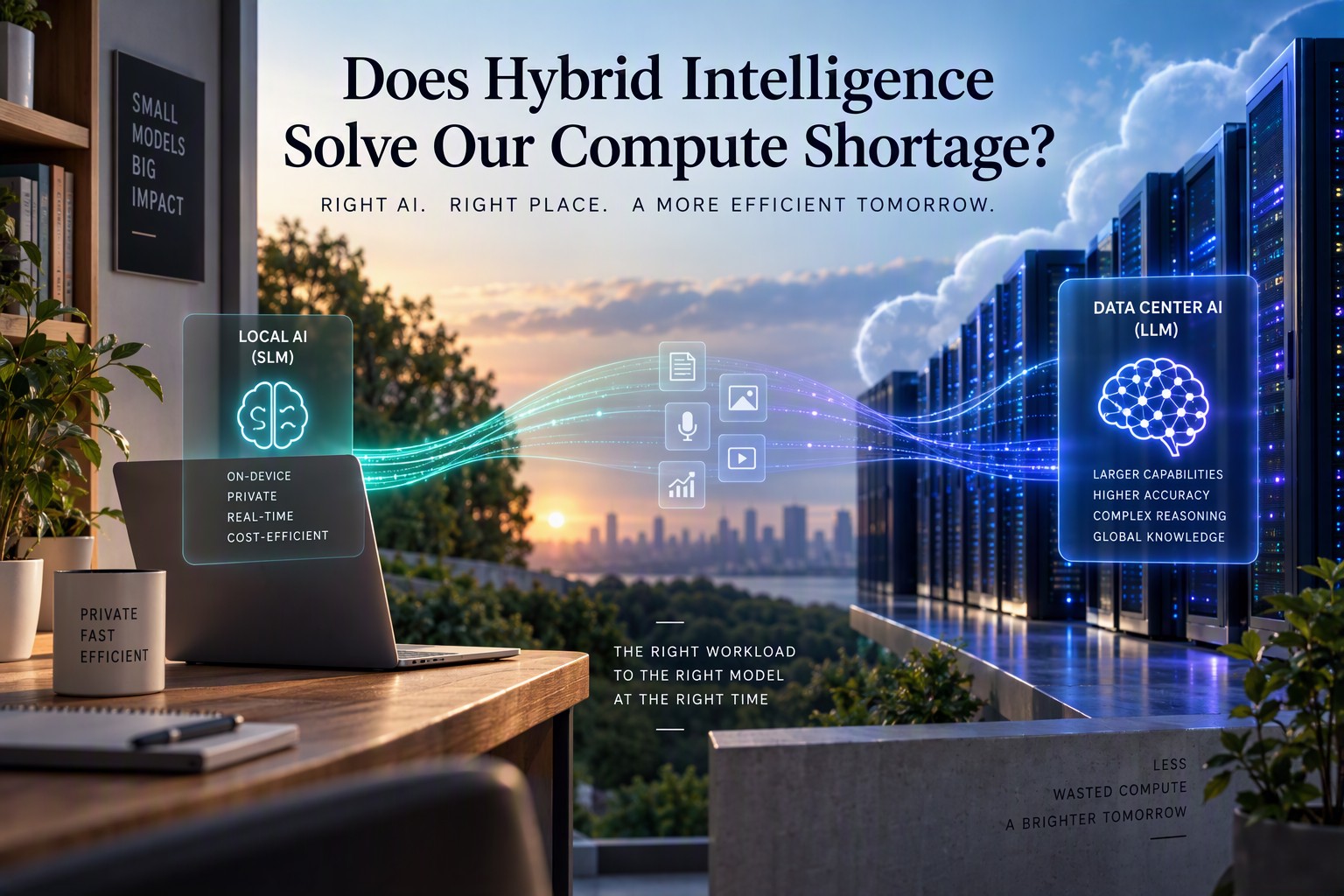
Does Hybrid Intelligence Solve Our Compute Shortage?

Does Hybrid Intelligence Solve Our Compute Shortage?

by Braden Kelley and Art Inteligencia


Here’s a mental image I can’t shake. Somewhere right now, a very large, very expensive, very thirsty computer in a very large building is being asked to figure out whether a customer’s email is angry or merely brisk.

That’s the compute shortage in one sentence. We have built an astonishing capability, and then we’ve gotten into the habit of using it for everything, including the tasks a much smaller tool could handle without breaking a sweat.

So let’s ask the obvious question. If we stopped sending every request to the biggest brain in the cloud, could we ease the shortage? Does hybrid intelligence solve it? My honest answer is: it helps a great deal, it won’t solve it alone, and the most interesting part is what the fix might do to the software we use every day.

The shape of the shortage

First, the problem. The International Energy Agency reports that electricity demand from data centers rose 17% in 2025, far outpacing 3% growth in global power demand overall, and it expects data center consumption to roughly double by 2030, with AI-specific demand growing even faster. Gartner warned back in 2024 that power shortages could constrain 40% of existing AI data centers by 2027. And industry reports describe waits of two to six years or more in some regions to connect a new large facility to the grid. (Some of those figures come from industry sources and older forecasts, so treat the specifics as directional. The direction itself is not in dispute.)

Notice what that tells you. The bottleneck isn’t only chips. It’s electricity, transformers, cooling and the time it takes to build all of it. You can’t download a substation.

When supply can’t expand quickly, the remaining lever is demand. Which brings us to a very old idea wearing new clothes: don’t use more than you need.

Hybrid intelligence: the right brain for the job

Hybrid intelligence is a simple idea. Run small language models (SLMs) on the device in your hand or on your desk for most everyday intelligence needs, and call on large models in the cloud only when a request truly needs the extra horsepower.

Think of it the way a hospital works. You don’t send every patient to the specialist surgeon. Most needs are handled by a nurse, a general practitioner, or a pharmacist, and the surgeon gets the cases that require one. The system works because someone, or something, decides where each case goes.

The pieces for this are arriving. Neural processing units are becoming standard in new phones and laptops. Operating systems are beginning to expose local models to developers, so a small team can use on-device intelligence without paying a per-request bill. Small open models are getting better at doing more with less, and with modern compression techniques, a capable model of several billion parameters can fit in a few gigabytes of memory. And the routing pattern already exists in the wild: Apple’s Private Cloud Compute, for instance, is built around handling what it can locally and sending only what it must to a larger remote model.

What would run locally? Summarizing a document, drafting a reply, sorting email, transcribing a call, classifying a support ticket, cleaning up an image, answering a question about the file you have open. What goes to the cloud? Long, complex reasoning, large-scale analysis, tasks that need broad world knowledge or the most capable model available.

If most requests are the first kind, and I suspect most are, the cloud’s workload shrinks by a lot. Every request that stays on your device is one fewer asking a data center for electricity.

Hybrid software: let each tool do what it’s good at

Here’s the companion idea, and I think it’s the underrated one. Hybrid intelligence is about where AI runs. Hybrid software is about when to use AI at all.

For decades, software has been written as explicit instructions: if this, then that. It’s predictable, fast, cheap and auditable. Language models are the opposite: flexible, adaptable and capable of handling the messy, ambiguous inputs that rigid code chokes on, but slower, costlier and occasionally creative in ways you’d rather they weren’t.

The wasteful approach is to use the flexible tool for everything. Asking a language model to add up a column of numbers is like hiring a poet to do your taxes: possible, expensive and slightly alarming. A better approach combines the two:

  • Traditional code handles what’s well-defined: calculations, rules, validations, database lookups, anything where the answer should be the same every time.
  • A small local model handles the fuzzy interpretation: understanding what the user meant, classifying, summarizing, extracting meaning from messy text.
  • A large cloud model is called only when the task is complex enough to justify the cost.

The result is software that’s smarter, more capable and more adaptable without being bigger. It’s smarter where intelligence helps, lean where it doesn’t, and cheap enough to run that you can afford to give it to everyone. That last part matters, and I’ll come back to it.

Adaptive interfaces: software that gets out of your way

Now for the part I find most exciting, because it changes how software feels to use.

Look at the menus of any mature application. They’re cathedrals of features, built up over decades. Hundreds of commands, nested menus, toolbars within toolbars. Most users touch a tiny fraction of them. Some features, in any given person’s hands, are never used once. And yet they sit there, every day, making the useful ones harder to find.

We’ve lived with this because the alternatives were bad. Hiding features meant frustrating people who needed them. Showing everything meant overwhelming everyone else.

AI changes that tradeoff. With a local model that understands how you work, an application can learn which features you actually use, surface those, and quietly tuck the rest out of sight. And, here’s the key, still make everything reachable. Ask for the hidden feature in plain language (“make this table a chart,” “remove the background,” “merge these two documents”) and the software finds it, or does the job for you. The capability never left. It just stopped getting in the way.

What this means in practice:

  • Simpler by default. A beginner sees an uncluttered tool. A power user sees their tools.
  • Nothing is locked away. A rarely used feature appears the moment you need it.
  • Interfaces that evolve. As your work changes, so does what the software puts in front of you.
  • Less to learn. You don’t need to memorize where things live. You describe what you want.

And there’s a compute angle too. An interface that adapts using a small, local model, with no round trip to a data center, is exactly the kind of lightweight intelligence that hybrid design makes affordable. The thing that makes software easier to use also happens to be easy on the grid.

There’s a caution worth saying out loud, though. Adaptive interfaces must be predictable enough that people don’t feel the ground shifting under them, and they should always let users see and control what’s been hidden. A menu that rearranges itself without warning is a terrible experience. The goal is to simplify, not to surprise.

Other technologies that can ease the squeeze

Hybrid intelligence isn’t the only tool in the box. Several others work alongside it.

  • Smaller, smarter models. Techniques like quantization (storing a model’s numbers with less precision) and distillation (teaching a small model to imitate a larger one) shrink the cost of running a model dramatically. Models that once needed a server rack increasingly fit on a laptop.
  • Architectures that don’t use everything at once. Some model designs activate only the portions of a network relevant to a given request, rather than firing every parameter every time. Less computing per answer.
  • Caching and reuse. If thousands of people ask nearly the same question, the system shouldn’t recompute the answer from scratch each time. Smart caching is a quiet and surprisingly large efficiency win.
  • Specialized chips. Hardware designed specifically for AI workloads can do more work per watt than general-purpose processors. The efficiency per unit of electricity keeps improving.
  • Better data center design. More efficient cooling, smarter power management and facilities built near abundant energy all reduce the electricity cost of each unit of computing.
  • Flexible scheduling. Not every AI job is urgent. Training runs and batch processing can be timed to match when power is cheap and plentiful, easing peak demand on the grid.
  • More power, built faster. Ultimately, supply matters too. New generation, grid upgrades and faster permitting are part of the answer, even if they take longer to arrive than software can.

None of these is a silver bullet. Together, they form something more like a portfolio.

The caveat I owe you: efficiency can backfire

Here’s the part that keeps me honest. When something gets dramatically cheaper to use, people tend to use a lot more of it. Economists have a name for it, the Jevons paradox, and it’s been observed with everything from coal to computing.

If hybrid intelligence makes AI cheap enough to put into every application, every device and every workflow, total demand could grow even as the cost of each task falls. I made a related argument recently about software itself: cheaper development means far more software gets built, not less. It’s the same pattern, and it cuts both ways. Efficiency is how we make wonderful things affordable, but it doesn’t automatically mean we use less in total.

So I wouldn’t promise that hybrid intelligence will shrink data center demand. I’d say it lets us do far more with whatever capacity we have, which is arguably the more useful outcome, and it buys time while supply catches up. Whether total consumption falls is a different question, and the honest answer is that we don’t know yet.

There are other limits too. Local models are less capable than the largest cloud models, so the routing has to be good. On-device AI uses battery, memory and heat. Different devices have different capabilities, which complicates life for developers. And keeping data on the device helps with privacy, but it doesn’t make an application automatically compliant.

What the future might hold

Let me make a few predictions, and mark them clearly as predictions.

  • Intelligence becomes a utility you don’t notice. Today, using AI feels like an event: you open a chat window, you type, you wait. I suspect that within a few years, most of it will disappear into the background. Your software will quietly handle small intelligent tasks locally, the way it quietly handles spell checking now, and you’ll hardly think of it as AI.
  • The cloud becomes the specialist. The big models won’t go away. They’ll become the surgeons, reserved for the hardest problems, which may make them more valuable, not less.
  • Software gets smaller and smarter at the same time. The old trend was that capability meant bloat. Hybrid design offers a different path: applications that are lean at rest, capable on demand and shaped around each user.
  • Compute becomes a design constraint, not an afterthought. Product teams will start asking, “where should this intelligence run?” alongside “what should it do?” That discipline, designing for efficiency from the start, may turn out to be one of the more important skills of the next decade.
  • The real shortage may be imagination. If we get better at doing more with less, the question shifts from “do we have enough compute?” to “what do we want to build with it?” I’d rather be wrestling with that one.

So, does it solve it?

Not alone. The shortage is a physical problem of power, hardware and time, and no software trick makes a transformer appear. But hybrid intelligence and hybrid software attack it from the other side, by making sure the biggest resources are used only when they’re needed, and by building software that’s capable without being bloated.

That’s the kind of solution I like best: not bigger, just smarter about where the work happens. And the next time a very large computer is asked whether an email is angry or merely brisk, I’d like a small, quiet model on a laptop somewhere to say, “I’ve got this one.”

Planning for the Future

If your team hasn’t yet pulled together the signals behind your current view of the future, the free FutureHacking Signal Picker helps you identify and prioritize the signals worth watching, which gives you the evidence to point to when the board asks where your view of the future comes from.

I’m also finishing the FutureCanvas Picker, which takes planners through the whole arc, from signals to trends to possible futures to your most probable future and the path toward the one you’d prefer. I’m opening early access to a select group first: Chief Strategy Officers, strategic planners and leaders preparing for planning cycles and board conversations right now, who can tell me honestly what works under real deadline pressure. If that’s you, reach out and let me know and I’ll follow up personally with the select few who get in first.

Frequently Asked Questions

What is hybrid intelligence?

Hybrid intelligence is an approach to AI in which small language models run locally on a device for most everyday tasks, and large cloud-based models are used only for complex requests that need more power. Because most requests stay on the device, less work lands on data centers.

Does hybrid intelligence solve the AI compute shortage?

It helps, but it can’t solve the shortage alone. Hybrid intelligence reduces how much demand reaches data centers, which buys time while power and hardware supply catch up. But the shortage is also a physical problem of electricity, equipment and construction time, and cheaper AI can lead people to use more of it, so total demand may not fall.

What is hybrid software?

Hybrid software combines traditional programming with AI. Standard code handles tasks that should give the same answer every time, such as calculations and rules. A small local model handles fuzzy interpretation, such as understanding what a user meant. A large cloud model is called only when a task is complex enough to justify it. The result is software that is smarter and more adaptable without being bigger.

Sources

Image Credits: m365 CoPilot

Content Authenticity Statement: The topic area, key elements to focus on, etc. were decisions made by Braden Kelley, with a little help from Claude to clean up the article.

Subscribe to Human-Centered Change & Innovation WeeklySign up here to get Human-Centered Change & Innovation Weekly delivered to your inbox every week.

Scenario Planning for CSOs: Building Multiple Futures into One Strategic Plan

Scenario Planning for CSOs: Building Multiple Futures Into One Strategic Plan

by Braden Kelley and Art Inteligencia

Ask a room of executives whether they do scenario planning and most of them will say yes. Ask to see the scenarios and you’ll usually get three slides: a good case, a base case and a bad case, each one a slightly adjusted version of the same spreadsheet.

I don’t blame them. That’s what the exercise has been reduced to, and a spreadsheet with a pessimistic column isn’t scenario planning. It’s the same future with the volume knob turned up and down.

For a Chief Strategy Officer, the real challenge is a harder one. You have to carry several genuinely different futures in your head, and then produce one strategic plan that doesn’t fall apart if the wrong one shows up. Here’s how I’d approach it.

Why three slides isn’t enough

The good-base-bad structure shares a hidden assumption: that the future differs from your forecast only in degree. A bit better, a bit worse. But the futures that actually blindside organizations are different in kind. A regulation reverses. A customer behavior flips. A competitor arrives from an industry you never watched.

You can’t see a difference in kind by adjusting a growth rate. You only see it by asking what different worlds the signals in front of you could be pointing toward.

Start from signals, not from a template

The most common mistake in scenario work is starting with the scenarios. Somebody picks two big uncertainties, draws a two-by-two grid, and fills in the four boxes with the most vivid story each combination suggests. It looks rigorous. It’s also built on whichever two uncertainties the loudest person in the room happened to pick.

A sturdier method works from the ground up, which is how the [FutureHacking™](https://bradenkelley.com/offerings/futurehacking/) approach is built:

  1. Collect signals. Small, specific observations about what’s changing: a competitor’s strange hire, a policy shift, a customer behavior that doesn’t fit your model.
  2. Group them into trends. The patterns those signals suggest. This is where the team has to argue about what it’s actually seeing.
  3. Build a set of possible futures from the trends. Several, and different enough that each demands a different strategic response.
  4. Decide which future is most probable. Not to bet everything on it, but so you know where your current plan is implicitly wagered.
  5. Choose the future you’d prefer, and map the path. That’s the part that turns a planning exercise into a strategy.

Because every future traces back to real signals, nobody can dismiss one as someone’s pet theory. The argument is about what the evidence suggests, which is a far better argument to have.

The test of a good set of futures

Not every set of scenarios is useful. Here are the questions I’d use to check yours.

Are they different enough? If one strategy works equally well in all of them, you haven’t described different futures. You’ve described one future with different labels.

Can someone defend each one with a straight face? A scenario that’s there only to look balanced, or to scare the board, doesn’t count. Each should be plausible to a thoughtful person in the room.

Does each one change a decision? If you can’t name something you’d do differently in a given future, it’s trivia, not scenario planning.

Is it tied to evidence? Every future should be traceable to signals you can point to.

From many futures to one plan

This is the part most guides skip, and it’s the real CSO problem. You don’t get to run four strategies. You have to deliver one plan. So what does carrying multiple futures into a single plan look like?

Find the moves that work everywhere. Some actions pay off in every future you’ve described. These are your no-regret moves, and they should anchor the plan.

Isolate the bets that depend on one future. Some investments make sense only if one future arrives. Name them as bets, with the future they depend on written next to them. Sometimes the right call is to place the bet. The point is that you’re doing it knowingly.

Build options for the uncertain middle. Where futures diverge, look for ways to buy the right to act later: a pilot, a partnership, a small investment that keeps a door open. Options cost little and are worth a lot if the world tilts your way.

Set tripwires. For each future, decide in advance what you’d have to see to conclude it’s arriving: a metric crossing a threshold, a regulation passing, a competitor making a particular move. Then assign someone to watch for it. A plan that says when to change course is a very different thing from one that hopes it won’t need to.

Done well, you end up with one plan that has a spine of no-regret moves, a short list of explicit bets, a handful of options and a set of tripwires. It’s a living plan that expects to be updated, which is exactly what the annual, single-future version can’t do.

The politics of it

I’d be doing you a disservice if I left out the human side. Presenting multiple futures to a leadership team can feel like admitting you don’t know the answer. Some executives hear “scenarios” and translate it as “indecision.”

The way through is to make the plan firm and the uncertainty explicit. “Here’s what we’re doing no matter what. Here are the bets we’re making and why. Here’s what would make us change our minds.” That isn’t indecision. It’s a level of clarity most single-future plans never reach.

A way to practice

If your team has never built scenarios from the ground up, start with step one. The free FutureHacking Signal Picker helps you identify and prioritize the signals worth watching, which is the foundation everything else rests on. Run it before your next planning cycle and bring the result into the room.

What I’m building next

I’m putting the finishing touches on the FutureCanvas Picker, which takes planners through the full arc: from signals, to trends, to a set of possible futures, to your most probable future, and then to the path toward the future you’d prefer. It’s the closest I’ve come to letting you feel the whole process in a single sitting.

I’m offering early access to a select group first: CSOs, strategic planners and leaders running a planning process right now who can give me honest feedback under real deadline pressure. If that’s you, reach out and let me know and I’ll follow up personally with the select few who get in first.

The plan that survives

The goal of scenario planning was never to predict. It was to build a plan that doesn’t need the prediction to be right. If your current one only works in one future, that’s worth knowing before the future gets a vote.

Image Credits: Pexels

Content Authenticity Statement: The topic area, key elements to focus on, etc. were decisions made by Braden Kelley, with a little help from Claude to clean up the article.

Subscribe to Human-Centered Change & Innovation WeeklySign up here to get Human-Centered Change & Innovation Weekly delivered to your inbox every week.
FutureCanvas™: A Better Way to Run Your Next Strategy Offsite

FutureCanvas™: A Better Way to Run Your Next Strategy Offsite

by Braden Kelley and Art Inteligencia

I have a theory about strategy offsites. The best idea of the entire two days is usually spoken during the coffee break, by someone who then doesn’t repeat it in the room, because the room has already moved on to the next slide.

That isn’t a people problem. It’s a structure problem. Most offsites are built like a conference with homework: a sequence of presentations, a breakout or two, a ballroom full of flip charts that get photographed and then never seen again. The output is a pile of opinions with no way to see how they connect, which means the loudest opinion wins by default.

If you’re about to plan one, here’s what I’d change, and the tool I built to help you change it.

What most offsites are missing

Walk into the typical agenda and you’ll find a lot of “what should we do?” and very little “what are we actually looking at?” Teams jump to priorities before they’ve agreed on what’s changing around them. So the debate about priorities is really a hidden debate about the future, and nobody realizes they’re having it.

Two executives can sit side by side, argue for an hour about whether to invest in a new market, and never notice that one of them is picturing a world where a regulation tightens and the other is picturing a world where it disappears. They don’t disagree about the market. They disagree about the future, and nothing on the agenda gives them a place to say so.

An offsite that works needs somewhere for those hidden pictures of the future to come out into the open, be put next to each other, and be compared. That’s the job of a canvas.

Why a canvas, and why visual

There’s a reason I keep reaching for something you can see on a single surface. When people argue in words, they argue past each other, because everyone is holding a slightly different mental map. Put the map on the wall and the argument changes. “I disagree” becomes “I’d move that one over there,” which is a far more useful sentence.

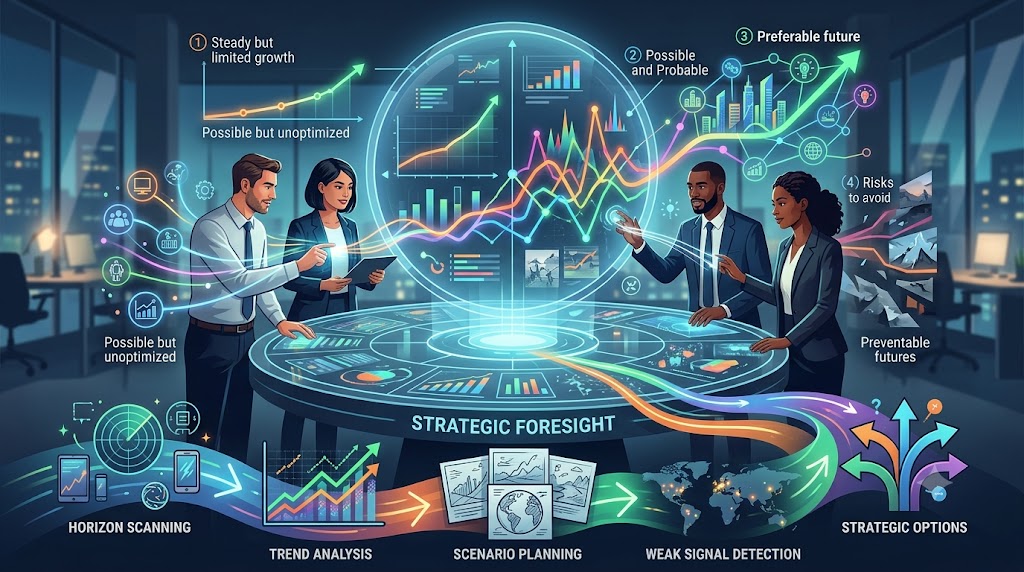
That’s the idea behind FutureCanvas™, one of the tools in the FutureHacking™ toolkit. It gives a leadership team a single, shared, visual place to work through the whole arc of foresight:

  • Signals: the small, specific things people have noticed, laid out where everyone can see them.
  • Trends: the patterns those signals suggest, grouped by the team rather than handed down to it.
  • Possible futures: a set of genuinely different, plausible futures, not one forecast wearing a trench coat.
  • Your most probable future: where the team thinks things are actually heading if nothing changes.
  • Your preferred future, and the path to it: the one you’d like to build, and what it takes to get there.

Notice the order. Priorities come at the end, once the team has agreed on what the world is doing. By then the coffee-break idea has somewhere to live, because there’s a surface for it.

How I’d run the day

If I were building your offsite agenda around it, I’d keep it simple.

Before anyone arrives, collect signals. Ask each attendee, and a few people from outside the leadership team, to bring the three oddest things they’ve noticed this year. The free FutureHacking Signal Picker is a good way to get people thinking in signals instead of opinions, and it means nobody walks in cold.

Morning: put the signals on the canvas and let the group cluster them into trends. Expect disagreement. That’s the point. A trend the whole room sees the same way in five minutes probably wasn’t interesting.

Midday: build the possible futures from those trends. The rule is that every future has to be one somebody in the room could defend with a straight face.

Afternoon: choose the most probable future, then the preferred one, and only then start talking about the path. By this point the priorities almost write themselves, and they’re attached to a picture of the world everyone helped draw.

Leave with something you can actually carry out of the room: a canvas, not a camera roll of flip charts.

Try the next step

I’m putting the finishing touches on the FutureCanvas Picker, a tool that gives planners a real taste of that full arc, from signals to trends to possible futures to a preferred path, in a single sitting. It’s the fastest way I’ve built yet to feel what the canvas does before you commit an offsite to it.

I’m opening early access to a select group first: strategic planners, CSOs and leaders who are designing or running a planning process right now and can tell me honestly what works under a real deadline. If that’s you, reach out and let me know and I’ll follow up personally with the select few who get in first.

One more thing about your agenda

Before you finalize it, find the slot where the team is supposed to agree on what’s changing in your world. If you can’t find one, that’s the slot your offsite is missing.

Put it first. Then keep the coffee break, because I’d still like to hear that idea, only this time somewhere to put it.

Image Credits: Gemini

Content Authenticity Statement: The topic area, key elements to focus on, etc. were decisions made by Braden Kelley, with a little help from Claude to clean up the article.

Subscribe to Human-Centered Change & Innovation WeeklySign up here to get Human-Centered Change & Innovation Weekly delivered to your inbox every week.
Getting Ready for Annual Planning Season? Start With Foresight, Not a Blank Template

Getting Ready for Annual Planning Season? Start With Foresight, Not a Blank Template

by Braden Kelley and Art Inteligencia

Somewhere in your organization, right about now, a calendar invite is going out. The subject line says something like “FY27 Strategic Planning Kickoff,” and attached to it is a template. The template has boxes. The boxes are empty. Everyone will spend the next several weeks filling them in.

I have nothing against boxes. I like boxes. But I’d like to make the case that the single most expensive moment in your planning cycle is the one where somebody opens that blank template and starts typing, because whatever goes in first becomes the frame for everything that follows.

The blank template has a gravity problem

Here’s what actually happens. A blank template isn’t blank. It’s been filled in, invisibly, by last year’s plan, last year’s assumptions and last year’s loudest voice in the room. People don’t start from the future. They start from the previous document, change a few numbers, and call it a strategy.

That works fine if the world held still. It didn’t, and it won’t. If the biggest shift in your market is something nobody has put in a box yet, the template can’t ask about it, because the template was designed by people who hadn’t seen it coming either.

So the question I’d ask before the kickoff isn’t “what goes in the boxes?” It’s “what do we know, and not know, about the world these boxes are supposed to describe?”

What “start with foresight” actually means

It doesn’t mean hiring a futurist for the offsite (though I’m certainly not going to talk you out of it). It means doing a small amount of structured looking-outward before anyone does any planning. Think of it as the warm-up lap. Three things, in order:

  1. Gather the signals. Not the trends. The signals. A signal is a small, specific thing you noticed: a competitor’s odd hire, a regulation that moved, a customer behavior that doesn’t fit your model. Trends are what you get when you’ve bundled signals together, and you can’t bundle what you haven’t collected. Ask your leadership team, and a few people from well outside it, to bring the three oddest things they’ve seen this year.
  2. Sort the signals into the trends they suggest. This is where the room starts to disagree, which is the good part. Two people looking at the same pile of signals will see different trends. Better to find that out in October than in March.
  3. Ask what futures those trends could produce. Plural, on purpose. Not the forecast. A handful of genuinely different, plausible futures, so that when the planning boxes finally get filled, they get filled with a plan that can survive more than one of them.

Then, and only then, open the template.

Why timing matters more than people think

Planning season has a quirk I’ve watched for twenty years. The moment a plan has a draft, it starts defending itself. People get attached to their numbers. Challenging the premises feels like challenging the person. So any foresight you want to influence the plan has to arrive before the first draft, not after it, when all it can do is make everyone feel bad.

That’s why I think of the weeks right before kickoff as a window, and a short one. Get the signals gathered now and the template gets filled in by people who’ve actually looked up from their desks. Skip it and you’re back to editing last year’s document with a fresh date on the cover.

A way to try it this week

If you want a low-risk way to feel what step one is like, the free FutureHacking Signal Picker walks you through identifying and prioritizing the signals worth watching, which is the foundation of the whole FutureHacking™ methodology. Run it yourself before the kickoff, then bring the output into the room instead of a blank whiteboard. You’ll be surprised how different the first fifteen minutes feel.

The next step, if you want it

I’m putting the finishing touches on a second tool, the FutureCanvas Picker, which carries you further: from signals, to the trends they suggest, to a set of possible futures, to your most probable future, and then to the path toward the future you’d actually prefer. It’s the closest thing I’ve built to the full FutureHacking™ arc in a single sitting, which makes it a natural fit for exactly this moment in the calendar.

I’m opening early access to a small group first: strategic planners, CSOs and leaders who are running a planning process right now and can tell me honestly what works under a real deadline. If that’s you, reach out and let me know and I’ll follow up personally with the select few who get in first.

Before you hit “accept” on that invite

The organizations that do planning well aren’t the ones with the best templates. They’re the ones who spent a little time, before the template appeared, finding out what the world was actually doing.

So when that kickoff invite lands, go ahead and accept it. Just make sure somebody has done the looking first.

Image Credits: Gemini

Content Authenticity Statement: The topic area, key elements to focus on, etc. were decisions made by Braden Kelley, with a little help from Claude to clean up the article.

Subscribe to Human-Centered Change & Innovation WeeklySign up here to get Human-Centered Change & Innovation Weekly delivered to your inbox every week.
NowBuilder™: Turning Long-Term Foresight Into This Year’s Strategic Priorities

NowBuilder™: Turning Long-Term Foresight Into This Year's Strategic Priorities

by Braden Kelley and Art Inteligencia

A ten-year vision and a one-year budget speak two completely different languages, and most organizations never actually build the translator between them. The vision lives in a deck somewhere, inspiring and directionally right. The budget lives in a spreadsheet, built around this year’s known commitments. Nobody owns the job of making sure the two are actually talking to each other, which is exactly how a genuinely good preferable-future exercise ends up having zero measurable effect on what gets funded next quarter.

Backcasting instead of forecasting

The specific technique that closes this gap is one most strategy teams have heard of and few actually practice with any rigor: backcasting. Forecasting starts from today and projects forward, asking what’s likely to happen. Backcasting starts from your preferable future and works backward, asking what would have to be true three years from now for that future to be arriving on schedule — and then what would have to be true one year before that, and what would have to be true starting now. It’s a deceptively simple reversal, and it’s the single most effective move for turning an inspiring but abstract future into a concrete near-term action, because it forces specificity at every step backward instead of letting the vision stay comfortably vague.

Finding the moves that survive contact with uncertainty

Not every action that would help you reach your preferable future is equally safe to commit to today, because you’re not actually certain that future is the one that arrives. This is where the idea of a no-regret move earns its keep: an action worth taking regardless of which of your mapped futures actually materializes. Building a more flexible operating model, investing in a capability your organization is clearly underweight in no matter how the market shifts, strengthening a relationship or a data asset that pays off across multiple scenarios — these are the moves to prioritize first, precisely because committing to them doesn’t require you to bet the organization on one version of the future being right.

The moves that only make sense if your probable future specifically arrives, and would actively hurt you if a different future showed up instead, need a different treatment entirely. Those belong staged as real options — decisions you’ve deliberately prepared for but haven’t yet committed resources to, triggered by specific signposts rather than locked into this year’s roadmap by default.

Why sequencing matters more than most roadmaps admit

A roadmap that lists everything as equally urgent isn’t really a roadmap — it’s a wishlist with a shared deadline. Real sequencing means being honest about dependencies (what has to happen before something else becomes possible), capacity (what your organization can actually execute on simultaneously without diluting all of it), and the specific signposts that would tell you it’s time to accelerate or pause a given initiative. Skip this step, and even a well-backcast set of near-term moves ends up competing for the same quarter’s attention with no clear priority among them.

The step most translation efforts skip: ownership

A near-term move without a named owner tends to survive exactly as long as the enthusiasm from the planning session that produced it — usually a matter of weeks. The organizations that actually execute against a foresight-informed roadmap are the ones that assign a specific person to each near-term priority before the room disbands, not afterward in a follow-up email nobody reads closely.

This is what NowBuilder™ is built to do

This is the specific job NowBuilder™ handles inside FutureHacking™: taking your probable and preferable futures and running the room through backcasting, identifying genuine no-regret moves versus future-specific options, sequencing them against real dependencies and capacity, and assigning ownership before anyone leaves — so the output isn’t another deck, it’s an actual set of near-term priorities with names attached to them. It’s the half of the methodology that turns “here’s what could happen” into “here’s what we’re doing about it, starting now.”

Where to start

If your team hasn’t run a structured foresight exercise yet, the free FutureHacking Signal Picker is the right place to begin — it’s the foundational first stage the rest of the methodology, NowBuilder™ included, builds on.

Something new I’m building

I’m also finishing a second tool — the FutureCanvas Picker — that carries a planning team through the full arc in one sitting: from signals, to the trends they suggest, to a genuine set of possible futures, narrowing to your most probable future, and mapping the path to your preferable one. It’s the closest thing I’ve built yet to running a complete FutureHacking™ session on your own.

I’m opening early access to a select group first — strategic planners, CSOs, and leaders actively running planning processes right now — because I want real feedback from people using it under real deadline pressure before it’s available more broadly. If that’s you, and you’d like to be considered for early access, reach out and let me know — I’ll be following up personally with the first few who get in.

A future worth building toward deserves more than a deck. It deserves a name next to this quarter’s first move toward it.

Image Credits: Gemini

Content Authenticity Statement: The topic area, key elements to focus on, etc. were decisions made by Braden Kelley, with a little help from Claude to clean up the article.

Subscribe to Human-Centered Change & Innovation WeeklySign up here to get Human-Centered Change & Innovation Weekly delivered to your inbox every week.
What is the Future of Work — and What Jobs Will Exist in 10 Years?

What is the Future of Work — and What Jobs Will Exist in 10 Years?

by Braden Kelley and Art Inteligencia


What Is the Future of Work? (Short Answer)

The future of work is the ongoing redesign of how, where, and by whom work gets done as AI, automation, demographics, and changing expectations reshape jobs. It isn’t a fixed forecast; it’s a set of choices being made now. Over the next ten years, most jobs will change more than disappear, and new roles will grow around guiding AI, verifying what’s real, designing experiences, leading change, and caring for people.

The future of work isn’t something that happens to us. It’s something we design — or something that gets designed for us.

Most “future of work” content is either a trend list or a fear headline. Neither helps you decide anything. Below you’ll find the five forces reshaping work, the jobs likely to exist in ten years, the jobs that will change most, what work itself will look like, and how individuals and leaders can prepare.

What Forces Are Shaping the Future of Work?

Five forces are reshaping work at the same time, and they interact in ways no single trend report captures:

  1. AI and automation. AI is changing the tasks inside nearly every job — automating some, augmenting others, and creating new ones. It is also adding a new kind of coworker: AI agents that can take actions, not just answer questions.
  2. Demographics. Aging populations, growing caregiving responsibilities, longer working lives, and fewer young people entering the workforce in many countries are changing who works, for how long, and what they need to do it well.
  3. Changing expectations. Flexibility, meaning, wellbeing, and fairness now weigh more heavily in where people choose to work and how long they stay.
  4. Volatility and climate. Supply shocks, extreme weather, and the energy transition are disrupting existing work while creating entire new categories of it.
  5. New ways of organizing. Skills-based hiring, platform and project-based work, and teams made up of people and AI agents are changing how organizations are structured and how careers unfold.

None of these forces decides the outcome. They set the conditions. People still choose the design.

What Jobs Will Exist in 10 Years?

Nobody can publish an accurate list of job titles for ten years from now. But you can see which families of work are growing, because many of these roles already exist in early form today:

Role family Example roles Why it grows
Guiding and overseeing AI AI agent supervisor, AI operations lead, AI evaluator and trainer, AI governance lead Every AI system acting in the world needs humans who direct it, check it, and answer for it
Verifying what’s real Trust and safety specialist, content provenance analyst, synthetic-media investigator As fake content becomes cheap, proving what’s authentic becomes valuable
Designing human–AI work and experiences Workflow designer, conversation designer, experience designer Someone has to design how people and AI work together — and how it feels to customers and employees
Leading change and adoption Change and adoption lead, AI enablement coach, learning experience designer Technology moves faster than organizations can absorb it without help
Caring for people Care navigator, eldercare coordinator, wellbeing and mental-health roles Aging populations and human needs that technology can support but not replace
Building resilience and the energy transition Building retrofit and heat-pump technicians, grid and battery specialists, resilience planners Climate adaptation and new energy systems require skilled hands and planning
Maintaining physical-digital systems Robotics maintenance technician, smart-building technician, field-service specialist More machines in the physical world means more people who install, maintain, and repair them
Sense-making and foresight Foresight analyst, futurist, strategic insights lead Faster change raises the value of seeing it coming and making sense of it

If the last row interests you, I explain the role in detail in What Does a Futurist Do — and How Do You Become One?

Job titles will change faster than this list. The pattern is what lasts: work grows wherever humans add judgment, trust, care, or the ability to fix what breaks.

Which Jobs Will Change the Most?

Over the next decade, most jobs won’t disappear. They’ll transform. A few examples of how:

  • Customer service shifts from routine answers to resolving complex problems and building relationships.
  • Marketing and content shifts from producing drafts to judgment, taste, and strategy.
  • Software development shifts from writing code to designing systems and reviewing AI-generated code.
  • Finance and accounting shifts from processing transactions to advising decisions.
  • Healthcare could shift toward more time with patients and less on documentation — but only if the time saved is protected instead of filled with more volume.
  • Managers will coach humans and orchestrate AI agents, which requires new skills on both fronts.
  • Entry-level roles face the biggest redesign challenge. AI is absorbing the routine work beginners used to learn on, so organizations will have to deliberately rebuild the path from newcomer to expert.

If you want to assess your own role, start with the five-question self-check in Will AI Take My Job? An Honest, Human-Centered Answer. For why the entry-level challenge deserves more attention than job-loss percentages, see 8 Predictions Leaders Can Ignore — and 8 They Cannot Afford To.

What Will Work Itself Look Like?

Beyond which jobs exist, the experience of working is changing too — how, where, and when work happens:

  • Human–AI teams become the default. People will routinely work alongside AI agents, with humans accountable for the outcomes.
  • Skills count alongside degrees. Hiring and promotion will increasingly rely on demonstrated capability, not only credentials.
  • Learning happens in the flow of work. Continuous learning on real tasks replaces one-time training events.
  • Arrangements become more flexible and varied. There won’t be a single winner between office and remote work; the right answer will differ by the kind of work and the people doing it.
  • Careers get longer and have more chapters. Expect multiple roles, reskilling, and transitions across a working life rather than one ladder.
  • Work gets measured by outcomes and experience, not activity. What got done — and how it felt to customers and employees — matters more than hours logged.

For how human–agent teams might reshape organizations in different ways, see 5 Scenarios for Agentic Organizations — and What Leaders Must Own in Each.

How Do You Prepare for the Future of Work?

If you’re an individual, become fluent with AI on real tasks, not just in training. Move toward work built on judgment, relationships, and outcomes. Keep a deliberate learning path, especially if AI is absorbing the work you used to learn on. And think in career chapters rather than a single ladder. For the capabilities that grow in value as automation spreads, see 9 Skills That Age Well When Everything Else Automates.

If you’re a leader, fund job redesign alongside every technology investment. Decide where saved time goes before it quietly turns into more volume. Rebuild the apprenticeship path for entry-level roles. And give frontline workers a real voice in how AI changes their work. For the warning signs that you’re preparing for the wrong version of the future, see 8 Signals You’re Preparing for the Wrong Future of Work.

The difference comes down to two landings. In a soft landing, work is redesigned around people, and they succeed alongside AI. In a hard landing, headcount math and tool rollouts design work by default — and people absorb the cost.

Ten years from now, the future of work will simply be work. The question is whether we designed it on purpose.

Ready to Take the Next Step?

The future of work won’t arrive as a single forecast. It will be shaped by the signals you notice early and the choices you make about them — as an individual planning a career or as a leader redesigning how your organization works. That is why I created FutureHacking™, a strategic foresight methodology that helps individuals and teams become their own futurist.

FutureHacking™ gives you a simple four-step approach, supported by 20+ visual, collaborative tools:

  1. Pick the signals that matter — the shifts most likely to reshape the work you do or the workforce you lead.
  2. Map how those signals evolve — so you can tell a passing headline from a real change.
  3. Explore possible, probable, and preferable futures — instead of betting everything on a single prediction.
  4. Make your preferable future a reality — with a roadmap, guideposts, and actions you can start now.

Whether you’re charting your next career chapter or helping your leadership team design work around people instead of headcount math, FutureHacking™ helps you design the future of work on purpose.

Learn more about the FutureHacking™ methodology →

FAQ: The Future of Work

What is the future of work?

The future of work is the ongoing redesign of how, where, and by whom work gets done as AI, automation, demographics, changing expectations, and climate reshape jobs. It is not a fixed forecast but a set of design choices organizations and people are making now.

What jobs will be in demand in 10 years?

Demand is likely to grow in roles that guide and oversee AI, verify what is real, design human–AI work and experiences, lead change and adoption, care for people, build climate resilience and new energy systems, maintain physical-digital systems, and practice foresight. Specific titles will vary, but these role families are already emerging.

What jobs will disappear in the next 10 years?

Most jobs will change more than disappear. Roles made up mostly of routine, predictable screen work — such as high-volume drafting, basic data processing, and rules-based first-line support — face the most pressure, especially where demand doesn’t grow as the work gets cheaper.

What skills will matter most in the future of work?

The most durable skills include AI fluency on real tasks, problem framing, judgment under uncertainty, relationship-building, facilitation, care and empathy, the ability to repair what breaks, and learning how to learn as tools keep changing.

Will remote work continue in the future?

Yes, in varied forms. Neither the office nor remote work is likely to win outright; the right arrangement depends on the kind of work, the team, and the people doing it. Flexibility will remain a major factor in where people choose to work.

Image credits: Cursor

Content Authenticity Statement: The topic area, key elements to focus on, etc. were decisions made by Braden Kelley, with a little help from Google Gemini and M365 CoPilot to clean up the article, add images and create infographics.

Subscribe to Human-Centered Change & Innovation WeeklySign up here to get Human-Centered Change & Innovation Weekly delivered to your inbox every week.
FutureSignals™: How to Separate Real Trends From Noise Before Your Next Planning Cycle

FutureSignals™: How to Separate Real Trends From Noise Before Your Next Planning Cycle

by Braden Kelley and Art Inteligencia

Ask any leadership team to name a trend shaping their industry, and you’ll get an answer within seconds. Ask them to explain why they believe it’s real, as opposed to something that just happened to come up in three meetings this month, and the room usually goes quiet. Most organizations aren’t short on trends. They’re short on a way to tell which of the dozens of things competing for the label “trend” actually deserve it.

Why this matters more than people think

Every strategic plan I’ve ever reviewed has been shaped, at least in part, by trends nobody rigorously tested. Not because the people building the plan were careless, but because there’s rarely a formal step in the process for testing a trend before acting on it. Something gets mentioned by a well-regarded analyst, or shows up in three unrelated conversations in the same month, and it quietly graduates from “thing I noticed” to “trend we’re planning around” without ever passing through anything that could reasonably be called scrutiny. Get that step wrong at the start of a planning cycle, and everything built on top of it inherits the mistake.

What actually separates a signal from noise

A genuine signal has a few characteristics that noise almost never does, and it’s worth being explicit about them rather than trusting instinct alone.

  1. It shows up from more than one independent direction. A single source, however credible, is a data point, not a trend. When you start seeing the same underlying shift from unrelated sources — a customer behavior pattern, an unrelated industry’s earnings call, a regulatory conversation, a technology adoption curve — that convergence is a much stronger indicator than any one source repeating itself loudly.
  2. It has a mechanism, not just a correlation. Noise often sounds like a trend because two things happened around the same time. A real signal comes with an explanation for why it’s happening — an incentive that changed, a cost curve that shifted, a constraint that got removed — not just a coincidence in timing that a confident narrator strung together after the fact.
  3. It’s sustained, not spiking. A lot of what gets treated as a trend is really just a spike — a burst of attention that fades within a quarter once the news cycle moves on. Real signals tend to persist and, more tellingly, tend to keep showing up even after the initial attention around them fades.

The traps that let noise through anyway

Even knowing these criteria, a few predictable biases let noise slip past them constantly. Recency bias — whatever you read most recently feels more significant than it actually is, purely because it’s fresh. Authority bias — a signal feels more credible because someone senior or well-known repeated it, regardless of whether they did any more rigorous evaluation than anyone else in the room. And the most dangerous one, confirmation bias — signals that happen to support what leadership already wants to believe about the future get waved through with far less scrutiny than signals that would require uncomfortable change. I’ve watched this last one derail more planning cycles than any of the others combined, because it’s the hardest one for a room to catch in itself.

Building a genuine filter, not just a gut check

The fix isn’t more research, exactly — it’s a consistent set of questions applied to every candidate signal before it earns a place in your planning conversation: Where else is this showing up, independently? What’s the actual mechanism driving it, and does that mechanism hold up under a second look? Has it persisted past its first burst of attention? And, the uncomfortable one worth asking every time — would we be this quick to believe it if it pointed toward a future we didn’t want?

This is exactly what FutureSignals™ is built to do

This filtering discipline is the first formal stage of FutureHacking™, and I built a specific component — FutureSignals™ — around exactly this problem: giving a team a structured, repeatable way to gather candidate signals and stress-test them against real criteria, before any of them get promoted into “trend we’re planning around” status. It’s the foundation the rest of the methodology builds on, because every later stage — the trends you map, the futures you build, the roadmap you eventually commit to — is only as good as the signals it started from.

Where to start

The free FutureHacking Signal Picker puts this exact discipline into practice, at no cost, before your next planning cycle — a genuinely useful way to arrive at your next strategy conversation with signals that have actually been tested, rather than whatever happened to come up most recently.

Something new I’m building

I’m also finishing a second tool — the FutureCanvas Picker — that carries a planning team through the full arc in one sitting: from signals, to the trends they suggest, to a genuine set of possible futures, narrowing to your most probable future, and mapping the path to your preferable one. It’s the closest thing I’ve built yet to running a complete FutureHacking™ session on your own.

I’m opening early access to a select group first — strategic planners, CSOs, and leaders actively running planning processes right now — because I want real feedback from people using it under real deadline pressure before it’s available more broadly. If that’s you, and you’d like to be considered for early access, reach out and let me know — I’ll be following up personally with the first few who get in.

Most planning cycles fail long before the strategy gets built. They fail at the moment someone mistakes a spike for a signal, and nobody in the room had a way to catch it.

Image Credits: Gemini

Content Authenticity Statement: The topic area, key elements to focus on, etc. were decisions made by Braden Kelley, with a little help from Claude to clean up the article.

Subscribe to Human-Centered Change & Innovation WeeklySign up here to get Human-Centered Change & Innovation Weekly delivered to your inbox every week.

Turning Foresight Into an Actual Strategic Roadmap

From “What If” to “What Now”

Turning Foresight Into an Actual Strategic Roadmap

by Braden Kelley and Art Inteligencia

I have seen more beautiful scenario maps gather dust than I can count. Gorgeous work — well-researched signals, genuinely thoughtful trends, three or four possible futures mapped out with real rigor, presented to an engaged room that nodded along and felt smarter walking out than they did walking in. And then, six months later, nothing about how the organization actually operates has changed. The binder is still on someone’s shelf. This is the single most common way foresight work dies, and it has nothing to do with the quality of the thinking.

“What if” is the fun part. That’s the problem.

Exploring possible futures is genuinely engaging work. There’s something almost playful about it — imagining how the market could shift, what technology could disrupt, which future would be exciting to build toward. Rooms come alive during this part of a planning session in a way they rarely do during budget reviews. That energy is valuable, and I’d never want to dampen it. But it’s also exactly why so much foresight work stalls right there: the “what if” conversation is satisfying enough on its own that it can feel like the destination, when it was only ever supposed to be the on-ramp.

Nobody’s job is the translation

Here’s the structural reason this happens, and it’s not about laziness or lack of follow-through. In most organizations, nobody’s actual job description includes turning a set of possible futures into this year’s specific strategic priorities. The strategy team’s job, as usually defined, ends at “here are the scenarios and here’s the probable one.” Execution teams’ jobs start from wherever the strategic plan already tells them to begin. The translation step — the actual “so given all that, what do we do differently starting Monday” — falls into a gap between two functions that both assume the other one owns it.

What “what now” actually requires

Turning a preferable future into a real roadmap means doing something more specific than restating the future in more urgent language. It means identifying the near-term moves that make sense regardless of exactly how the future unfolds — the no-regret moves, the ones that pay off whether your probable future arrives on schedule, arrives differently than expected, or gets overtaken by one of the other futures you mapped. It means sequencing those moves against a realistic timeline instead of listing them all as equally urgent. And it means naming specific owners for each one, because a strategic priority without a named owner is, in practice, nobody’s priority at all.

It also means building in signposts — specific, observable things you’ll watch for that would tell you your probable future is actually arriving, or that one of the other futures is starting to look more likely instead. Without signposts, “what now” plans quietly calcify into exactly the single-future thinking foresight was supposed to prevent in the first place. With them, the roadmap stays genuinely responsive instead of becoming next year’s version of the plan that goes stale by Q2.

This is exactly why I built a specific step for it

This translation gap is precisely why FutureHacking™ doesn’t stop at mapping possible futures. The methodology includes a dedicated step — I call it NowBuilder™ — built specifically to take the output of the “what if” work and force the room through the “what now” conversation before anyone leaves: near-term moves, sequencing, ownership, and the signposts that tell you when to adjust course. It exists because I watched too many organizations do genuinely excellent scenario work and then have no structured way to turn it into anything that showed up on an actual roadmap the following Monday.

You can learn more about the full methodology at FutureHacking™ — it’s the art and science of getting to the future first, and getting there requires both halves: the imagination to genuinely hold multiple futures, and the discipline to convert that thinking into something your organization actually does.

Where to start

The free FutureHacking Signal Picker is the right first step if your team hasn’t run a structured foresight exercise yet — it walks you through identifying and prioritizing real signals, the foundation everything else in the methodology builds on, at no cost.

Something new I’m building

I’m also finishing a second tool — the FutureCanvas Picker — that carries a planning team through the full arc in one sitting: from signals, to the trends they suggest, to a genuine set of possible futures, narrowing to your most probable future, and mapping the path to your preferable one. It’s the closest thing I’ve built yet to running a complete FutureHacking™ session on your own.

I’m opening early access to a select group first — strategic planners, CSOs, and leaders actively running planning processes right now — because I want real feedback from people using it under real deadline pressure before it’s available more broadly. If that’s you, and you’d like to be considered for early access, reach out and let me know — I’ll be following up personally with the first few who get in.

A scenario map tells you what could happen. It’s still just a very well-organized guess until something in your organization actually moves because of it.

Image Credits: Gemini

Content Authenticity Statement: The topic area, key elements to focus on, etc. were decisions made by Braden Kelley, with a little help from Claude to clean up the article.

Subscribe to Human-Centered Change & Innovation WeeklySign up here to get Human-Centered Change & Innovation Weekly delivered to your inbox every week.

The Chief Strategy Officer’s Guide to Strategic Foresight Without a Foresight Department

The Chief Strategy Officer's Guide to Strategic Foresight Without a Foresight Department

by Braden Kelley and Art Inteligencia

Every CSO I talk to agrees, without hesitation, that strategic foresight matters. Almost none of them have a foresight team. That’s not a contradiction — it’s a budget reality. Foresight sounds like a function you’d staff if you had unlimited headcount: a few analysts, a research subscription or two, maybe a futurist on retainer. Most organizations don’t have that, and most CSOs I’ve worked with have quietly concluded that means real foresight is out of reach for now. It isn’t. What’s actually out of reach is foresight-as-a-department. Foresight-as-a-method is a completely different proposition, and it’s one you can run yourself, starting with your next planning cycle.

The department was never the point

Here’s the thing dedicated foresight teams are actually good at: running a repeatable process for collecting signals, testing them against trends, and building out possible futures in a structured way. That process is genuinely valuable. The team that runs it is not the value itself — it’s just one way of executing the process, and an expensive one. If you can borrow the process without hiring the department, you get most of the value at a fraction of the cost, and you get it fast enough to actually use before your next planning cycle rather than after a hiring search.

What the process actually needs to include

Any real foresight process, department or no department, has to move through the same core stages, whether or not anyone calls it that explicitly:

Signals. Real, specific, early evidence of change — not opinions about the future, not trade press headlines repackaged as insight, but the actual raw material: a shift in customer behavior, a regulatory rumbling, a technology crossing from experimental to viable. Most organizations are already collecting fragments of this informally, scattered across different people’s inboxes and conference notes. The first job of a lightweight foresight process is simply gathering it into one place and being disciplined about separating real signal from noise.

Trends. What do multiple signals, taken together, actually suggest is happening? This is where a lot of informal foresight efforts quietly fail, because it’s tempting to jump straight from one interesting signal to a confident prediction. A trend needs more than one data point behind it, and it needs the room to genuinely disagree about what it means before converging.

Possible futures. Not one future — several, genuinely held as plausible at the same time, even when they contradict each other. This is the step organizations without a formal process almost never do at all, because it feels inefficient to build out three futures when you’re only going to act on one. It isn’t inefficient. It’s the entire point — holding multiple futures seriously is what keeps you from betting everything on the first plausible story anyone tells convincingly in the room.

The probable future, and the preferable one. Eventually you do have to narrow down — most organizations can’t operate against three futures simultaneously forever. But narrowing to your probable future is only half the job. The other half is identifying your preferable future and building a deliberate path toward it, rather than just passively waiting to see which future arrives and reacting once it does.

Building this into your existing calendar, not a new one

You don’t need a standing foresight function to run this. You need a recurring slot on a calendar you already have. Most CSOs I’ve worked with fold this into the run-up to quarterly business reviews as a lightweight signal-check, and run the fuller version — trends through preferable future — as a structured session ahead of annual planning. The key discipline is treating it as a process with defined inputs and outputs, not an open-ended brainstorm, because open-ended brainstorms are exactly what devolves into “opinions about the future” instead of genuine foresight work.

Who actually needs to be in the room

Resist the temptation to run this solo, or with just your immediate strategy team. The signals worth catching often live with the people furthest from the strategy function — sales hearing objections in real deals, support seeing friction firsthand, product watching usage patterns shift. A cross-functional group, even a small one, catches signals a strategy team working in isolation will miss entirely, and it builds organizational buy-in for whatever future the group eventually converges on, which matters enormously when it’s time to actually execute against it.

This is exactly what FutureHacking™ was built to be

I built FutureHacking™ to be precisely this — a structured, visual, collaborative methodology that takes a cross-functional team through signals, trends, possible futures, your probable future, and a real path to your preferable one, without requiring a dedicated foresight function to run it. FutureHacking™ is the art and science of getting to the future first, and it’s built for CSOs running lean, not for organizations with a research budget to spare.

Where to start

The free FutureHacking Signal Picker is the fastest way to run the first stage of this process before your next planning cycle — identifying and prioritizing real signals, at no cost, with no department required.

Something new I’m building

I’m also finishing a second tool — the FutureCanvas Picker — that carries a planning team through the full arc in one sitting: from signals, to the trends they suggest, to a genuine set of possible futures, narrowing to your most probable future, and mapping the path to your preferable one. It’s the closest thing I’ve built to running an entire FutureHacking™ session on your own.

I’m opening early access to a select group first — CSOs and strategic planners actively running planning processes right now — because I want real feedback from people using it under real deadline pressure before it’s available more broadly. If that’s you, and you’d like to be considered for early access, reach out and let me know — I’ll be following up personally with the first few who get in.

You don’t need a department to see what’s coming. You need a process, run consistently, with the discipline to hold more than one future until you’ve genuinely earned the right to narrow it down.

Image Credits: Gemini

Content Authenticity Statement: The topic area, key elements to focus on, etc. were decisions made by Braden Kelley, with a little help from Claude to clean up the article.

Subscribe to Human-Centered Change & Innovation WeeklySign up here to get Human-Centered Change & Innovation Weekly delivered to your inbox every week.

Why Your Strategic Planning Offsite Needs a Foresight Exercise, Not Just Another SWOT

Why Your Strategic Planning Offsite Needs a Foresight Exercise, Not Just Another SWOT

by Braden Kelley and Art Inteligencia

I’ve sat in more strategic planning offsites than I can count, and I can predict the SWOT exercise before it starts. Someone draws a four-quadrant grid on the whiteboard. The room fills in Strengths and Weaknesses quickly, because those are about the company as it exists right now, and everyone in the room already agrees on most of them. Then it gets to Opportunities and Threats, and the energy noticeably drops — because now the exercise is quietly asking the room to predict the future, and SWOT gives them no actual tool for doing that. So they default to whatever opportunities and threats came up in last year’s version of the same exercise, lightly reworded.

SWOT was never built for what you’re using it for

SWOT is a genuinely useful tool for organizing what you already know about your current position. It was never designed to help a group reason about an uncertain future — there’s no mechanism in the exercise for surfacing real signals, testing which trends they suggest, or imagining more than one way things could unfold. When a room uses it to fill in “Opportunities” and “Threats,” what actually happens is everyone reaches for whatever future feels most familiar or most recently discussed in the trade press, and the exercise quietly becomes a confidence-building ritual around a single assumed future rather than genuine strategic thinking.

The offsite is the right room. It’s the wrong exercise.

Here’s what I’d push back on if someone suggested dropping the offsite structure entirely: getting your leadership team in a room together, away from daily operations, is exactly the right container for this kind of thinking. The problem isn’t the offsite. It’s that the exercise running inside it isn’t built for the actual question a strategic planning session needs to answer, which isn’t “what do we already know about ourselves” — it’s “what’s actually changing around us, and what should we do about it before it’s obvious to everyone else.”

What a foresight exercise does differently

A structured foresight exercise starts somewhere SWOT never goes: the real signals your team is picking up from the market, technology, customer behavior, and adjacent industries — not opinions about the future, but the actual early evidence of it. From there, it asks the room to genuinely work through which trends those signals suggest, and to hold more than one possible future seriously rather than converging immediately on whichever one the most senior person in the room already believes. Only after that does it narrow toward a most-probable future and, critically, a preferable one — the future you’d actually choose to build toward, and the specific path to get there. That’s a fundamentally different exercise than filling in a quadrant, and it produces a fundamentally different kind of strategic plan.

Why this matters more in the room than anywhere else

The offsite is where organizational alignment either happens or doesn’t. A room that’s just filled in a familiar SWOT grid leaves with a comfortable, mostly unchanged view of the future — which feels productive in the moment and shows up as a strategic plan that’s already outdated within a couple of quarters. A room that’s worked through real signals together, disagreed about what they mean, and built a shared view of multiple possible futures leaves with something SWOT structurally can’t produce: genuine, tested alignment on what’s actually likely to happen and what the team is going to do about it either way.

Bringing this into your next offsite

This is exactly the gap FutureHacking™ was built to close — a structured, visual, collaborative foresight methodology any leadership team can run in a room together, without needing a dedicated foresight function or an outside futurist facilitating every session. FutureHacking™ is the art and science of getting to the future first, and the fastest way to feel the difference is to bring it into the room where your planning conversations already happen.

Where to start before your next offsite

The free FutureHacking Signal Picker is a genuinely useful way to arrive at your next offsite with real signals already identified and prioritized, instead of starting the room from a blank whiteboard. It’s the foundational first step of the full methodology, and it’s free.

Something new I’m building

I’m also finishing a second tool — the FutureCanvas Picker — that carries a planning team further into the full arc in a single sitting: from signals, to the trends they suggest, to a genuine set of possible futures, narrowing to your most probable future, and then mapping the path toward the future you’d actually prefer to build. It’s the closest thing I’ve built yet to running a full FutureHacking™ session in miniature.

I’m opening early access to a select group first — strategic planners, CSOs, and leaders actively running planning processes right now — because I want real feedback from people using it under real offsite deadline pressure before it’s available more broadly. If that’s you, and you’d like to be considered for early access, reach out and let me know — I’ll be following up personally with the first few who get in.

Your next offsite is going to happen either way. The only real question is whether the room leaves with a shared view of one comfortable future, or a genuine head start on several possible ones.

Image Credits: Pexels

Content Authenticity Statement: The topic area, key elements to focus on, etc. were decisions made by Braden Kelley, with a little help from Claude to clean up the article.

Subscribe to Human-Centered Change & Innovation WeeklySign up here to get Human-Centered Change & Innovation Weekly delivered to your inbox every week.