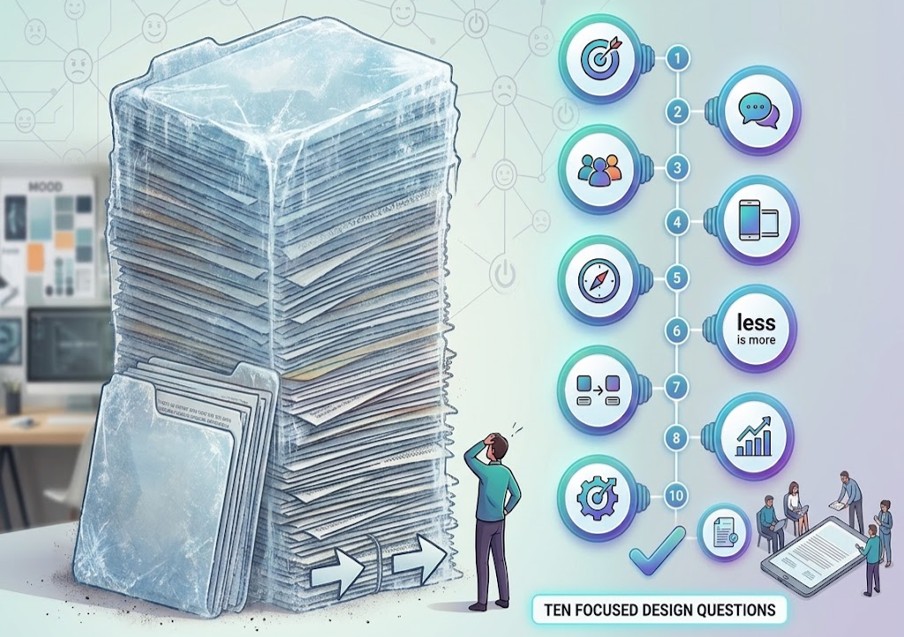
How Do You Prototype Experience Without Building a Product? (Short Answer)
Ten ways to prototype experience without building a product: (1) concierge delivery, (2) Wizard of Oz, (3) fake-door / offer test, (4) paper or sketch walkthrough, (5) service rehearsal, (6) moment-of-truth enactment, (7) manual-backed facade, (8) pop-up front door, (9) human-scripted conversation, and (10) recovery rehearsal. Soft landings learn the feeling, the job, and the seam before the backlog. Hard landings fund the build and hope the experience shows up later.
Prototype the experience humans will live — not the product you wish you had budget to build.
Why Prototype the Experience Before You Fund the Build?
I keep watching teams schedule a product build to “see if people like it,” polish UI before a behavior hypothesis exists, and treat stakeholder applause at a demo as desirability proof. Those are expensive costumes. Experience prototypes falsify whether people can finish the job with dignity — cheaply.
If you haven’t felt the experience, you haven’t prototyped it — you’ve only scheduled a build.
1. How Does Concierge Delivery Prototype Experience?
Method: Deliver the end-to-end experience manually for a small set of humans — humans are the system.
Falsifies: Desirability and job fit — will they hire this outcome done this way?
Run lean: Cap at N customers or employees; script the promise; log every step and friction.
Kill/continue: They return, refer, or abandon a workaround — or they ghost after one try.
2. What Is Wizard of Oz Experience Prototyping?
Method: Present an “automated” or agentic experience while a human performs the work unseen.
Falsifies: Interaction trust — clarity, control, and competence feel — before you build the agent.
Run lean: Chat, voice, or UI shell; human operator; record where people hesitate or demand a human.
Kill/continue: They complete with confidence — or trap, retell, or escape the channel. For the trust contract when agents later act for real, see 6 Trust Pillars for Agentic Customer Experience.
3. How Do Fake-Door / Offer Tests Work Without Building?
Method: Offer the experience — landing page, button, email, QR, shelf talker — before it exists; measure intent.
Falsifies: Demand signal without building fulfillment.
Run lean: Clear promise; easy signup; honest “not ready yet” follow-up; no dark patterns.
Kill/continue: Qualified interest above threshold — or curiosity theater with zero follow-through. Fake doors that shame people are trust violations, not prototypes.
4. Why Run a Paper or Sketch Walkthrough?
Method: Walk real users through screens, cards, or paper steps that stand in for the product.
Falsifies: Flow risk — where the job breaks, where language fails, where dignity costs spike.
Run lean: Low fidelity on purpose; one job; watch hands and faces; don’t defend the sketch.
8. How Does a Pop-Up Front Door Prototype Channel Fit?
Method: Stand up a temporary physical or digital front door where the job already happens.
Falsifies: Context and channel fit — will they enter here, not only in your preferred portal?
Run lean: Hours or days, not months; observe wrong-door and escape; capture verbatim jobs.
Kill/continue: Traffic converts to completed jobs — or people walk past to the old path.
9. How Do You Prototype Experience With Human-Scripted Conversation?
Method: Run the conversational experience with a human following — and adapting — a script across SMS, chat, voice, or desk.
Falsifies: Dialogue design — can conversation finish the job without loops or shame?
Run lean: One intent; escalation rules; measure completion and “felt heard.”
Kill/continue: Job done in one conversation — or an escalation storm and retelling tax. Prototyping without a named behavior is a classic design-thinking misuse — see 7 Ways Design Thinking Gets Misused.
10. Why Rehearse Recovery Before You Scale?
Method: Deliberately break or simulate failure; rehearse undo, apology, refund, rebook, and human handoff.
Falsifies: Trust under failure — control, care, and accountability when the happy path dies.
Run lean: One failure mode; powered recovery band; time-to-make-right; named accountable human.
Kill/continue: Recovery restores trust — or “the system decided” leaves nobody askable.
What Should You Ask Before the Next Build Request?
Five questions for experience prototyping:
What named behavior are we falsifying?
Which of these ten methods is the cheapest honest test?
What is the kill/continue date?
Who feels the experience — real humans or stakeholders only?
What must we not build until the experience proves out?
Mantra: Prototype the experience. Build the product only when the feeling and the job survive contact with humans.
FAQ: Prototyping Experience Without Building a Product
How do you prototype an experience without a product?
Prototype an experience without a product by delivering the job manually, running Wizard of Oz interactions, testing offers with fake doors, walking paper flows, rehearsing services and recovery, using manual-backed facades, pop-up front doors, and human-scripted conversations — each with a named behavior and a kill/continue date.
What is a concierge MVP for CX?
A concierge MVP for CX is delivering the end-to-end customer or employee experience by hand for a small set of people — humans are the system — so you learn whether they will hire the outcome before you fund a product build.
What is Wizard of Oz prototyping?
Wizard of Oz prototyping presents an automated or agentic experience while a human performs the work behind the curtain — falsifying whether the interaction feels clear, competent, and controllable before you build the real system.
How do you test a service before building software?
Test a service before building software with service rehearsals, pop-up front doors, manual-backed facades, human-scripted conversations, and recovery rehearsals that prove seams, capacity, dialogue, and make-right — not stakeholder applause at a clickable demo.
When should you stop prototyping and build?
Stop prototyping and build when a named behavior is proven or falsified on a decision date, the experience survives contact with real humans, seams and recovery have owners, and further learning requires scale you cannot fake by hand — not when the demo looks fundable.
Content Authenticity Statement: The topic area, key elements to focus on, etc. were decisions made by Braden Kelley, with a little help from Google Gemini and Cursor to clean up the article, add images and create infographics.
Sign up here to get Human-Centered Change & Innovation Weekly delivered to your inbox every week.
Which Design Artifacts Are Worth Keeping — and Which Are Ceremony? (Short Answer)
Six design artifacts worth keeping: (1) problem/mandate brief, (2) lived contact evidence, (3) behavior hypothesis with kill criteria, (4) owned journey or service blueprint, (5) decision log, and (6) adoption/transfer card. Six that are ceremony: (1) conference-room personas, (2) unowned journey-map posters, (3) prototype-as-finish-line demos, (4) vision walls that never gate funding, (5) requirements novels / RACI theater, and (6) sticky archaeology without decisions. Soft landings keep evidence and owners. Ceremony keeps wallpaper.
An artifact earns its keep when it changes a decision, a behavior, or an owner. Everything else is ceremony with better typography.
How Do You Tell a Keep Artifact From Design Ceremony?
I have walked rooms full of beautiful design and still asked the only question that matters: does this artifact still earn a decision? Teams drown in deliverables. Soft landings keep what forces contact, mandate, falsifiable learning, ownership, kill decisions, and adoption. Hard landings accumulate ceremony — artifacts that photograph well, survive governance, and never change the median person’s work.
Keep-vs-ceremony test: Can you name the next decision this artifact forces? Who will act on it this week? What would you stop producing if the workshop never happened? If the answers are vague, it is ceremony.
Ceremony 1. Why Are Conference-Room Personas Ceremony?
Looks like: Persona cards and empathy maps built from imagination, averages, or AI synthesis with no field contact.
Why it seduces: Fast, safe, printable — and it feels like design.
Instead: Fund lived contact evidence. Personas only as summaries after contact — never as substitutes.
Ceremony 2. Why Are Unowned Journey-Map Posters Ceremony?
Looks like: End-to-end maps that end at the workshop wall, with no operator for seams.
Why it seduces: Visible craft. Executives can point at “the journey.”
Instead: Keep an owned blueprint. Fix one seam before the next print.
Ceremony 3. Why Is Prototype-as-Finish-Line a Ceremony Artifact?
Looks like: Clickable or AI-generated mockups treated as validation because stakeholders smiled.
Why it seduces: It photographs well and feels like progress.
Instead: Keep a behavior hypothesis with kill criteria. Measure what people do — not what they clap for.
Ceremony 4. Why Are Vision Walls That Never Gate Funding Ceremony?
Looks like: North-star posters, future-state murals, and “innovation strategy” walls that never constrain budget or kill weak bets.
Why it seduces: Aspiration is cheap. Tradeoffs are expensive.
Instead: Keep the mandate brief and the decision log. Vision that cannot stop a bad project is ceremony.
Ceremony 5. Why Are Requirements Novels and RACI Theater Ceremony?
Looks like: Spec tomes and responsibility matrices that freeze assumed solutions and hide stakes.
Why it seduces: It feels rigorous. Audits love paper.
Instead: Mandate and design questions first. Specs follow a framed problem — they do not lead.
Ceremony 6. Why Is Sticky Archaeology Without Decisions Ceremony?
Looks like: Preserved walls of “How might we…,” affinity clusters, and photos of workshops as the work product.
Why it seduces: Proof of process. Facilitation theater.
Instead: Keep the decision log and kill criteria. If nothing was stopped or funded, the workshop was a meeting with snacks.
What Should You Ask Before the Next Design Review?
Five questions for artifact hygiene:
Which artifact forces a decision this week?
Where is the contact evidence?
What behavior are we falsifying — and by when?
Who owns the journey after applause?
What ceremony will we stop producing?
Mantra: Keep the evidence. Retire the wall art. Design is what changes work — not what fills the Miro board.
FAQ: Design Artifacts Worth Keeping vs Ceremony
What design artifacts are worth keeping?
Design artifacts worth keeping are a problem/mandate brief, lived contact evidence, a behavior hypothesis with kill criteria, an owned journey or service blueprint, a decision log, and an adoption/transfer card — anything that forces a decision, a behavior, or an owner.
What is design ceremony?
Design ceremony is deliverable theater — personas nobody met, unowned journey posters, demo applause as proof, vision walls that never gate funding, requirements/RACI theater, and sticky archaeology without decisions — artifacts that photograph well but do not change the work.
How do you know if a design deliverable is useful?
A design deliverable is useful when you can name the next decision it forces, who will act on it this week, and what you would stop producing if the workshop never happened. If those answers are vague, it is ceremony.
Should you keep personas and journey maps?
Keep personas only as summaries after real contact — never as substitutes for field evidence. Keep journey maps or service blueprints only when they name an owner and the next seam to fix; unowned posters are ceremony.
What replaces design theater artifacts?
Replace design theater with mandate briefs, contact evidence, falsifiable behavior hypotheses with kill dates, owned blueprints, decision logs, and adoption/transfer cards — artifacts that change decisions, behaviors, and ownership after applause.
Image credits: Gemini
Content Authenticity Statement: The topic area, key elements to focus on, etc. were decisions made by Braden Kelley, with a little help from Google Gemini and Cursor to clean up the article, add images and create infographics.
Sign up here to get Human-Centered Change & Innovation Weekly delivered to your inbox every week.
What Are the Principles for Designing Trust — Not Just Usability? (Short Answer)
Eleven principles for designing trust (not just usability): (1) design for stakes, not only screens, (2) make the actor and the deal visible, (3) finish the job and keep the context, (4) give real control — stop, undo, reverse, (5) optimize for their interest at the moment of truth, (6) earn consent; minimize what you take, (7) keep the promise across channels and fine print, (8) design recoverability as a product, (9) make status and decisions explainable, (10) offer human help without punishment, and (11) name who is accountable when it fails.
Usability reduces effort. Trust reduces fear — and fear is what decides whether people stay, pay, share, or delegate.
Why Isn’t Usable the Same as Trusted?
I have used products that were easy and still felt unsafe — one-click paths that hid the actor, finished nothing, or left me with no undo and no human when it mattered. Frictionless can still feel like a trap.
Usability asks whether people can complete a flow. Trust asks whether they will risk themselves with you — money, data, identity, reputation, or delegated action — and come back after something goes wrong. Soft landings require designing for both.
Usability
Trust
Core question
Can they do it?
Will they risk it — and recover with us?
Failure mode
Friction, confusion
Betrayal, opacity, trapped loops, no one to ask
Design target
Task completion
Stakes, dignity, accountability
Principle
Trust move
Tell you’re missing it
1. Stakes before screens
Match friction to risk
High completion, high regret
2. Visible actor & deal
Who acts, what happens, limits
“Was that a bot?” after damage
3. Finish + context
Complete resolution; memory
“I already told you”
4. Real control
Stop, undo, reverse
Buried cancel; irreversible “success”
5. Their interest
Defaults serve their job
Metric over human
6. Consent & minimize
Plain purpose; least take
Creepy reuse of data
7. Promise integrity
UI, policy, frontline align
Surprise cliffs after “done”
8. Recoverability
Make-right as a product
Apology without a fix
9. Explainable status
Progress, why, what’s next
“The system said no”
10. Human help
Handoff without punishment
Bot-loop rage
11. Named accountability
Someone who can answer why
Liability shrug
1. How Do You Design for Stakes — Not Only Screens?
The principle: Map what the human is risking — money, data, identity, time, dignity, reputation — before you polish the UI.
Why usability alone fails: Smooth flows for high-stakes actions feel reckless, not helpful.
Trust move: Match friction, confirmation, and reassurance to stakes — not to a flat “reduce clicks” ideology.
Tell you’re missing it: High completion, high regret, chargebacks, or “I didn’t mean to.”
2. Why Must the Actor and the Deal Be Visible?
The principle: People should know who is acting (human, system, agent), what will happen next, and on whose behalf.
Why usability alone fails: Clever automation that hides the actor feels like a trick.
Trust move: Visible ownership and decision rights. A human who can be asked why.
Tell you’re missing it: Liability shrug. Brand promise with no operator.
How Do You Run a Trust-vs-Usability Check Before the Next Release?
Before the next release, run five go/no-go questions:
What is the human risking in this flow?
Who or what is acting — and is that obvious?
Can they stop, undo, and reach a human without punishment?
What happens when we are wrong — with what power?
Who is accountable by name when trust breaks?
Ship usability for the task. Design trust for the relationship — or the relationship will fire you.
Frequently Asked Questions
What is the difference between usability and trust?
Usability asks whether people can complete a task with acceptable effort. Trust asks whether they will risk money, data, identity, or delegated action with you — and recover with you when something goes wrong. A product can be usable and still feel unsafe, extractive, or abandoned.
How do you design for trust?
Design for trust by matching friction to stakes, making the actor and deal visible, finishing jobs with context that travels, giving real control, optimizing for the human’s interest, earning consent with minimization, keeping promises across fine print, designing recoverability, explaining status and decisions, offering unpunished human help, and naming accountability when it fails.
What are trust design principles?
Trust design principles include stakes before screens, visible actors, complete resolution with memory, real control (stop/undo/reverse), care over containment, consent and minimization, promise integrity, recoverability as a product, explainable status and decisions, human handoff without punishment, and named accountability.
Why is usability not enough?
Usability is not enough because people will not stay, pay, share, or delegate when they feel tricked, trapped, or abandoned — even if the clicks were easy. Fear, opacity, and missing recovery decide the relationship after the first smooth flow.
How do you measure trust in UX?
Measure trust in UX with signals beyond task time: regret and undo rates, repeat-explain rate, recovery success, escalation without loop traps, surprise-denial rate, consent comprehension, and whether people continue to share data or delegate after a failure — not only SUS scores or completion rates.
Image credits: Google Gemini
Content Authenticity Statement: The topic area, key elements to focus on, etc. were decisions made by Braden Kelley, with a little help from Google Gemini and Cursor to clean up the article, add images and create infographics.
Sign up here to get Human-Centered Change & Innovation Weekly delivered to your inbox every week.
What Is Efficient Misery — and Which Service Design Mistakes Create It? (Short Answer)
Efficient misery is a service that meets internal efficiency and SLA-like targets while customers — and often employees — experience higher effort, lower dignity, and no path to succeed without heroics. Eight service design mistakes that create it: (1) happy-path-only design, (2) channel efficiency over job success, (3) orphan seams, (4) self-service as unpaid labor, (5) designing to the SLA, (6) recovery left to heroes, (7) policy and fine print as the real design, and (8) frontline without recovery power.
Efficient misery is not a culture problem. It is service design that succeeded at the wrong job — making the organization look fast while humans absorb the cost.
Why Do Efficient Services Still Make Humans Miserable?
I have sat in service reviews where every KPI was on target and every human in the story was exhausted. Cost-per-contact was down. Digital deflection was up. The dashboard was green. The job still failed — unfinished, retold, or rescued by someone who was not supposed to need a hero.
That is efficient misery: local throughput and SLA optics winning while the human job gets harder. Soft landings for service require designing for human success — not mistaking channel speed for a finished experience.
Mistake
Feels efficient
Misery
1. Happy-path-only
Fewer flows; cleaner demos
Stressed paths become unpaid workarounds
2. Channel over job
Cost-per-contact drops
Unfinished jobs; more contacts later
3. Orphan seams
Local SLAs look healthy
Retelling tax; unowned waits
4. Self-service as unpaid labor
Headcount and handle time look better
Homework and failed DIY
5. Design to the SLA
Clear, vendor-friendly scoreboard
Fast wrong closes; green/miserable
6. Recovery as heroes
Don’t fund recovery until crisis
Dignity costs; apology theater
7. Policy as real design
Speed to launch
Surprise denials; broken promises
8. Powerless frontline
Scripts and controllable cost
Known fixes that cannot ship
1. How Does Happy-Path-Only Design Create Efficient Misery?
The mistake: Design and fund the average case; treat exceptions, life context, and “edge” humans as noise.
Why it feels efficient: Fewer flows, cleaner demos, cheaper builds.
The misery: The people who need the service most become unpaid workaround engineers — or churn silently.
Redesign: Design for the struggling moment and the recovery path as first-class journeys. Measure success for the median and the stressed path.
2. Why Is Channel Efficiency Over Job Success a Service Design Mistake?
The mistake: Steer humans to the cheapest channel — bot, portal, IVR — without making that channel able to finish the job.
Why it feels efficient: Cost-per-contact drops. “Digital adoption” rises.
The misery: More contacts, wrong doors, unfinished jobs, and anger mislabeled as “resistance.”
Redesign: Optimize for job completion and time-to-confidence across channels — not deflection rate. Cheap unfinished is still expensive.
3. How Do Orphan Seams Produce Green Steps and a Red Journey?
The mistake: Each team owns a step; nobody owns the handoff, the wait, or the story that must be retold.
Why it feels efficient: Local SLAs and team KPIs look healthy.
The misery: Story-retelling tax, unowned waiting, “not my department” at the moment of truth.
The mistake: Move work to the customer — or employee — without reducing complexity, providing context, or owning failure modes.
Why it feels efficient: Headcount and handle time look better.
The misery: Homework before entry, identity theater, DIY that fails into a worse contact.
Redesign: Inventory unpaid labor. Kill it or redesign it as a supported step with less burden and a human escape hatch that works.
5. What Happens When You Design the Service to the SLA?
The mistake: Shape flows, scripts, and closures around uptime, response, resolution, or handle-time targets instead of human success.
Why it feels efficient: The scoreboard is clear and vendor-friendly.
The misery: Fast wrong closes, defensive ticket hygiene, green dashboards with miserable humans.
Redesign: Demote SLAs to enabling conditions. Design and govern with experience-level measures of human success. For the maturity path, see 5 Stages from SLAs to XLAs.
6. Why Is Recovery Left to Heroes Still a Design Mistake?
The mistake: Assume things will work; when they don’t, recovery is improvised by “great people.”
Why it feels efficient: You don’t fund recovery capability until something breaks publicly.
The misery: Dignity costs, status opacity, powerless moments, brand trust spent on apology theater.
Redesign: Design recovery as a product — powers, playbooks, and metrics for make-right — not a personality trait.
7. How Do Policy and Fine Print Become the Real Service Design?
The mistake: Experience teams draw the happy path; legal, risk, and ops freeze the real rules after “done” — or hide them in terms nobody can act on.
Why it feels efficient: Speed to launch. Compliance parked elsewhere.
The misery: Surprise denials, bait-and-switch constraints, agents who cannot keep the brand promise.
Redesign: Bring constraint honesty into the design. Name what must not be faked. Write policy as experience — not only as a liability shield.
8. How Does a Frontline Without Recovery Power Create Efficient Misery?
The mistake: Script and meter the people closest to the customer while denying decision rights, tools, or permission to make things right.
Why it feels efficient: Consistency, compliance, and controllable cost.
The misery: Humans who know the fix and cannot do it. Customers who escalate to survive. Employees who quit the dignity of the job.
How Do You Audit Efficient Misery Before the Next Service Redesign?
Before the next service redesign, run five go/no-go questions:
Whose efficiency are we optimizing — and whose effort absorbs the savings?
Which seam has no owner?
What unpaid labor did we just invent?
Which metric could make the dashboard green while the job fails?
Who can make it right at the moment of truth — with what power?
Stop designing services that look fast. Start designing services humans can finish with dignity.
Frequently Asked Questions
What is efficient misery?
Efficient misery is a service that meets internal efficiency and SLA-like targets while customers — and often employees — experience higher effort, lower dignity, and no path to succeed without heroics. The organization looks fast; humans absorb the cost.
What are common service design mistakes?
Common service design mistakes include happy-path-only design, optimizing channels instead of job completion, orphan seams with no handoff owner, self-service that shifts unpaid labor, designing to SLAs instead of human success, leaving recovery to heroes, freezing policy after “done,” and denying frontline recovery power.
Why are SLAs green but customers unhappy?
SLAs can be green while customers are unhappy because SLAs measure whether the service ran — uptime, response, resolution — not whether humans finished the job with dignity. Designing to the SLA produces fast wrong closes and defensive ticket hygiene while the journey stays red.
How does self-service create bad CX?
Self-service creates bad CX when it shifts complexity to the customer without reducing burden, providing context, or owning failure modes. Headcount looks better while humans do homework, fail DIY, and escalate into a worse contact. Real empowerment finishes the job; deflection theater does not.
How do you redesign a service for human success?
Redesign for human success by designing stressed paths and recovery as first-class journeys, optimizing for job completion over deflection, naming seam owners, killing unpaid labor, demoting SLAs to enabling conditions, funding recovery as a product, bringing policy into the design early, and giving the frontline real make-right power.
Image credits: Pixabay
Content Authenticity Statement: The topic area, key elements to focus on, etc. were decisions made by Braden Kelley, with a little help from Google Gemini and Cursor to clean up the article, add images and create infographics.
Sign up here to get Human-Centered Change & Innovation Weekly delivered to your inbox every week.
What Jobs-to-Be-Done Prompts Should Product Teams Run? (Short Answer)
Nine jobs-to-be-done prompts every product team should run: (1) the struggling moment, (2) the progress definition, (3) the trigger, (4) the competing workaround, (5) the hiring and firing criteria, (6) the anxiety and trust barrier, (7) the dignity and emotional cost, (8) the constraints that govern, and (9) the behavior you will falsify. Run them before roadmaps freeze — in customer contact, synthesis, and review — or you will optimize features for a job nobody is actually trying to get done.
A persona describes who marketing hopes exists. A job prompt reveals who showed up trying to make progress — and what they hired instead of you.
Why Isn’t the Backlog the Job?
I have watched product reviews that felt like feature auctions. Requests on the left. Capacity on the right. Someone asked what progress a human was trying to make. The room reached for a persona slide the way a drowning person reaches for a brochure.
Jobs-to-be-done is not a workshop poster. It is a set of prompts you run — in interviews, synthesis, roadmap reviews, and falsification — before the backlog freezes. AI can summarize after contact. It cannot replace the prompts that force contact with reality. Specs and roadmaps can follow. They should not lead.
Prompt
Surfaces
Costume version
1. Struggling moment
Situation, stakes, real language
Generic pain points; scraped reviews as “research”
2. Progress definition
The job in their words
“Users want faster reporting”
3. Trigger
Why act now; switching energy
Evergreen needs with no trigger
4. Competing workaround
Shadow tools, heroics, effort
Competitor cards without workaround archaeology
5. Hiring and firing criteria
Trust, good enough, non-negotiables
Feature parity with no fire criteria
6. Anxiety and trust
Fear, undo, recoverability
“Frictionless UX” that ignores stakes
7. Dignity and emotional cost
Shame, trapped, alone
Sentiment tags without a story
8. Constraints that govern
Policy, politics, system of record
Discovery that ends at the happy path
9. Behavior to falsify
Observable success hypothesis
Roadmap items with no testable behavior
1. What Is the Struggling Moment Prompt?
The prompt: “Walk me through the last time this was hard.” Ask for a specific recent episode — not opinions about the category.
Surfaces: Situation, stakes, context, and language that could not have been invented in the building.
Costume: Generic pain points; scraped reviews mistaken for contact; synthetic personas with fluent prose and no episode.
Run it: One interview rule — no hypotheticals until the story is concrete. If you cannot point to a moment, you do not have a job yet. You have a market segment.
2. How Do You Define Progress in the Customer’s Words?
The prompt: “What were you trying to get done?” Separate the job from the feature request; ask in their words, not your taxonomy.
Surfaces: Functional and emotional progress — not “use our dashboard.”
Costume: Requirements that name features while the decision or relief the human sought stays invisible.
The prompt: “What changed that made you act now?” Why this moment, not last quarter.
Surfaces: Urgency, switching energy, events that open a hiring window.
Costume: Evergreen “needs” with no trigger — roadmap fiction that could ship any quarter.
Run it: Map triggers to release timing and onboarding moments. Timing is part of the job.
4. How Do You Surface Competing Workarounds?
The prompt: “What did you use instead — including the ugly fix?” Ask for spreadsheets, email chains, heroics, shadow tools — not only named competitors.
Surfaces: Real competition (often internal); effort, failure demand, and dignity cost of the workaround.
Costume: Competitor battle cards without workaround archaeology.
The prompt: “What will people do differently if this job gets easier?” Name one observable behavior — complete in one try, abandon workaround, time-to-confidence.
Costume: Roadmap items with no falsifiable behavior; applause demos that teach nothing.
Run it: One behavior per bet; measure what people do, not what they clap for. For method costume that skips falsification, see 7 Ways Design Thinking Gets Misused.
How Do Product Teams Check JTBD Before the Roadmap Commits?
Before the next roadmap commit, run five go/no-go questions. If you cannot answer them with contact-backed evidence, you are prioritizing features, not jobs:
Did we run contact-backed prompts — not only desk research and generated personas?
Can we state the job in their words — as a verb phrase, not a feature cluster?
What workarounds are we competing with — including the ugly internal ones?
What anxieties and dignity costs are in scope — with recovery designed in?
What behavior falsifies success — not what demo are we showing?
Optional 90-minute JTBD sprint: One journey, one room, nine prompts as a wall — answers as evidence, not slogans. Then a thin backlog that traces back to the prompts. Requirements should be the receipt of understanding — not the substitute for it.
Run the prompts before the backlog owns you.
Frequently Asked Questions
What are jobs-to-be-done prompts?
Jobs-to-be-done prompts are structured questions product teams run in discovery — about struggling moments, progress sought, triggers, workarounds, hire/fire criteria, anxiety, dignity costs, constraints, and falsifiable behaviors — to understand what job a human is trying to get done before freezing features or roadmaps.
How do product teams use JTBD?
Product teams use JTBD in customer interviews, synthesis, roadmap reviews, and testing — running prompts that surface real episodes, language, workarounds, and trust barriers, then tying backlog items to observable behavior change rather than feature requests alone.
What is the difference between JTBD and personas?
Personas often describe demographic or attitudinal segments. JTBD focuses on the progress a person is trying to make in a specific situation — including competing workarounds, triggers, anxieties, and firing criteria. Personas can inform marketing; job prompts should inform product bets.
How do you run JTBD interviews?
Start with a concrete struggling moment — no hypotheticals. Walk through progress sought, what triggered action, what they used instead, hire/fire criteria, fears, dignity costs, and governing constraints. Close by naming one behavior that would change if the job got easier, then test for it.
Can AI replace jobs-to-be-done research?
AI can assist after contact — summarizing interviews, clustering themes, drafting job maps — but it cannot replace lived episodes, workaround archaeology, or judgment about trust and dignity. Synthetic insights without contact produce fluent decoration, not product discovery.
Image credits: Google Gemini
Content Authenticity Statement: The topic area, key elements to focus on, etc. were decisions made by Braden Kelley, with a little help from Google Gemini and Cursor to clean up the article, add images and create infographics.
Sign up here to get Human-Centered Change & Innovation Weekly delivered to your inbox every week.
I. The Spark: A Venn Diagram That Captures a Powerful Truth
Inspiration for this article came from a simple but powerful visual shared in a recent post by Hugo Gonçalves. The image illustrated the relationship between Future Thinking, Design Thinking, and Systems Thinking using a Venn diagram that placed Resilient Innovation at the center.
At first glance the framework seems obvious. Each discipline is already well established in the innovation world:
Future Thinking helps organizations anticipate multiple possible futures.
Design Thinking focuses on solving problems through a human-centered approach.
Systems Thinking encourages examining systems holistically to understand complexity.
But what makes the diagram compelling is not the individual circles. It is the insight revealed at their intersections. When these disciplines operate together rather than in isolation, they unlock capabilities that are difficult for organizations to achieve otherwise.
At the intersection of Future Thinking and Design Thinking, organizations begin designing solutions for future scenarios rather than merely reacting to present conditions.
Where Design Thinking meets Systems Thinking, innovation becomes both human-centered and system-aware, producing solutions that account for real-world complexity and ripple effects.
And where Future Thinking intersects with Systems Thinking, organizations gain the ability to prepare systems for long-term sustainability and increasing complexity.
When all three perspectives come together, something more powerful emerges: the ability to create innovations that are not only desirable and viable today, but resilient enough to thrive across multiple possible futures.
In a world defined by accelerating change, uncertainty, and interconnected systems, resilient innovation may be the most important capability organizations can develop. And as this simple diagram suggests, it thrives at the intersection of three powerful ways of thinking.
II. The Problem with One-Dimensional Innovation
Most organizations pursue innovation through a single dominant lens. Some lean heavily into design thinking workshops and rapid prototyping. Others invest in strategic foresight to anticipate future disruption. Still others focus on systems analysis to understand complexity and organizational dynamics.
Each of these approaches provides valuable insight. But when used in isolation, each also has significant limitations.
Design thinking, for example, excels at uncovering human needs and translating them into compelling solutions. Yet even the most desirable idea can fail if it ignores the larger systems it must operate within — regulatory structures, supply chains, cultural norms, or organizational incentives.
Future thinking helps organizations explore uncertainty and imagine multiple possible futures. Scenario planning and horizon scanning can expand strategic awareness and reduce surprise. But foresight alone rarely produces solutions that people are ready to adopt.
Systems thinking provides the ability to map complexity, understand feedback loops, and identify leverage points within interconnected environments. However, deep system insight does not automatically translate into solutions that resonate with human users.
When organizations rely on only one of these approaches, innovation often stalls. Ideas may be creative but impractical, visionary but disconnected from human behavior, or analytically sound but difficult to implement.
The challenge is not that these disciplines are flawed. The challenge is that they are incomplete on their own.
Innovation today takes place in environments that are simultaneously human, complex, and uncertain. Addressing only one dimension of that reality inevitably leads to blind spots.
Resilient innovation requires something more: the integration of multiple ways of thinking that together allow organizations to anticipate change, understand complexity, and design solutions people will actually embrace.
III. Future Thinking: Anticipating Multiple Possible Futures
One of the most dangerous assumptions organizations can make is that the future will look largely like the present. History repeatedly shows that markets, technologies, and societal expectations can shift faster than even experienced leaders anticipate.
This is where Future Thinking becomes essential, and the FutureHacking™ methodology helps everyone be their own futurist.
Future thinking is not about predicting a single outcome. Instead, it focuses on exploring a range of plausible futures so organizations can prepare for uncertainty rather than react to it after the fact.
Practitioners of future thinking use tools such as horizon scanning, trend analysis, and scenario planning to identify emerging signals of change and imagine how those signals might combine to shape different future environments.
By examining multiple possible futures, organizations expand their strategic imagination. They begin to see opportunities and risks that would otherwise remain invisible when planning is based solely on past performance or current market conditions.
What changes on the horizon could reshape our industry?
Which emerging technologies or behaviors might disrupt our assumptions?
How might our customers’ needs evolve over the next decade?
When organizations incorporate future thinking into their innovation efforts, they gain the ability to design strategies and solutions that remain relevant even as conditions change.
However, foresight alone does not create innovation. Imagining the future is only the beginning. Organizations must also translate those insights into solutions that people value and systems can support.
That is why future thinking becomes far more powerful when combined with other perspectives — particularly the human-centered creativity of design thinking and the holistic understanding provided by systems thinking.
IV. Design Thinking: Solving Problems with a Human-Centered Approach
If future thinking expands our view of what might happen, design thinking helps ensure that the solutions we create actually matter to the people they are intended to serve.
Design thinking is grounded in a deceptively simple premise: innovation succeeds when it begins with a deep understanding of human needs, behaviors, and motivations. Rather than starting with technology or internal capabilities, design thinking begins with empathy.
Practitioners use methods such as observation, interviews, journey mapping, and rapid prototyping to uncover insights about how people experience products, services, and systems in the real world.
Through this process, organizations move beyond assumptions and begin designing solutions that reflect genuine human needs. Ideas are then explored through iterative experimentation, allowing teams to quickly learn what works, what doesn’t, and why.
This approach offers several powerful advantages:
It surfaces unmet or unarticulated customer needs.
It encourages experimentation and rapid learning.
It increases the likelihood that new solutions will be embraced by the people they are designed for.
Design thinking reminds organizations that innovation is not simply about creating something new. It is about creating something people will choose to adopt.
However, even the most human-centered solution can fail if it ignores the broader systems in which it must operate. A beautifully designed product may struggle against regulatory constraints, supply chain limitations, or cultural resistance within organizations.
This is why design thinking alone is not enough. To create innovations that truly endure, organizations must also understand the complex systems surrounding those solutions.
V. Systems Thinking: Seeing the Whole System
While design thinking focuses on people and future thinking explores uncertainty, systems thinking helps organizations understand the complex environments in which innovation must operate.
Modern organizations do not exist in isolation. They function within interconnected systems made up of customers, partners, suppliers, regulators, technologies, cultures, and internal structures. Changes in one part of the system often create ripple effects across many others.
Systems thinking encourages leaders and innovators to step back and examine these relationships holistically rather than focusing only on individual components.
Practitioners use tools such as system maps, causal loop diagrams, and stakeholder ecosystem mapping to identify patterns, dependencies, and feedback loops that influence outcomes over time.
This perspective provides several critical advantages:
It reveals hidden interdependencies within complex environments.
It helps identify leverage points where small changes can create large impact.
It reduces the likelihood of unintended consequences when introducing new solutions.
Many innovations fail not because the idea was flawed, but because the surrounding system was never designed to support it. Incentives may be misaligned. Processes may resist change. Infrastructure may not exist to scale the solution.
Systems thinking helps innovators recognize these structural realities early, allowing them to design solutions that fit within — or intentionally reshape — the systems they operate within.
Yet systems thinking alone can also fall short. Deep analysis of complexity does not automatically produce solutions that resonate with people or anticipate future shifts.
This is why resilient innovation emerges not from any one perspective, but from the intersection of future thinking, design thinking, and systems thinking working together.
VI. Future Thinking + Design Thinking: Designing Solutions for Future Scenarios
When future thinking and design thinking come together, innovation shifts from solving today’s problems to designing solutions that remain meaningful in tomorrow’s world.
Future thinking expands the time horizon. It helps organizations explore emerging technologies, evolving social expectations, and potential disruptions that could reshape the environment in which products and services operate.
Design thinking brings the human perspective. It ensures that ideas developed in response to these future possibilities remain grounded in real human needs, motivations, and behaviors.
Together, these disciplines allow organizations to design solutions not just for the present moment, but for multiple possible futures.
Rather than asking only “What do customers need today?” teams begin asking deeper questions:
How might customer expectations evolve in the next five to ten years?
What new behaviors could emerge as technologies mature?
How might shifting social norms reshape what people value?
Several practices emerge from this intersection:
Creating future personas that represent how users might behave in different scenarios.
Building scenario-based prototypes that test how solutions perform under different future conditions.
Using speculative design to explore bold possibilities before they become reality.
This combination helps organizations avoid a common innovation trap: designing solutions perfectly optimized for a present that is already beginning to disappear.
By integrating foresight with human-centered design, organizations create innovations that are better prepared to evolve as the future unfolds.
VII. Design Thinking + Systems Thinking
Human-centered innovation is most powerful when it takes the wider system into account.
Integrating empathy with complexity awareness ensures that solutions are not only desirable but also viable and scalable within real-world systems.
Many well-intentioned innovations fail because they neglect system dynamics—leading to unintended consequences that can undermine adoption, efficiency, or long-term impact.
Example Practices
Journey Mapping + System Mapping: Understand the user experience alongside the broader system in which it operates.
Stakeholder Ecosystem Analysis: Identify all the players, relationships, and dependencies that influence outcomes.
Designing for Policy, Culture, and Infrastructure Simultaneously: Ensure solutions are compatible with the real-world environment, not just ideal scenarios.
Benefit: Solutions that scale effectively and endure within complex systems, reducing risk and maximizing long-term impact.
VIII. Future Thinking + Systems Thinking
Combining anticipation with structural understanding enables organizations to prepare systems for long-term sustainability and complexity. This intersection ensures that strategies and innovations are not just reactive but resilient to change and disruption.
Many organizations fail because they plan for the future without considering system-wide dynamics, leaving them vulnerable when change inevitably occurs.
Example Practices
Resilience Mapping: Identify system vulnerabilities and strengths to anticipate risks and opportunities.
Adaptive Strategy Design: Develop strategies that can flex and evolve as conditions change.
Long-Term Capability Building: Invest in skills, processes, and structures that sustain innovation over time.
Benefit: Organizations become prepared for volatility, able to respond to complex challenges without being derailed by disruption.
IX. The Center of the Venn Diagram: Resilient Innovation
True innovation resilience happens at the intersection of all three disciplines: Future Thinking, Design Thinking, and Systems Thinking. Organizations that operate here anticipate multiple possible futures, design solutions humans actually want, and understand the systems those solutions must survive inside.
This holistic approach moves beyond isolated innovation efforts, ensuring solutions are desirable, viable, and adaptable in a complex world.
Capabilities at the Center
Adaptive Innovation Portfolios: Maintain a diverse set of initiatives that can pivot as conditions change.
Experimentation Across Future Scenarios: Test solutions against multiple possible futures to validate robustness.
Human-Centered System Transformation: Redesign processes, structures, and policies to align with real human needs within systemic constraints.
Benefit: Organizations achieve resilient innovation that can thrive amidst uncertainty, disruption, and complexity, rather than merely surviving it.
X. What Leaders Must Do to Build This Capability
Building resilient innovation requires leaders to shift their mindset and practices. It’s no longer enough to treat innovation as a siloed department or isolated initiative. Leaders must actively create the conditions that allow foresight, design, and systems thinking to work together.
Practical Leadership Shifts
Stop Treating Innovation as a Department: Embed innovation across teams and functions, not just in a single unit.
Build Foresight, Design, and Systems Capabilities Together: Develop cross-disciplinary skills that enable three-dimensional thinking.
Encourage Cross-Disciplinary Collaboration: Foster communication and shared problem-solving across different expertise areas.
Measure Resilience, Not Just Efficiency: Track long-term adaptability, system impact, and future-readiness, not only short-term outputs.
Design Organizations That Can Evolve Continuously: Create structures and processes that allow constant learning, adaptation, and iteration.
By adopting these leadership practices, organizations can ensure that their innovation efforts are not only creative but also resilient and scalable within complex systems.
XI. A Simple Test for Your Organization
To evaluate whether your organization is truly building resilient innovation capabilities, ask three critical questions:
Are we designing only for today’s customers, or tomorrow’s realities?
This question tests whether your innovation anticipates future needs and scenarios.
Do our solutions work only in pilot environments, or within real systems?
This evaluates whether innovations are scalable and resilient within the complex systems they must operate in.
Are we solving human problems, or just optimizing processes?
This ensures that your solutions are genuinely human-centered, not just operationally efficient.
If the answer to any of these is “no,” the missing capability likely lies at one of the intersections of Future Thinking, Design Thinking, and Systems Thinking. Addressing these gaps is critical for achieving resilient innovation.
XII. Final Thought: Innovation Is No Longer Linear
The world has become too complex for single-method innovation. Organizations that thrive in the future will be those that operate at the intersection of:
Anticipation: Preparing for multiple possible futures.
Human Understanding: Designing solutions people actually want and will adopt.
System Awareness: Ensuring solutions can survive and scale within real-world systems.
Resilient innovation does not come from seeing the future clearly. It comes from being prepared for many possible futures and designing systems and solutions that can adapt when they arrive. Organizations that master this approach are the ones that will endure, evolve, and thrive.
FAQ: Resilient Innovation
1. What is resilient innovation?
Resilient innovation is the ability of an organization to anticipate multiple possible futures, design solutions humans actually want, and ensure those solutions survive and scale within complex systems. It emerges at the intersection of Future Thinking, Design Thinking, and Systems Thinking.
2. Why do organizations struggle with one-dimensional innovation?
Many organizations rely on a single approach—such as design thinking, systems thinking, or future thinking—without integrating the others. This can lead to solutions that are desirable but not viable, or insightful but not actionable, resulting in innovation that fails to scale or adapt.
3. How can leaders build resilient innovation capabilities?
Leaders can foster resilient innovation by embedding cross-disciplinary collaboration, developing foresight, design, and systems capabilities together, measuring resilience (not just efficiency), and designing organizations that can continuously learn, adapt, and evolve.
p.s. Kristy Lundström posed the question of whether regenerative would be a better adjective than resilient, and I responded that it depends on where you draw the boundaries on the word resilient. I tend to think of it as an active word instead of a passive one, meaning the way that I look at the word incorporates elements of regeneration and making *#&! happen. Keep innovating!
Image credits: ChatGPT, Google Gemini
Content Authenticity Statement: The topic area, key elements to focus on, etc. were decisions made by Braden Kelley, with a little help from ChatGPT to clean up the article and add citations.
Sign up here to get Human-Centered Change & Innovation Weekly delivered to your inbox every week.
What Elements of Human-Centered Design Can AI Not Own? (Short Answer)
Five elements of human-centered design AI cannot own: lived contact with people doing the job, problem framing before solutions, constraint and tradeoff honesty, behavior falsification (not demo applause), and adoption design for Tuesday. AI can draft personas, journey maps, wireframes, and “How might we…” at volume. It cannot bear dignity costs, name what you are empowered to change, choose under uncertainty with accountability, measure what people do, or own the seam after the workshop.
When generation is cheap, the elements that require a body in the room become the whole design — not the wallpaper around the model.
Why Are Artifacts Cheap and Judgment the Design?
I have watched the same room light up twice — once when sticky notes arrived, and again when the model could generate a persona, a journey map, and a clickable prototype before lunch. The second room felt more advanced. It was often less honest.
AI did not retire human-centered design. It made the human elements more urgent. Models can invent users who never existed, roadmaps that answer the wrong question beautifully, and pilots that prove the demo while the operating model stays frozen. Generation got cheap. Design judgment is still expensive — in the right way: contact, stakes, mandate, falsifiable learning, and adoption.
This is not a list of things to ban. It is a division of design labor. AI can assist each element. Humans must own them — because each requires someone who bears stakes, accountability, and contact with Tuesday.
Element
AI can assist
Humans must own
1. Lived contact
Summarize interviews, cluster themes
Field time, dignity costs, reality that contradicts the roadmap
2. Problem framing
Explore options inside a human-set frame
The question, the mandate, killing the wrong problem
3. Constraint honesty
Retrieve policy, model scenarios
Tradeoffs, winners and losers, what we stop doing
4. Behavior falsification
Generate flows, demos, copy variants
What to test, what people do, when to kill the idea
5. Adoption design
Draft rollout plans and training outlines
Owners, seams, shadow-process kill dates, Tuesday
1. Why Can’t AI Own Lived Contact in Human-Centered Design?
The element: Understanding humans by contact — jobs-to-be-done, friction, dignity costs — in their language and context, before the artifact freezes the story.
AI can assist: Summarize interviews, cluster themes, draft empathy maps after contact. Useful synthesis once reality has entered the room.
The costume: Synthetic users, scraped reviews, generated personas nobody met; empathy theater at machine speed. Fluency mistaken for evidence.
Humans own: Field time, ride-alongs, the awkward conversation where reality contradicts the roadmap. If the insight could have been invented in the building, it is not design. It is decoration.
2. Why Is Problem Framing a Design Element AI Cannot Own?
The element: Naming the right problem, constraints, and stakes before freezing solutions — the frame that makes options meaningful.
AI can assist: Explore options inside a human-set frame; draft scenarios; challenge assumptions once the frame exists.
The costume: Instant roadmaps and solution spam that answer the wrong brief beautifully; “innovation” that skips the question entirely.
Humans own: The mandate to sit with the problem; kill ideas that solve a different problem; sponsor alignment on what is actually being designed. Faster wrong is still wrong — and now it ships faster too.
3. What Design Tradeoffs Must Humans Own That AI Cannot Fake?
The element: Surfacing policy, power, incentives, risk, staffing, and dignity limits that govern what can actually ship — and naming winners and losers.
AI can assist: Retrieve policy, summarize regulations, model scenarios within declared constraints.
The costume: Infinite “yes” in the prototype; designs that assume permission nobody has; surprise policy after “done.”
Humans own: The political work of tradeoffs; what we will stop doing; who loses if this works. Design without constraint honesty is a portfolio piece, not a plan. For sharper framing before specs freeze, see 10 Design Questions That Beat a 40-Page Requirements Document.
4. How Do Humans Own Behavior Falsification When AI Makes Prototypes Cheap?
The element: Prototyping and testing to falsify a named human behavior hypothesis — completion, workaround abandoned, time-to-confidence — not to win a room.
AI can assist: Generate clickable flows, agent demos, copy variants for tests. Speed to artifact, not speed to truth.
The costume: Applause demos; portfolio pieces; A/B theater without a behavior theory. Gorgeous output that teaches nothing about Tuesday.
Humans own: Choosing what to falsify; interpreting what people do; killing the idea when the evidence says kill. A beautiful demo that teaches nothing is still theater — and AI makes theater cheaper every quarter.
5. Who Owns Adoption Design That AI Cannot?
The element: Designing for who operates the journey after the markers dry — owners, handoffs, incentives, retirement of the old path, recovery power at the moment of truth.
AI can assist: Draft rollout plans, comms, training outlines — inside a human-owned adoption frame.
The costume: Workshop output that ends at the wall; maps without operators; “we’ll figure out ownership at scale.”
Humans own: Named workflow owner; seam owners; kill date for shadow process; enablement as practice, not completions. Design that stops at demo day is not human-centered. It is human-decorated. For friction customers feel before any map names it, read 12 Friction Points Customers Feel Before Your Journey Map Does.
How Do You Check the Division of Design Labor Before an AI-Assisted Sprint?
Before the next AI-assisted design sprint, run five go/no-go questions. If you cannot answer them, you are buying artifacts without a design:
Who did we talk to — real humans doing the job, in their words?
What problem are we empowered to change — decide, ship, or stop?
What constraint or tradeoff are we naming out loud — policy, power, dignity, what we stop?
What behavior are we falsifying — not what demo are we showing?
Who owns Tuesday after the workshop — workflow, seams, shadow process retired?
AI can own the draft. Humans own the design — contact, frame, tradeoffs, behavior, and adoption.
Frequently Asked Questions
What elements of human-centered design can AI not replace?
AI cannot own lived contact with real users, problem framing before solutions, honest constraint and tradeoff work, behavior falsification in testing, or adoption design for Tuesday. It can assist each — drafting, clustering, prototyping — but humans must bear stakes, mandate, accountability, and contact with reality.
Can AI do human-centered design?
AI can accelerate artifacts inside human-centered design — personas, maps, wireframes, copy — but it cannot do the design discipline on its own. Without human-owned contact, framing, tradeoffs, falsification, and adoption, AI produces fluent decoration: faster artifacts, same theater.
What is the difference between AI-assisted design and AI-owned design?
AI-assisted design uses models after humans set the problem frame, gather real evidence, and clarify decision rights — then to explore, draft, and test faster. AI-owned design lets generation substitute for contact, framing, tradeoffs, learning, and adoption — producing impressive artifacts that never land on Tuesday.
Why do AI-generated personas fail in human-centered design?
They often replace lived contact instead of summarizing it. Synthetic personas feel researched because the prose is fluent, but they optimize for a human who never existed — skipping dignity costs, workarounds, and the awkward truth that contradicts the roadmap. Empathy theater at machine speed.
How do you keep design human with AI?
Keep humans owning contact, problem framing, constraint honesty, behavior falsification, and adoption design. Use AI inside that frame for synthesis and speed. Run a division-of-labor check before each sprint: real humans in the evidence, empowered problem, named tradeoffs, falsifiable behavior, and an owner for Tuesday.
Image credits: Gemini
Content Authenticity Statement: The topic area, key elements to focus on, etc. were decisions made by Braden Kelley, with a little help from Google Gemini and Cursor to clean up the article, add images and create infographics.
Sign up here to get Human-Centered Change & Innovation Weekly delivered to your inbox every week.
Something fundamental has changed in how products are created.
Artificial intelligence can now generate working software in minutes. Designers can move from an idea to a functional prototype without waiting for engineering. Engineers can generate interface concepts, user flows, and even early product ideas with a few well-crafted prompts.
The traditional product development cycle — design, then build, then test — is collapsing into something faster, messier, and far more fluid.
In the past, the biggest constraint in innovation was the cost and time required to build something. Today, AI dramatically reduces that barrier. Entire features, experiments, and even applications can be created almost instantly.
Which raises an uncomfortable question that many product leaders, designers, and engineers are quietly asking:
If we can ship almost immediately, do we still need design thinking?
At first glance, the answer might seem obvious. Design thinking was created to help teams understand people, define the right problems, and avoid building the wrong solutions. Those goals have not disappeared.
But when the cost of building approaches zero, the role of design inevitably changes. The traditional pacing of discovery, ideation, prototyping, and testing begins to compress. The boundaries between designer and engineer begin to blur.
And as those boundaries dissolve, the question is no longer simply whether design thinking still matters.
The deeper question is whether the discipline itself must evolve to survive in a world where almost anyone can turn an idea into working software.
II. Design Thinking Was Built for a World of Scarcity
To understand how artificial intelligence is reshaping product creation, it helps to remember the environment in which design thinking originally emerged.
Design thinking did not appear because organizations suddenly discovered empathy or creativity. It emerged because building things was expensive, slow, and risky. Every product decision carried significant cost, and mistakes could take months or years to correct.
In that world, organizations needed a structured way to reduce uncertainty before committing engineering resources. Design thinking provided that structure.
Its now-famous stages helped teams move deliberately from understanding people to building solutions:
Empathize — deeply understand the people you are designing for.
Define — frame the real problem worth solving.
Ideate — generate a wide range of possible solutions.
Prototype — create rough representations of potential ideas.
Test — validate whether those ideas actually work for people.
The goal was simple: avoid spending months building something no one actually needed.
Design thinking slowed teams down in the right places so they could move faster later. It created space for exploration before the heavy machinery of engineering was set in motion.
But this entire framework assumed one critical constraint:
Building was the most expensive part of innovation.
Prototypes were often static mockups. Experiments required engineering time. Even small product changes could take weeks or months to ship.
In other words, design thinking was optimized for a world where the biggest risk was building the wrong thing.
Today, AI is rapidly changing that assumption. When working software can be generated in minutes rather than months, the bottleneck shifts — and the role of design must evolve with it.
III. AI Has Flipped the Innovation Constraint
For most of the history of digital product development, the limiting factor in innovation was the ability to build. Even the best ideas had to wait in line for scarce engineering resources, long development cycles, and complex release processes.
Artificial intelligence is rapidly dismantling that constraint.
Today, AI tools can generate functional code, working interfaces, and interactive prototypes in minutes. What once required a team of specialists and weeks of effort can often be produced by a single individual in an afternoon.
Designers can now:
Create interactive prototypes that behave like real products
Generate front-end code directly from design concepts
Rapidly explore multiple product directions
Engineers can now:
Generate user interfaces and layouts
Experiment with product concepts before committing to full builds
Quickly iterate on product experiences
The barrier between idea and implementation is shrinking dramatically.
As a result, the core constraint in innovation is no longer the ability to build something. The new constraint is the ability to decide what should actually be built.
When creation becomes cheap, judgment becomes the scarce resource.
Organizations can now generate more ideas, features, and experiments than they have the capacity to evaluate thoughtfully. The risk is no longer simply building the wrong thing slowly.
The risk is building thousands of things quickly without enough clarity about which ones actually matter.
This shift fundamentally changes the role of design. Instead of primarily helping teams avoid costly mistakes in development, design increasingly becomes the discipline that helps organizations navigate overwhelming possibility.
IV. The Blurring of Roles: Designers Reach Forward, Engineers Reach Back
One of the most profound effects of AI in product development is the erosion of traditional professional boundaries.
For decades, the technology industry operated with relatively clear separations of responsibility. Designers focused on user needs, interaction models, and visual systems. Engineers translated those designs into working software. Product managers coordinated priorities and timelines between the two.
That structure was largely a reflection of technical limitations. Designing and building required specialized tools, knowledge, and workflows that made cross-disciplinary work difficult.
AI is rapidly dissolving those barriers.
Designers can now reach forward into the domain that once belonged exclusively to engineering. With AI-assisted tools, they can generate working interfaces, produce front-end code, and simulate complex user interactions without waiting for implementation.
At the same time, engineers can reach backward into design. AI systems can help them generate layouts, propose interface structures, and explore experience flows that once required specialized design expertise.
The result is a new kind of creative overlap:
Designers who can prototype in code
Engineers who can explore experience design
Product creators who move fluidly between disciplines
The traditional model of work moving through a linear chain — research to design to engineering — begins to give way to a far more integrated creative process.
The future product creator is not defined by a job title, but by the ability to move fluidly between understanding problems and building solutions.
This does not mean design expertise or engineering skill become less important. If anything, the opposite is true. As tools make it easier for everyone to participate in creation, the depth of real craft becomes more visible and more valuable.
But it does mean the rigid boundaries between “designer” and “builder” are beginning to dissolve, creating a new generation of hybrid creators who can move seamlessly between imagining, designing, and shipping experiences.
V. The Death of the Handoff
For decades, most product development operated like a relay race. Work moved from one team to the next through a series of formal handoffs.
Researchers gathered insights and passed them to designers. Designers created wireframes and mockups that were handed to engineering. Engineers translated those designs into working software and eventually passed the finished product to testing and operations.
Each transition introduced delays, misinterpretations, and loss of context. The original understanding of the problem often became diluted as it traveled through the system.
Artificial intelligence is accelerating the collapse of this model.
When individuals can move rapidly from idea to prototype to functional product, the need for rigid handoffs begins to disappear. A single person can now:
Explore a user problem
Design a potential solution
Generate working code
Launch an experiment
Instead of waiting for work to pass from one discipline to another, creators can stay connected to the entire lifecycle of an idea.
The distance between insight and implementation is shrinking.
This shift has profound implications for how innovation happens inside organizations. Instead of large teams coordinating complex handoffs, smaller groups — or even individuals — can rapidly test ideas and learn from real-world feedback.
Product development begins to look less like an industrial assembly line and more like a creative studio, where ideas are explored, built, and refined continuously.
The most effective teams in this environment will not simply move faster. They will maintain ownership of ideas from the moment a problem is discovered all the way through to the moment a solution is experienced by real people.
VI. What AI Actually Kills
Artificial intelligence is not killing design thinking.
What it is killing are many of the habits that organizations adopted in the name of design thinking but that were never truly about understanding people or solving meaningful problems.
For years, some teams have mistaken the appearance of innovation for the practice of it. Workshops replaced experiments. Sticky notes replaced decisions. Slide decks replaced prototypes.
When building was slow and expensive, these behaviors were often tolerated because teams needed time to align before committing resources. But in a world where working solutions can be generated almost instantly, those habits quickly become friction.
AI removes the excuses that allowed these patterns to persist.
Process Theater
Innovation workshops that generate energy but not outcomes become difficult to justify when teams can build and test ideas immediately.
Endless Ideation
Brainstorming sessions that produce dozens of ideas without committing to experiments lose their value when ideas can be rapidly turned into prototypes and evaluated in the real world.
Documentation Instead of Exploration
Detailed reports, long strategy decks, and static artifacts once helped communicate ideas across teams. But when AI allows concepts to be expressed through working experiences, documentation becomes less important than experimentation.
Safe Innovation
Perhaps most importantly, AI challenges organizations that use process as a shield against risk. When it becomes easy to test bold ideas quickly and cheaply, avoiding experimentation becomes a choice rather than a necessity.
AI doesn’t eliminate design thinking. It eliminates the distance between thinking and doing.
The organizations that thrive in this environment will not be the ones with the most polished innovation processes. They will be the ones that are most willing to replace discussion with discovery and ideas with experiments.
VII. The New Role of Design: Decision Velocity
When the cost of building drops dramatically, the nature of competitive advantage changes.
In the past, organizations succeeded by efficiently transforming ideas into products. Engineering capacity, technical expertise, and operational discipline were often the primary constraints.
But when AI can generate working software, prototypes, and experiments almost instantly, the challenge is no longer how quickly something can be built.
The challenge becomes how quickly and wisely teams can decide what is actually worth building.
In an AI-driven world, innovation speed is no longer about development velocity — it is about decision velocity.
This is where the role of design evolves.
Design shifts from primarily producing artifacts — wireframes, mockups, and prototypes — to guiding the choices that shape meaningful innovation.
Designers increasingly become the people who help teams:
Frame the right problems to solve
Clarify human needs and motivations
Prioritize which ideas deserve experimentation
Interpret signals from real-world user behavior
In other words, design becomes less about shaping the interface of a product and more about shaping the direction of learning.
When organizations can generate thousands of potential solutions, the real value lies in identifying the small number that actually create meaningful value for people.
Designers, at their best, help organizations navigate that complexity. They connect technology to human context, helping teams avoid the trap of building faster without thinking better.
In the AI era, design is not slowing innovation down. It is helping organizations move quickly without losing their sense of where they should be going.
VIII. From Design Thinking to Design Doing
As artificial intelligence compresses the distance between idea and implementation, the nature of design practice begins to change. The emphasis shifts away from structured stages and toward continuous experimentation.
Traditional design thinking frameworks helped teams organize their thinking before committing to build. But in an AI-enabled environment, building itself becomes part of the thinking process.
Instead of long cycles of analysis followed by development, teams can now explore ideas directly through working prototypes and rapid experiments.
The most effective teams no longer separate thinking from building. They think by building.
This shift marks a move from design thinking to what might be called design doing.
In this model, learning happens through fast cycles of creation, feedback, and refinement. Ideas are not debated endlessly in workshops or captured in lengthy documents. They are explored through tangible experiences that can be observed, tested, and improved.
The practical differences begin to look like this:
Traditional Model
AI-Enabled Model
Workshops and brainstorming sessions
Rapid experiments and live prototypes
Personas and research summaries
Behavioral data and real-world signals
Concept mockups
Functional prototypes
Long planning cycles
Continuous learning loops
None of this diminishes the importance of understanding people. If anything, the need for deep human insight becomes even more important as the pace of experimentation accelerates.
What changes is how that understanding is expressed. Instead of existing primarily as documents or presentations, insight becomes embedded directly into the experiences teams create and test.
In an AI-native organization, design is no longer a phase that happens before development begins. It becomes an ongoing activity woven directly into the act of building and learning.
IX. Human Trust Becomes the New Design Material
As artificial intelligence accelerates the speed of building, the most important design challenges begin to shift away from usability and toward something deeper: trust.
When products can be created, modified, and deployed almost instantly, the risk is not simply poor interface design. The risk is creating experiences that feel disconnected from human values, human context, and human expectations.
AI makes it easier than ever to generate functionality. But it does not automatically ensure that what is generated is responsible, understandable, or aligned with the needs of the people who will use it.
In an AI-driven world, the most important design material is no longer pixels or screens — it is human trust.
This raises a new set of responsibilities for designers, engineers, and product leaders alike.
Teams must think carefully about questions such as:
Do people understand what the system is doing?
Are decisions being made transparently?
Does the experience respect human autonomy?
Does the technology reinforce or erode confidence?
As AI systems become more powerful, the danger is not just that they might fail. The danger is that they might succeed in ways that quietly undermine the relationship between organizations and the people they serve.
Design therefore becomes a critical safeguard. It ensures that rapid technological capability does not outpace thoughtful consideration of human consequences.
In this sense, the role of design expands beyond shaping products. It becomes the discipline that ensures technology remains grounded in human meaning, responsibility, and trust.
X. The Future: Designers Who Ship, Engineers Who Empathize
As AI blurs the traditional boundaries between design and engineering, the most valuable creators in the future will be those who can move fluidly between imagining, designing, and building.
Designers will need to ship working products, not just static prototypes. Engineers will need to empathize deeply with users, understanding problems and shaping experiences that align with human needs.
The new hybrid product creator embodies both curiosity and capability, bridging the gap between thinking and doing. They are able to:
Rapidly translate insights into working solutions
Experiment and learn from real-world user behavior
Balance technical feasibility with human desirability
Maintain alignment between strategy, design, and execution
In this new landscape, design thinking does not disappear — it evolves. AI removes many of the barriers that previously prevented designers and engineers from collaborating fully and iterating quickly.
The organizations that succeed will be those where everyone has the ability to both understand humans and act on that understanding at the speed of AI.
The future belongs to hybrid creators who can navigate ambiguity, make fast decisions, and embed human trust into every experiment. In such a world, innovation is no longer the domain of specialists — it is the responsibility of anyone capable of connecting insight with action.
XI. The Real Question Leaders Should Be Asking
The debate is often framed as a dramatic question: “Has AI killed design thinking?” But this framing misses the deeper challenge facing organizations today.
The real question is not whether design thinking survives — it is whether organizations are prepared to operate in a world where anyone can turn ideas into working products almost instantly.
In this AI-accelerated environment, success depends less on the speed of coding or the elegance of design frameworks. It depends on human judgment, understanding, and alignment.
Leaders must ask themselves:
Do our teams know what problems are truly worth solving?
Can we prioritize experiments that create real human value?
Are we embedding human trust and ethical consideration into everything we build?
Are our designers and engineers equipped to operate across traditional boundaries?
In this new era, the organizations that thrive will not be the ones with the fastest developers or the slickest design processes.
They will be the organizations that can rapidly identify meaningful opportunities, make thoughtful decisions, and maintain human-centered principles while moving at the speed of AI.
Innovation will no longer belong to the people who can code. It will belong to the people who understand humans well enough to know what should be built in the first place.
The role of leadership is no longer just managing workflows — it is shaping the environment in which hybrid creators can think, act, and build responsibly at unprecedented speed.
New Tools for the New Design Reality
To help you find problems worth solving and to design and execute experiments, I created a couple of visual and collaborative tools to help you thrive in this new reality. Download them both from my store and enjoy!
No. AI has not killed design thinking, but it has changed the context in which it operates. Traditional design thinking frameworks assumed that building was slow and expensive. With AI accelerating the creation of prototypes and software, design thinking evolves from a staged process into a continuous cycle of experimentation and decision-making.
2. How are the roles of designers and engineers changing with AI?
AI blurs the traditional boundaries between designers and engineers. Designers can now generate working code and functional prototypes, while engineers can explore user experience and interface design. The future favors hybrid creators who can both understand human needs and rapidly implement solutions.
3. What becomes the main focus of design in an AI-driven product environment?
The primary focus shifts from producing artifacts to guiding decision-making and protecting human trust. Design becomes the discipline that helps teams prioritize meaningful experiments, interpret real-world feedback, and ensure that rapid technological development remains aligned with human values and needs.
Image credits: ChatGPT
Content Authenticity Statement: The topic area, key elements to focus on, etc. were decisions made by Braden Kelley, with a little help from ChatGPT to clean up the article and add citations.
Sign up here to get Human-Centered Change & Innovation Weekly delivered to your inbox every week.
Why Does Design Thinking Get Misused? (Short Answer)
Design thinking gets misused when organizations treat it as a workshop format instead of a discipline for understanding humans and making better choices under constraint. Seven common misuses are: empathy theater without real people, ideation without mandate, prototyping without a behavior to test, journey maps without owners, endless discover as schedule padding, facilitators without power, and “we design think” as brand instead of outcomes.
Course correction means restoring jobs-to-be-done, real evidence, decision rights, behavior-based tests, journey ownership, time boxes with kill criteria, sponsors with levers, and success measured by adoption — not sticky-note acreage.
The Method Is Not the Costume
I have walked into rooms that smell like fresh markers and old coffee and felt the familiar mix of hope and dread. Hope because someone finally said “human-centered.” Dread because the wall is already filling with personas nobody met and “How might we…” statements nobody is allowed to answer.
Design thinking is not the problem. Misuse is. When empathy becomes a poster, ideation a substitute for power, and prototypes a way to delay a decision, you get innovation cosplay with better stationery. The method still works — when it is tied to real humans, real constraints, and a Tuesday someone can actually succeed on.
Misuse
Why it happens
Course-correct
1. Empathy theater
Faster, no access politics
Talk to humans doing the job
2. Ideation without mandate
Performance over power
Match method to decision rights
3. Prototyping without behavior
Demos photograph well
Test one falsifiable behavior
4. Journey maps without owners
Maps are deliverables
Name owner + one seam to fix
5. Schedule padding
Ambiguity feels safe
Time-box; define the decision
6. Facilitators without power
DT outsourced
Sponsor with levers in room
7. DT as brand
Credibility borrowing
Judge by behavior and adoption
1. Empathy Theater — Post-Its Without People
The misuse: Personas, empathy maps, and “user needs” built from conference-room imagination. No customers in the room. No frontline staff. No evidence beyond what someone senior once said at an offsite.
Why it happens: It is faster. It avoids access politics. It lets the team feel virtuous without scheduling the awkward conversation where reality contradicts the roadmap.
Course-correct: Talk to humans doing the job — customers, employees, partners. Capture jobs-to-be-done, friction, and dignity costs in their language. If your empathy artifact could have been written without leaving the building, it is fiction with better fonts.
2. Ideation Without Mandate — Brainstorming What You Cannot Change
The misuse: “How might we…” on problems policy, budget, incentives, or turf forbid anyone to fix. The wall fills with clever ideas that die the moment the workshop ends.
Why it happens: Design thinking becomes performance. Brainstorming feels like progress without naming decision rights or making enemies.
Course-correct: Before the workshop, ask: What are we empowered to decide, ship, or stop? Match the method to the mandate. If the honest answer is “nothing structural,” fix the mandate — or cancel the sticky notes and stop charging the room rent for theater.
3. Prototyping Without a Behavior — Demo Is Not Learning
The misuse: Clickable mockups, storyboards, or AI demos that never test a named human behavior or success signal. The prototype exists to impress, not to falsify.
Why it happens: Prototypes photograph well. Measurement is harder. Applause is immediate; adoption is delayed and therefore ignorable.
Course-correct: Prototype to test one behavior hypothesis — completion in one attempt, abandoned workaround, time-to-confidence, effort reduced. Measure what people do, not what they say in the debrief. A beautiful demo that does not change a behavior is a portfolio piece, not design.
4. Journey Maps Without Owners — Beautiful Maps, Orphaned Seams
The misuse: Journey maps that end at the workshop wall. Broken handoffs identified, celebrated, and then left without an operator in business-as-usual.
Why it happens: Maps are deliverables. Operating-model change is political. Printing is easier than owning.
Course-correct: Name a journey owner with decision rights before you print the poster. Pick one seam — one handoff, one wait, one moment of shame — and fund its fix. A map without an owner is wallpaper that teaches the organization how to look empathetic while staying unchanged.
5. Design Thinking as Schedule Padding — “We’re Still in Discover”
The misuse: Endless discover and define to avoid a decision, a vendor choice, a kill, or a tradeoff someone does not want to make.
Why it happens: Ambiguity feels like safety. Without kill criteria, “we’re learning” becomes a luxury hobby with catering.
Course-correct: Time-box phases. Define what decision the sprint must produce — proceed, pivot, or stop. Learning without a decision date is tourism. Design thinking should reduce uncertainty, not indefinitely postpone it.
6. Facilitators Without Power — Great Session, No Tuesday
The misuse: External or internal facilitators who run excellent sessions but cannot move budget, policy, metrics, or the workaround everyone still uses on Monday.
Why it happens: Design thinking is outsourced to people without levers. Sponsors attend the readout and disappear into the next crisis.
Course-correct: Put a sponsor with decision rights in the room for the whole arc — not only the applause at the end. The facilitator serves evidence and structure; the sponsor owns tradeoffs. If nobody with power was present when the uncomfortable insight appeared, the insight will not survive contact with the calendar.
7. “We Design Think” as Brand — Method as Moral License
The misuse: The label slapped on unchanged process. Design thinking badge replaces human-centered outcomes. Workshop count substitutes for adoption.
Why it happens: Credibility borrowing. Innovation theater with better vocabulary. Easier to claim the method than to change the system.
Course-correct: Judge by behavior change and adopted outcomes on a named journey — not wall art, not certificate count, not how many times someone said “empathy” in a steering committee. Design thinking earns its keep when humans can succeed on Tuesday. Everything else is branding.
How Do You Fix Misused Design Thinking?
Before the next design thinking workshop, run five go/no-go questions. If you cannot answer them, you are buying costume, not method:
Who did we talk to — and did we hear jobs and friction in their words?
What can we change if the evidence says we should?
What behavior are we testing — not what demo are we showing?
Who owns the journey after the markers dry?
What decision must this sprint produce — by when?
Design thinking is still one of the most practical ways to put humans back at the center of innovation — when it is used as a discipline for contact with reality, not as a sticker on the same broken Tuesday. Course-correct the misuse, and the method does what it always promised: better questions, better choices, and work that lands where people actually live it.
Frequently Asked Questions
What are common design thinking mistakes?
Common mistakes include empathy theater without real users, ideation without decision rights, prototypes that never test behavior, journey maps without owners, endless discover phases, facilitators without power to implement, and treating design thinking as brand instead of measuring adoption and outcomes.
Why does design thinking fail in organizations?
It often fails when used as a workshop format rather than a discipline tied to real humans, real constraints, and decision rights. Teams produce personas and prototypes but cannot change policy, incentives, or broken handoffs — so the operating model stays the same and the method gets blamed.
How do you course-correct misused design thinking?
Talk to people doing the work, match workshops to what you are empowered to change, prototype to test specific behaviors, name journey owners, time-box phases with kill criteria, keep sponsors with levers in the room, and measure success by behavior change and adoption — not workshop output.
Is design thinking the same as brainstorming?
No. Brainstorming is one activity. Design thinking is an end-to-end discipline: understand humans and jobs-to-be-done, define the right problem, ideate within mandate, prototype to learn, and test behavior — with owners who can change the system after the session.
What should you ask before a design thinking workshop?
Ask who you will talk to, what you can change if evidence requires it, what behavior you will test, who owns the journey afterward, and what decision the sprint must produce by when. Without those answers, you are likely funding empathy theater.
Image credits: Braden Kelley from a Pixabay base image
Content Authenticity Statement: The topic area, key elements to focus on, etc. were decisions made by Braden Kelley, with a little help from Google Gemini and Cursor to clean up the article, add images and create infographics.
Sign up here to get Human-Centered Change & Innovation Weekly delivered to your inbox every week.
Why Do Design Questions Beat a Requirements Document? (Short Answer)
A 40-page requirements document often fails because it freezes an assumed solution, hides tradeoffs, and treats missing human context as “out of scope.” Ten design questions beat it by forcing clarity on who is trying to succeed, what job they are hiring the experience to do, where friction and power live, and how you will know it worked in behavior — before you freeze features. Specs can follow. They should not lead.
The ten questions are: (1) Who is trying to succeed — and what does success feel like? (2) What job are they hiring this to do? (3) What happens right before and after? (4) Where does the current experience already fail? (5) What must never be true? (6) Who decides, who does the work, who gets blamed? (7) What would earn enough trust to kill the workaround? (8) How will we know it worked in behavior? (9) What will we deliberately not build? (10) If this ships poorly, what human harm are we designing for?
The Spec Is Not the Work
I have sat with teams who were proud of the document. Forty pages. Traceability. Version control. Every field named. And still nobody could say, in a sentence a frontline person would recognize, what a good Tuesday would feel like if this shipped.
That is not a writing problem. It is a design-sequence problem. Requirements documents are excellent at recording what the system should contain. They are weak at surfacing what humans are trying to get done, under what constraints, with what emotional and operational stakes. So the spec becomes a frozen guess — then a contract — then a reason not to learn.
Human-centered innovators do not ban specifications. They refuse to let the novel substitute for understanding. Ask better questions first. Write a thin spec as the receipt.
Design question
What a 40-page spec usually misses
1. Who succeeds — and how should it feel?
Named roles without lived stakes
2. What job are they hiring this to do?
Feature lists that never name the job
3. What happens before and after?
Isolated screens treated as the whole journey
4. Where does it already fail (with or without dignity)?
Pain as a “usability” bullet, not a human cost
5. What must never be true?
Constraints as footnotes after the solution is drawn
6. Who decides, works, and gets blamed?
Workflow boxes with no power map
7. What would earn trust enough to drop the workaround?
Acceptance criteria that never mention undo or trust
8. How will we know it worked in behavior?
Done = signed off, not “humans finished the job”
9. What will we deliberately not build?
Forty pages of yes; no real choice
10. If it ships poorly, what harm lands on humans?
Risk as defects; harm as someone else’s problem
1. Who Is Trying to Succeed — and What Does Success Feel Like for Them?
What it reveals: The actual human, not the persona slide. Functional success and emotional residue — calm, dignity, confidence, relief.
What the spec usually misses: “Users” as a bucket. Stakeholders as job titles. No one can describe what a good outcome feels like in the body, only what fields must exist on the form.
If you cannot name a specific person in a specific moment — and what “this worked” would feel like for them — you are specifying a system, not designing an experience.
2. What Job Are They Hiring This to Do — in Their Language, Not Ours?
What it reveals: The job-to-be-done, the context around it, and the competing solutions people already use — including spreadsheets, side channels, and “ask Maya.”
What the spec usually misses: Feature inventories that never name the job. Internal vocabulary that customers and employees would not use if you paid them.
People do not hire your module. They hire progress. Write the job in their words. If the sentence only makes sense inside IT or product, you are not done asking.
3. What Happens Right Before and Right After This Moment?
What it reveals: Journey continuity — handoffs, orphaned steps, the quiet “then they go back to email and re-enter everything.”
What the spec usually misses: Isolated screens treated as the whole experience. Requirements that start at login and end at submit, as if life does too.
Experience lives in the seams. A 40-page document that never maps the five minutes before and after is a novel about a doorway with no house.
4. Where Does the Current Experience Already Fail — With Dignity, or Without It?
What it reveals: Friction, workarounds, extra effort, and the places people feel stupid, trapped, or professionally exposed.
What the spec usually misses: Pain flattened into “usability” or “training issue.” No account of shame, delay, or the dignity cost of asking for help.
Human-centered design starts with how failure already feels. If you skip that, you will automate embarrassment and call it a release.
5. What Must Never Be True — the Constraints That Actually Govern Behavior?
What it reveals: Policy, risk, time, tools, staffing, compliance, and politics — the real design surface, not the wish list.
What the spec usually misses: Constraints listed as footnotes after the solution is already drawn. Then “exceptions” eat the experience in production.
Constraints are not the enemy of design. Hidden constraints are. Get them on the table before you freeze the happy path.
6. Who Decides, Who Does the Work, and Who Gets Blamed When It Breaks?
What it reveals: Decision rights, invisible labor, and accountability theater — who has power versus who has the ticket queue.
What the spec usually misses: Swimlanes that look tidy and say nothing about who can actually say yes, stop, or undo.
If the person who gets blamed cannot change the thing that failed, you have specified a trap. Design the power map, not just the process map.
7. What Would Make Someone Trust This Enough to Stop Using the Workaround?
What it reveals: Reliability, recoverability, and the bet people make with their Tuesday — “I will stop the spreadsheet when this won’t hang me out to dry.”
What the spec usually misses: Acceptance criteria with no undo, no explanation, no graceful failure, no path back to a human.
Adoption is a trust decision. Until the new way is safer than the workaround, the workaround is the real system. Your spec just hasn’t admitted it.
8. How Will We Know It Worked — in Behavior, Not in Sign-Off?
What it reveals: Experience measures you can observe: completion, effort, repeat contact, time-to-confidence, abandoned workarounds — not “requirements met.”
What the spec usually misses: Done equals documented. Success equals a steering committee signature. Humans finishing the job is someone else’s metric.
If you cannot name the behavior that changes when you win, you are managing a document, not an outcome. Sign-off is not evidence.
9. What Will We Deliberately Not Build — and Who Is Brave Enough to Say It?
What it reveals: Scope as a design choice. Tradeoffs made visible instead of smuggled in as “phase two.”
What the spec usually misses: Everything in, nothing chosen. Forty pages of yes. A backlog that is really a refusal to decide.
Innovation is subtraction with a spine. If nobody can name what you will not build, you do not have a design. You have a catalog.
10. If This Ships Poorly, What Human Harm Are We Actually Designing For?
What it reveals: Failure modes that land on customers and employees — lost time, lost money, lost dignity, lost trust — not just “defects.”
What the spec usually misses: Risk as technical. Harm as someone else’s problem. No owner for the human cost of a bad release.
Every shipped experience is a bet on someone’s Tuesday. Name the downside in human terms. Then design recovery as carefully as the happy path. That is not pessimism. That is professionalism.
How Do You Replace a Requirements Document With Design Questions?
You don’t throw away rigor. You change the sequence. Run the ten questions as a working session — 60 to 90 minutes, one critical journey, people who have actually done the work in the room (or on the call). Capture answers as evidence, not slogans. Then write a thin spec that traces every requirement back to a question you can still defend.
Pick one journey — not the entire platform.
Answer the ten questions in order — skip none, especially 9 and 10.
Show the answers to the humans who live the work — if they don’t recognize themselves, you invented a document.
Write the spec as a receipt — features only where they serve a named job, constraint, and success behavior.
Keep a kill list — what you will not build, and the workaround you intend to make unnecessary.
Requirements should be the receipt of understanding — not the substitute for it. A 40-page document can still be useful. It just should never be allowed to go first.
Frequently Asked Questions
Why do requirements documents fail in experience design?
They often freeze an assumed solution, hide tradeoffs, and skip jobs-to-be-done, journey seams, power, trust, and felt success. The document records what the system should contain while missing what humans are trying to get done — so teams ship to the spec and still fail the experience.
What questions should you ask instead of writing a long requirements document?
Ask who is trying to succeed and how success should feel; what job they are hiring the experience to do; what happens before and after; where the current experience fails; which constraints actually govern behavior; who decides, works, and gets blamed; what would earn trust enough to drop workarounds; how you will know it worked in behavior; what you will not build; and what human harm a poor ship would create.
How do you replace a requirements document with design questions?
Run the ten questions in a 60–90 minute session on one journey with people who do the work. Capture evidence, not slogans. Then write a thin spec that traces every requirement back to those answers, including a kill list of what you will not build.
Should you still write a requirements document after asking design questions?
Yes — as a receipt of understanding, not as the starting point. A thin spec that traces features to jobs, constraints, and behavioral success is useful. A 40-page document that goes first usually becomes a frozen guess and a reason not to learn.
What is the difference between a requirements document and human-centered design questions?
A requirements document specifies system contents and sign-off criteria. Human-centered design questions specify understanding: who succeeds, what job is being done, where friction and power live, and how behavior will prove the experience worked. Questions lead; the spec follows.
Image credits: Google Gemini
Content Authenticity Statement: The topic area, key elements to focus on, etc. were decisions made by Braden Kelley, with a little help from Google Gemini and Cursor to clean up the article, add images and create infographics.
Sign up here to get Human-Centered Change & Innovation Weekly delivered to your inbox every week.
 Sign up here to get Human-Centered Change & Innovation Weekly delivered to your inbox every week.

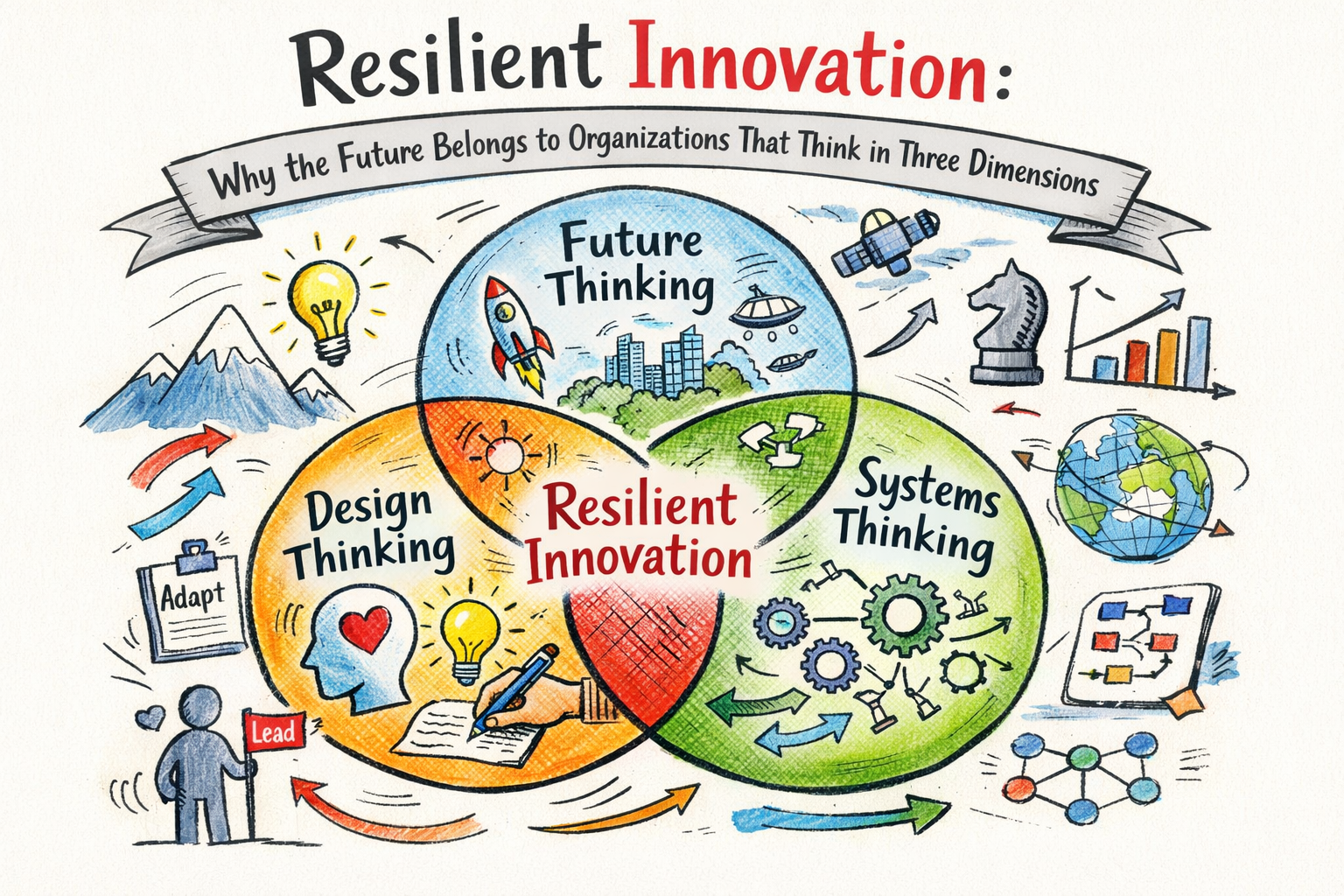
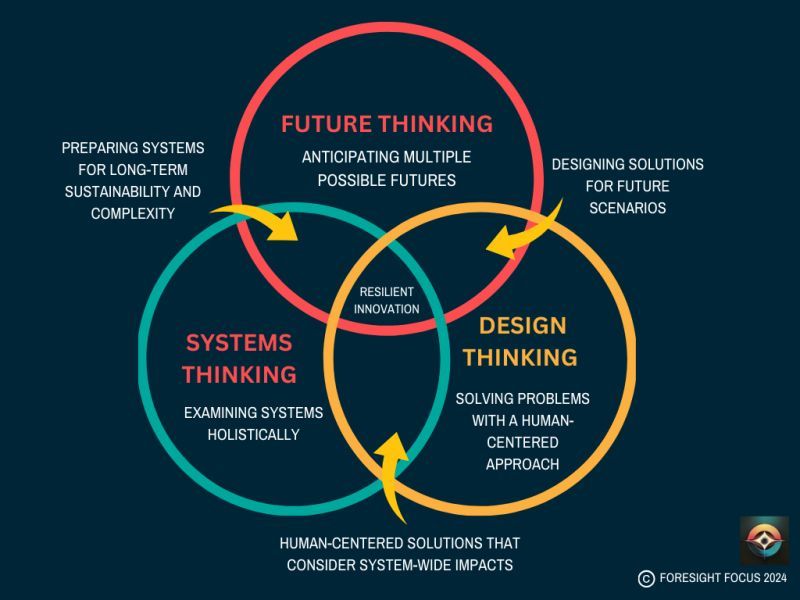
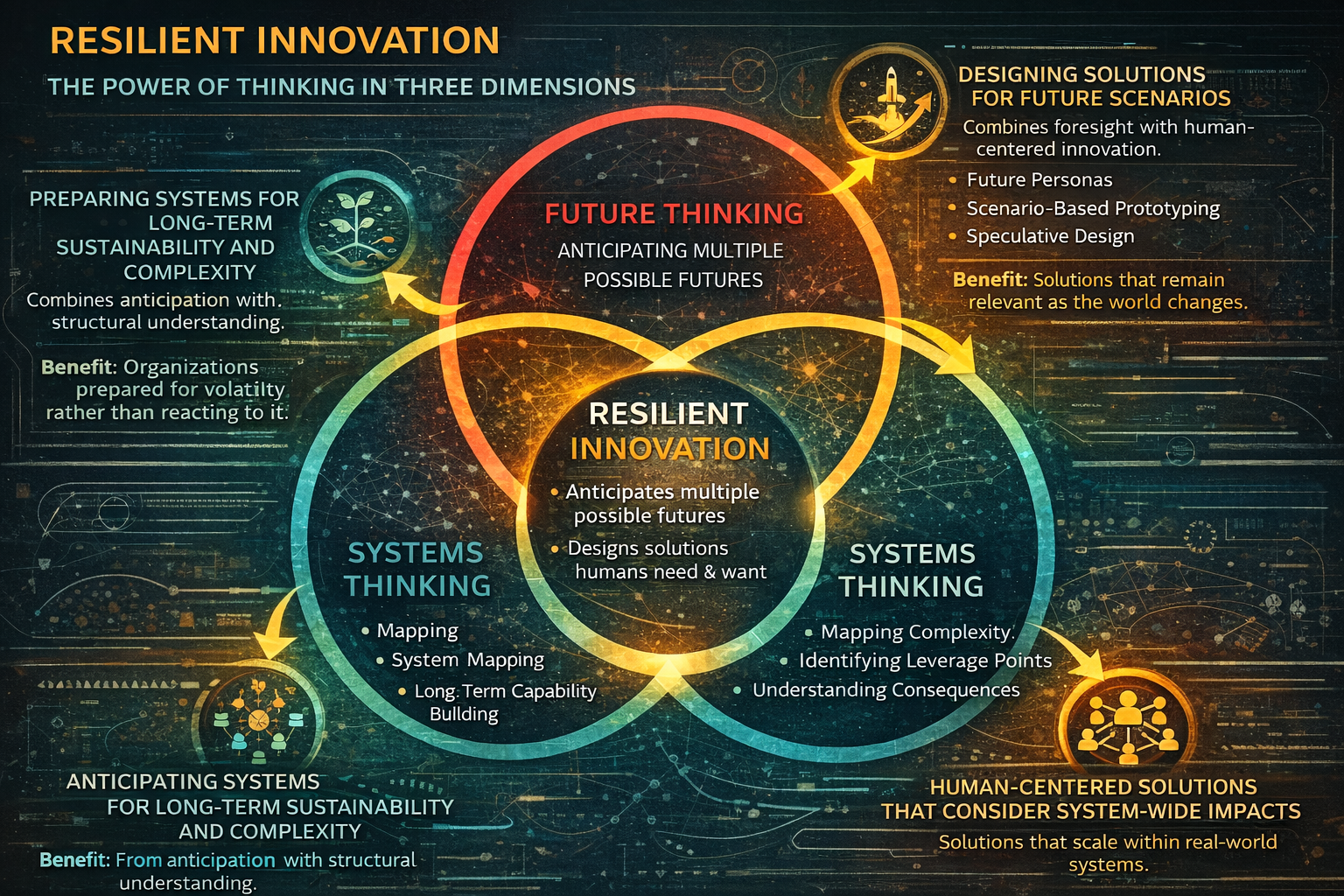
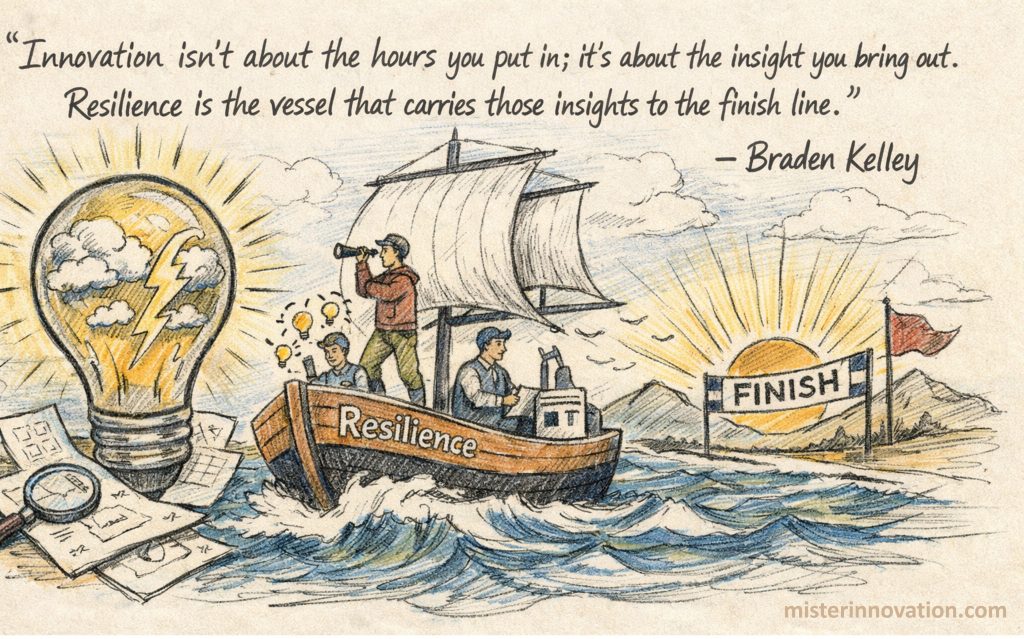

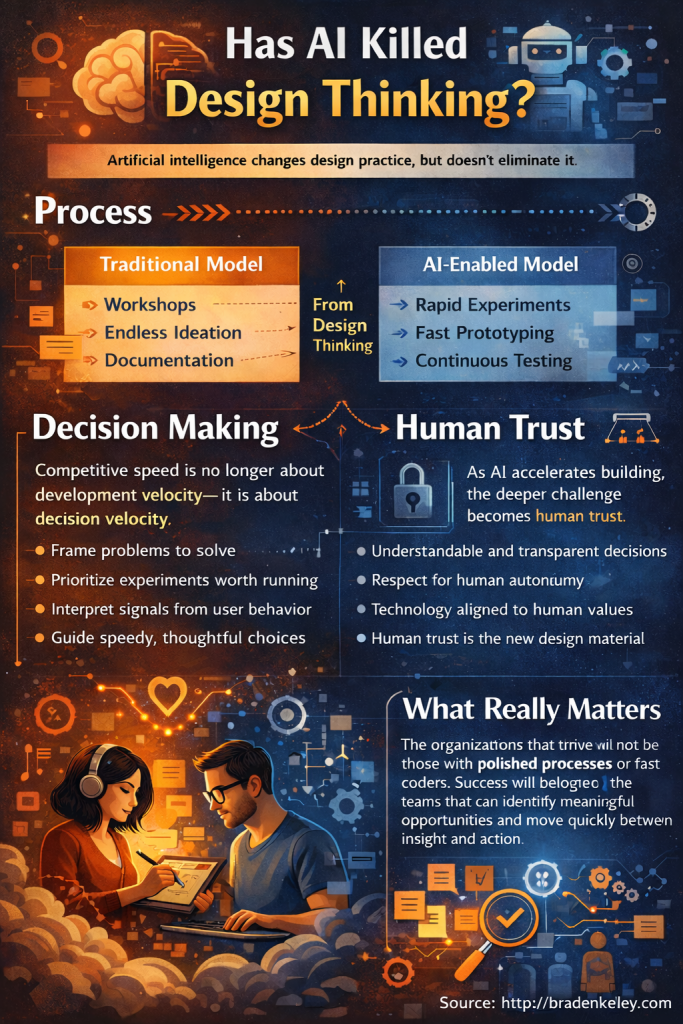
 To help you find problems worth solving and to design and execute experiments, I created a couple of visual and collaborative tools to help you thrive in this new reality. Download them both from my store and enjoy!