
Author Archives: Chateau G Pato

About Chateau G Pato

Chateau G Pato is a senior futurist at Inteligencia Ltd. She is passionate about content creation and thinks about it as more science than art. Chateau travels the world at the speed of light, over mountains and under oceans. Her favorite numbers are one and zero. Content Authenticity Statement: If it wasn't clear, any articles under Chateau's byline have been written by OpenAI Playground or Gemini using Braden Kelley and public content as inspiration.

7 Differences Between Interface Design and Experience Design

7 Differences Between Interface Design and Experience Design

by Braden Kelley and Chateau G Pato


What Is the Difference Between Interface Design and Experience Design? (Short Answer)

Seven differences between interface design and experience design: (1) what each designs, (2) the success question, (3) the boundary of the system, (4) how seams and handoffs are treated, (5) how stakes, emotion, and recovery are handled, (6) whether the operating model is in scope, and (7) what “done” and evidence look like. Interface design shapes the surface. Experience design shapes whether a human can finish the job with dignity — before, during, and after the screen. Soft landings fund both. Hard landings ship interface polish and call it UX.

How Should Leaders Define Interface Design vs Experience Design?

Interface design is the craft of controls, layouts, flows, and interaction patterns on a surface — screen, kiosk, voice UI, form — so people can act with clarity and low friction at that surface. Experience design is the craft of the end-to-end lived journey: jobs-to-be-done, emotions, seams, waiting, policy, human help, recovery, and operating-model fit — so people succeed across time and channels, not only inside one UI.

Organizations often hire “UX,” ship polished screens, and call the job done. Interface craft matters. It is not the whole experience. For trust beyond usability heuristics, see 11 Principles for Designing Trust (Not Just Usability). For how service systems manufacture misery even when channels look efficient, see 8 Service Design Mistakes That Create Efficient Misery.

Difference Interface Design Experience Design
Designs Surfaces, controls, interaction patterns End-to-end lived journey
Success question Can they use this UI? Can they finish the job with dignity?
Boundary Edge of the screen/session Before/after, other channels, humans, policy
Seams Often “out of scope” Core design material
Stakes / recovery Error states and microcopy Make-right, trust, powered recovery
Operating model Rarely in the Figma file Incentives, ownership, old path
“Done” / evidence Usability heuristics, task completion Behavior, effort, outcome, return

If the screen is green and the job still fails, you designed an interface — not an experience.

1. What Does Interface Design Design vs Experience Design?

Difference: The object of the craft.

Interface design: Layouts, components, navigation, and interaction patterns on a channel surface.

Experience design: The whole path a human lives — entry, struggle, wait, handoff, outcome, and memory.

Example: A clean checkout UI (interface) vs the journey from “I need this” through delivery anxiety, status silence, and return dignity (experience).

Tell you’re only doing interface work: Shipping a redesign of screens while the journey map still has no owner.

2. How Does the Success Question Differ?

Difference: The primary question the work answers.

Interface design: Can they complete tasks on this surface with low friction?

Experience design: Did they get the job done — functionally and emotionally — as they define success?

Example: High task-completion on “submit claim” (interface) vs claim actually paid without retelling and shame (experience).

Tell: Usability scores celebrated while recontact and quiet exits rise. Usability sits closer to the interface; experience includes trust and outcome dignity — not only whether the button was findable.

3. Where Does the System Boundary End?

Difference: What counts as “in scope.”

Interface design: Ends at the viewport, the app, or the form.

Experience design: Includes what happens before entry, after exit, in email/SMS/phone/store, and with other humans.

Example: A beautiful self-service portal (interface) vs unpaid homework assembling documents before anyone ever logs in (experience).

Tell: “That’s not UX — that’s operations” used to eject the hard parts. For friction that shows up before your map looks tidy, see 12 Friction Points Customers Feel Before Your Journey Map.

4. How Are Seams and Handoffs Treated?

Difference: How broken borders are treated.

Interface design: Handoffs to other teams and systems often become edge cases or dead ends.

Experience design: Seams are where journeys live — designed, owned, and instrumented.

Example: Smooth bot chat (interface) vs bot → agent retelling tax with lost context (experience failure).

Tell: Each channel looks good alone; the customer pays at the border. Those border failures are also where moments that matter more than NPS either earn trust or spend it.

5. How Do Stakes, Emotion, and Recovery Differ?

Difference: How failure and feeling are designed.

Interface design: Validation errors, empty states, microcopy, maybe a “contact us” link.

Experience design: Stakes matched to friction; recovery as a product; dignity when it breaks.

Example: Friendly 404 and undo on a form (interface) vs powered refund or rebook with a human who can finish (experience).

Tell: Apology UI without recovery power.

6. Is the Operating Model In Scope?

Difference: Whether work, policy, and power are design materials.

Interface design: Often assumes the process and incentives are fixed; UI wraps them.

Experience design: Redesigns jobs, decision rights, fine print, and old paths when they block human success.

Example: A sleek approval screen (interface) vs an exception that still needs three supervisors and punishes care (experience still broken).

Tell: “We redesigned the UI” while policy and metrics still manufacture misery. Framing questions that beat a requirements dump help here — see 10 Design Questions That Beat a Requirements Document.

7. What Does “Done” and Evidence Look Like?

Difference: The finish line and proof.

Interface design: Design-system consistency, heuristic review, moderated usability for key tasks.

Experience design: Adopted behavior, effort down, seams owned, recovery used, outcomes that hold — evidence from the lived journey.

Example: Stakeholders love the prototype (interface theater) vs median user time-to-confidence and job completion move in production (experience).

Tell: Demo applause as the definition of done.

How Do You Run a Design-Scope Check Before the Next Release?

Before the next release, ask five questions: Are we designing a surface or a journey? Where does the job actually start and end? Which seam has an owner? What happens when it fails — with what power? What evidence would prove experience success — not only interface usability?

Polish the interface. Design the experience. Don’t confuse the two on the roadmap.

FAQ: Interface Design vs Experience Design

What is the difference between interface design and experience design?

Interface design crafts the surface — controls, layouts, and interaction patterns so people can act clearly on a screen or channel. Experience design crafts the end-to-end lived journey — including seams, waiting, policy, human help, and recovery — so people finish the job with dignity across time and channels.

Is UX the same as UI?

No. UI (user interface) design is closer to interface craft on a surface. UX (user experience) ideally means experience design across the journey — but many organizations use “UX” to mean UI polish. Soft landings insist on naming the difference so polish is not mistaken for success.

Is interface design part of experience design?

Yes. Strong experiences need strong interfaces. Interface design is necessary craft inside experience design — not a substitute for designing seams, policy, recovery, and outcomes beyond the screen.

Why isn’t a good UI enough?

Because the job often fails after the screen — in waiting, handoffs, fine print, unpaid homework, and powerless recovery. A green usability score can coexist with rising recontact, quiet exits, and lost trust when the lived journey was never designed.

How do you measure experience design vs usability?

Usability measures task completion and friction on a surface. Experience design measures whether people finish the job with dignity in context — effort, seam ownership, recovery used, outcomes that hold, and return behavior — not demo applause or heuristic checklists alone.

Image credits: Gemini

Content Authenticity Statement: The topic area, key elements to focus on, etc. were decisions made by Braden Kelley, with a little help from Google Gemini and Cursor to clean up the article, add images and create infographics.

Subscribe to Human-Centered Change & Innovation WeeklySign up here to get Human-Centered Change & Innovation Weekly delivered to your inbox every week.

6 Design Artifacts Worth Keeping and 6 That Are Ceremony

6 Design Artifacts Worth Keeping and 6 That Are Ceremony

by Braden Kelley and Chateau G Pato


Which Design Artifacts Are Worth Keeping — and Which Are Ceremony? (Short Answer)

Six design artifacts worth keeping: (1) problem/mandate brief, (2) lived contact evidence, (3) behavior hypothesis with kill criteria, (4) owned journey or service blueprint, (5) decision log, and (6) adoption/transfer card. Six that are ceremony: (1) conference-room personas, (2) unowned journey-map posters, (3) prototype-as-finish-line demos, (4) vision walls that never gate funding, (5) requirements novels / RACI theater, and (6) sticky archaeology without decisions. Soft landings keep evidence and owners. Ceremony keeps wallpaper.

An artifact earns its keep when it changes a decision, a behavior, or an owner. Everything else is ceremony with better typography.

How Do You Tell a Keep Artifact From Design Ceremony?

I have walked rooms full of beautiful design and still asked the only question that matters: does this artifact still earn a decision? Teams drown in deliverables. Soft landings keep what forces contact, mandate, falsifiable learning, ownership, kill decisions, and adoption. Hard landings accumulate ceremony — artifacts that photograph well, survive governance, and never change the median person’s work.

Keep-vs-ceremony test: Can you name the next decision this artifact forces? Who will act on it this week? What would you stop producing if the workshop never happened? If the answers are vague, it is ceremony.

When the method itself becomes costume, see 7 Ways Design Thinking Gets Misused. When generation is cheap and judgment is the design, see 5 Elements of Human-Centered Design That AI Cannot Own.

Keep Forces Ceremony twin
1. Mandate brief What we can change Persona deck nobody met
2. Contact evidence Jobs in their language Empathy map from imagination
3. Behavior + kill criteria Learning with a stop date Clickable demo as proof
4. Owned blueprint One seam + owner Journey poster without operator
5. Decision log What we stopped/funded Status deck of activity
6. Adoption/transfer card BAU owner + old-path kill “Change plan” as cascade slide

If it cannot force a decision, it is decoration.

1. Why Keep a Problem / Mandate Brief?

Artifact: One page — problem, who hurts, stakes, constraints, and what the team is allowed to decide, ship, or stop.

Forces: Mandate before methods. It kills ideation on forbidden ground.

Keep it alive: Update when sponsors change levers. Refuse workshops without it. Before you fund the next pilot, pair this brief with 11 Questions Before Funding Any Innovation Pilot.

2. Why Keep Lived Contact Evidence?

Artifact: Notes, clips, verbatim jobs, friction, and dignity costs from real people doing the work — not synthesized vibes.

Forces: Contact before solution. It grounds every later artifact.

Keep it alive: Revisit when the product drifts. Cite evidence in reviews the way finance cites numbers. Better framing questions live in 10 Design Questions That Beat a 40-Page Requirements Document.

3. Why Keep a Behavior Hypothesis With Kill Criteria?

Artifact: One falsifiable human behavior, a success signal, a cheap test, and a kill/continue date — an Experiment Canvas or equivalent.

Forces: Learning over demo applause. Premature scale gets a brake.

Keep it alive: No scale funding without a named behavior and a decision date. For runnable examples, see Experiment Canvas examples.

4. Why Keep an Owned Journey or Service Blueprint?

Artifact: A map or blueprint that names the journey/workflow owner, broken seams, and the next seam to fix — not a mural for the lobby.

Forces: Operating-model ownership. Orphaned handoffs become visible work.

Keep it alive: Review seams in steering. Retire maps with no owner.

5. Why Keep a Decision Log?

Artifact: A running record of tradeoffs — what we chose, stopped, deferred, and why — tied to evidence.

Forces: Truth over narrative polish. It prevents re-litigating settled kills.

Keep it alive: Open every design review with last decisions. Ceremony hates receipts. When the program starts performing for the deck instead of the work, see 11 Signs Your Transformation Is Managing the Deck, Not the Work.

6. Why Keep an Adoption / Transfer Card?

Artifact: BAU owner, redesigned work, old-path kill date, reinforcement ritual, and success behavior — equal weight to the product backlog.

Forces: Soft landing after pilot. It kills “innovation owns it forever.”

Keep it alive: No go-live celebration without a signed transfer card. Shelfware is what you get when adoption never becomes a design deliverable — see 12 Adoption Mistakes That Turn Good Tools Into Shelfware.

Ceremony 1. Why Are Conference-Room Personas Ceremony?

Looks like: Persona cards and empathy maps built from imagination, averages, or AI synthesis with no field contact.

Why it seduces: Fast, safe, printable — and it feels like design.

Instead: Fund lived contact evidence. Personas only as summaries after contact — never as substitutes.

Ceremony 2. Why Are Unowned Journey-Map Posters Ceremony?

Looks like: End-to-end maps that end at the workshop wall, with no operator for seams.

Why it seduces: Visible craft. Executives can point at “the journey.”

Instead: Keep an owned blueprint. Fix one seam before the next print.

Ceremony 3. Why Is Prototype-as-Finish-Line a Ceremony Artifact?

Looks like: Clickable or AI-generated mockups treated as validation because stakeholders smiled.

Why it seduces: It photographs well and feels like progress.

Instead: Keep a behavior hypothesis with kill criteria. Measure what people do — not what they clap for.

Ceremony 4. Why Are Vision Walls That Never Gate Funding Ceremony?

Looks like: North-star posters, future-state murals, and “innovation strategy” walls that never constrain budget or kill weak bets.

Why it seduces: Aspiration is cheap. Tradeoffs are expensive.

Instead: Keep the mandate brief and the decision log. Vision that cannot stop a bad project is ceremony.

Ceremony 5. Why Are Requirements Novels and RACI Theater Ceremony?

Looks like: Spec tomes and responsibility matrices that freeze assumed solutions and hide stakes.

Why it seduces: It feels rigorous. Audits love paper.

Instead: Mandate and design questions first. Specs follow a framed problem — they do not lead.

Ceremony 6. Why Is Sticky Archaeology Without Decisions Ceremony?

Looks like: Preserved walls of “How might we…,” affinity clusters, and photos of workshops as the work product.

Why it seduces: Proof of process. Facilitation theater.

Instead: Keep the decision log and kill criteria. If nothing was stopped or funded, the workshop was a meeting with snacks.

What Should You Ask Before the Next Design Review?

Five questions for artifact hygiene:

  1. Which artifact forces a decision this week?
  2. Where is the contact evidence?
  3. What behavior are we falsifying — and by when?
  4. Who owns the journey after applause?
  5. What ceremony will we stop producing?

Mantra: Keep the evidence. Retire the wall art. Design is what changes work — not what fills the Miro board.

FAQ: Design Artifacts Worth Keeping vs Ceremony

What design artifacts are worth keeping?

Design artifacts worth keeping are a problem/mandate brief, lived contact evidence, a behavior hypothesis with kill criteria, an owned journey or service blueprint, a decision log, and an adoption/transfer card — anything that forces a decision, a behavior, or an owner.

What is design ceremony?

Design ceremony is deliverable theater — personas nobody met, unowned journey posters, demo applause as proof, vision walls that never gate funding, requirements/RACI theater, and sticky archaeology without decisions — artifacts that photograph well but do not change the work.

How do you know if a design deliverable is useful?

A design deliverable is useful when you can name the next decision it forces, who will act on it this week, and what you would stop producing if the workshop never happened. If those answers are vague, it is ceremony.

Should you keep personas and journey maps?

Keep personas only as summaries after real contact — never as substitutes for field evidence. Keep journey maps or service blueprints only when they name an owner and the next seam to fix; unowned posters are ceremony.

What replaces design theater artifacts?

Replace design theater with mandate briefs, contact evidence, falsifiable behavior hypotheses with kill dates, owned blueprints, decision logs, and adoption/transfer cards — artifacts that change decisions, behaviors, and ownership after applause.

Image credits: Gemini

Content Authenticity Statement: The topic area, key elements to focus on, etc. were decisions made by Braden Kelley, with a little help from Google Gemini and Cursor to clean up the article, add images and create infographics.

Subscribe to Human-Centered Change & Innovation WeeklySign up here to get Human-Centered Change & Innovation Weekly delivered to your inbox every week.

8 Service Design Mistakes That Create Efficient Misery

8 Service Design Mistakes That Create Efficient Misery

by Braden Kelley and Chateau G Pato


What Is Efficient Misery — and Which Service Design Mistakes Create It? (Short Answer)

Efficient misery is a service that meets internal efficiency and SLA-like targets while customers — and often employees — experience higher effort, lower dignity, and no path to succeed without heroics. Eight service design mistakes that create it: (1) happy-path-only design, (2) channel efficiency over job success, (3) orphan seams, (4) self-service as unpaid labor, (5) designing to the SLA, (6) recovery left to heroes, (7) policy and fine print as the real design, and (8) frontline without recovery power.

Efficient misery is not a culture problem. It is service design that succeeded at the wrong job — making the organization look fast while humans absorb the cost.

Why Do Efficient Services Still Make Humans Miserable?

I have sat in service reviews where every KPI was on target and every human in the story was exhausted. Cost-per-contact was down. Digital deflection was up. The dashboard was green. The job still failed — unfinished, retold, or rescued by someone who was not supposed to need a hero.

That is efficient misery: local throughput and SLA optics winning while the human job gets harder. Soft landings for service require designing for human success — not mistaking channel speed for a finished experience.

Mistake Feels efficient Misery
1. Happy-path-only Fewer flows; cleaner demos Stressed paths become unpaid workarounds
2. Channel over job Cost-per-contact drops Unfinished jobs; more contacts later
3. Orphan seams Local SLAs look healthy Retelling tax; unowned waits
4. Self-service as unpaid labor Headcount and handle time look better Homework and failed DIY
5. Design to the SLA Clear, vendor-friendly scoreboard Fast wrong closes; green/miserable
6. Recovery as heroes Don’t fund recovery until crisis Dignity costs; apology theater
7. Policy as real design Speed to launch Surprise denials; broken promises
8. Powerless frontline Scripts and controllable cost Known fixes that cannot ship

1. How Does Happy-Path-Only Design Create Efficient Misery?

The mistake: Design and fund the average case; treat exceptions, life context, and “edge” humans as noise.

Why it feels efficient: Fewer flows, cleaner demos, cheaper builds.

The misery: The people who need the service most become unpaid workaround engineers — or churn silently.

Redesign: Design for the struggling moment and the recovery path as first-class journeys. Measure success for the median and the stressed path.

2. Why Is Channel Efficiency Over Job Success a Service Design Mistake?

The mistake: Steer humans to the cheapest channel — bot, portal, IVR — without making that channel able to finish the job.

Why it feels efficient: Cost-per-contact drops. “Digital adoption” rises.

The misery: More contacts, wrong doors, unfinished jobs, and anger mislabeled as “resistance.”

Redesign: Optimize for job completion and time-to-confidence across channels — not deflection rate. Cheap unfinished is still expensive.

3. How Do Orphan Seams Produce Green Steps and a Red Journey?

The mistake: Each team owns a step; nobody owns the handoff, the wait, or the story that must be retold.

Why it feels efficient: Local SLAs and team KPIs look healthy.

The misery: Story-retelling tax, unowned waiting, “not my department” at the moment of truth.

Redesign: Name a journey or seam owner with authority to fix the cliff — before you celebrate step metrics. For the frictions maps miss at those cliffs, see 12 Friction Points Customers Feel Before Your Journey Map Does.

4. How Does Self-Service Become Unpaid Labor?

The mistake: Move work to the customer — or employee — without reducing complexity, providing context, or owning failure modes.

Why it feels efficient: Headcount and handle time look better.

The misery: Homework before entry, identity theater, DIY that fails into a worse contact.

Redesign: Inventory unpaid labor. Kill it or redesign it as a supported step with less burden and a human escape hatch that works.

5. What Happens When You Design the Service to the SLA?

The mistake: Shape flows, scripts, and closures around uptime, response, resolution, or handle-time targets instead of human success.

Why it feels efficient: The scoreboard is clear and vendor-friendly.

The misery: Fast wrong closes, defensive ticket hygiene, green dashboards with miserable humans.

Redesign: Demote SLAs to enabling conditions. Design and govern with experience-level measures of human success. For the maturity path, see 5 Stages from SLAs to XLAs.

6. Why Is Recovery Left to Heroes Still a Design Mistake?

The mistake: Assume things will work; when they don’t, recovery is improvised by “great people.”

Why it feels efficient: You don’t fund recovery capability until something breaks publicly.

The misery: Dignity costs, status opacity, powerless moments, brand trust spent on apology theater.

Redesign: Design recovery as a product — powers, playbooks, and metrics for make-right — not a personality trait.

7. How Do Policy and Fine Print Become the Real Service Design?

The mistake: Experience teams draw the happy path; legal, risk, and ops freeze the real rules after “done” — or hide them in terms nobody can act on.

Why it feels efficient: Speed to launch. Compliance parked elsewhere.

The misery: Surprise denials, bait-and-switch constraints, agents who cannot keep the brand promise.

Redesign: Bring constraint honesty into the design. Name what must not be faked. Write policy as experience — not only as a liability shield.

8. How Does a Frontline Without Recovery Power Create Efficient Misery?

The mistake: Script and meter the people closest to the customer while denying decision rights, tools, or permission to make things right.

Why it feels efficient: Consistency, compliance, and controllable cost.

The misery: Humans who know the fix and cannot do it. Customers who escalate to survive. Employees who quit the dignity of the job.

Redesign: Design empowerment with the service — recovery bands, escalation that works, metrics that don’t punish care. For the rulebook, see 10 Agent Empowerment Rules Your Customer Deserves Before They Quit. If your CX program is managing the number instead of the journey, use 11 Signs Your CX Program Is Scorekeeping, Not Sense-Making.

How Do You Audit Efficient Misery Before the Next Service Redesign?

Before the next service redesign, run five go/no-go questions:

  1. Whose efficiency are we optimizing — and whose effort absorbs the savings?
  2. Which seam has no owner?
  3. What unpaid labor did we just invent?
  4. Which metric could make the dashboard green while the job fails?
  5. Who can make it right at the moment of truth — with what power?

Stop designing services that look fast. Start designing services humans can finish with dignity.

Frequently Asked Questions

What is efficient misery?

Efficient misery is a service that meets internal efficiency and SLA-like targets while customers — and often employees — experience higher effort, lower dignity, and no path to succeed without heroics. The organization looks fast; humans absorb the cost.

What are common service design mistakes?

Common service design mistakes include happy-path-only design, optimizing channels instead of job completion, orphan seams with no handoff owner, self-service that shifts unpaid labor, designing to SLAs instead of human success, leaving recovery to heroes, freezing policy after “done,” and denying frontline recovery power.

Why are SLAs green but customers unhappy?

SLAs can be green while customers are unhappy because SLAs measure whether the service ran — uptime, response, resolution — not whether humans finished the job with dignity. Designing to the SLA produces fast wrong closes and defensive ticket hygiene while the journey stays red.

How does self-service create bad CX?

Self-service creates bad CX when it shifts complexity to the customer without reducing burden, providing context, or owning failure modes. Headcount looks better while humans do homework, fail DIY, and escalate into a worse contact. Real empowerment finishes the job; deflection theater does not.

How do you redesign a service for human success?

Redesign for human success by designing stressed paths and recovery as first-class journeys, optimizing for job completion over deflection, naming seam owners, killing unpaid labor, demoting SLAs to enabling conditions, funding recovery as a product, bringing policy into the design early, and giving the frontline real make-right power.

Image credits: Pixabay

Content Authenticity Statement: The topic area, key elements to focus on, etc. were decisions made by Braden Kelley, with a little help from Google Gemini and Cursor to clean up the article, add images and create infographics.

Subscribe to Human-Centered Change & Innovation WeeklySign up here to get Human-Centered Change & Innovation Weekly delivered to your inbox every week.

5 Elements of Human-Centered Design That AI Cannot Own

5 Elements of Human-Centered Design That AI Cannot Own

by Braden Kelley and Chateau G Pato


What Elements of Human-Centered Design Can AI Not Own? (Short Answer)

Five elements of human-centered design AI cannot own: lived contact with people doing the job, problem framing before solutions, constraint and tradeoff honesty, behavior falsification (not demo applause), and adoption design for Tuesday. AI can draft personas, journey maps, wireframes, and “How might we…” at volume. It cannot bear dignity costs, name what you are empowered to change, choose under uncertainty with accountability, measure what people do, or own the seam after the workshop.

When generation is cheap, the elements that require a body in the room become the whole design — not the wallpaper around the model.

Why Are Artifacts Cheap and Judgment the Design?

I have watched the same room light up twice — once when sticky notes arrived, and again when the model could generate a persona, a journey map, and a clickable prototype before lunch. The second room felt more advanced. It was often less honest.

AI did not retire human-centered design. It made the human elements more urgent. Models can invent users who never existed, roadmaps that answer the wrong question beautifully, and pilots that prove the demo while the operating model stays frozen. Generation got cheap. Design judgment is still expensive — in the right way: contact, stakes, mandate, falsifiable learning, and adoption.

This is not a list of things to ban. It is a division of design labor. AI can assist each element. Humans must own them — because each requires someone who bears stakes, accountability, and contact with Tuesday.

Element AI can assist Humans must own
1. Lived contact Summarize interviews, cluster themes Field time, dignity costs, reality that contradicts the roadmap
2. Problem framing Explore options inside a human-set frame The question, the mandate, killing the wrong problem
3. Constraint honesty Retrieve policy, model scenarios Tradeoffs, winners and losers, what we stop doing
4. Behavior falsification Generate flows, demos, copy variants What to test, what people do, when to kill the idea
5. Adoption design Draft rollout plans and training outlines Owners, seams, shadow-process kill dates, Tuesday

1. Why Can’t AI Own Lived Contact in Human-Centered Design?

The element: Understanding humans by contact — jobs-to-be-done, friction, dignity costs — in their language and context, before the artifact freezes the story.

AI can assist: Summarize interviews, cluster themes, draft empathy maps after contact. Useful synthesis once reality has entered the room.

The costume: Synthetic users, scraped reviews, generated personas nobody met; empathy theater at machine speed. Fluency mistaken for evidence.

Humans own: Field time, ride-alongs, the awkward conversation where reality contradicts the roadmap. If the insight could have been invented in the building, it is not design. It is decoration.

2. Why Is Problem Framing a Design Element AI Cannot Own?

The element: Naming the right problem, constraints, and stakes before freezing solutions — the frame that makes options meaningful.

AI can assist: Explore options inside a human-set frame; draft scenarios; challenge assumptions once the frame exists.

The costume: Instant roadmaps and solution spam that answer the wrong brief beautifully; “innovation” that skips the question entirely.

Humans own: The mandate to sit with the problem; kill ideas that solve a different problem; sponsor alignment on what is actually being designed. Faster wrong is still wrong — and now it ships faster too.

3. What Design Tradeoffs Must Humans Own That AI Cannot Fake?

The element: Surfacing policy, power, incentives, risk, staffing, and dignity limits that govern what can actually ship — and naming winners and losers.

AI can assist: Retrieve policy, summarize regulations, model scenarios within declared constraints.

The costume: Infinite “yes” in the prototype; designs that assume permission nobody has; surprise policy after “done.”

Humans own: The political work of tradeoffs; what we will stop doing; who loses if this works. Design without constraint honesty is a portfolio piece, not a plan. For sharper framing before specs freeze, see 10 Design Questions That Beat a 40-Page Requirements Document.

4. How Do Humans Own Behavior Falsification When AI Makes Prototypes Cheap?

The element: Prototyping and testing to falsify a named human behavior hypothesis — completion, workaround abandoned, time-to-confidence — not to win a room.

AI can assist: Generate clickable flows, agent demos, copy variants for tests. Speed to artifact, not speed to truth.

The costume: Applause demos; portfolio pieces; A/B theater without a behavior theory. Gorgeous output that teaches nothing about Tuesday.

Humans own: Choosing what to falsify; interpreting what people do; killing the idea when the evidence says kill. A beautiful demo that teaches nothing is still theater — and AI makes theater cheaper every quarter.

5. Who Owns Adoption Design That AI Cannot?

The element: Designing for who operates the journey after the markers dry — owners, handoffs, incentives, retirement of the old path, recovery power at the moment of truth.

AI can assist: Draft rollout plans, comms, training outlines — inside a human-owned adoption frame.

The costume: Workshop output that ends at the wall; maps without operators; “we’ll figure out ownership at scale.”

Humans own: Named workflow owner; seam owners; kill date for shadow process; enablement as practice, not completions. Design that stops at demo day is not human-centered. It is human-decorated. For friction customers feel before any map names it, read 12 Friction Points Customers Feel Before Your Journey Map Does.

How Do You Check the Division of Design Labor Before an AI-Assisted Sprint?

Before the next AI-assisted design sprint, run five go/no-go questions. If you cannot answer them, you are buying artifacts without a design:

  1. Who did we talk to — real humans doing the job, in their words?
  2. What problem are we empowered to change — decide, ship, or stop?
  3. What constraint or tradeoff are we naming out loud — policy, power, dignity, what we stop?
  4. What behavior are we falsifying — not what demo are we showing?
  5. Who owns Tuesday after the workshop — workflow, seams, shadow process retired?

For the broader work humans should keep when glue work shrinks, see 11 Human Endeavors AI Should Free (Not Replace). For habits that protect these elements in innovation practice, read 9 Habits of Human-Centered Innovators That Still Matter in the Age of AI. For method costume that skips them, see 7 Ways Design Thinking Gets Misused.

AI can own the draft. Humans own the design — contact, frame, tradeoffs, behavior, and adoption.

Frequently Asked Questions

What elements of human-centered design can AI not replace?

AI cannot own lived contact with real users, problem framing before solutions, honest constraint and tradeoff work, behavior falsification in testing, or adoption design for Tuesday. It can assist each — drafting, clustering, prototyping — but humans must bear stakes, mandate, accountability, and contact with reality.

Can AI do human-centered design?

AI can accelerate artifacts inside human-centered design — personas, maps, wireframes, copy — but it cannot do the design discipline on its own. Without human-owned contact, framing, tradeoffs, falsification, and adoption, AI produces fluent decoration: faster artifacts, same theater.

What is the difference between AI-assisted design and AI-owned design?

AI-assisted design uses models after humans set the problem frame, gather real evidence, and clarify decision rights — then to explore, draft, and test faster. AI-owned design lets generation substitute for contact, framing, tradeoffs, learning, and adoption — producing impressive artifacts that never land on Tuesday.

Why do AI-generated personas fail in human-centered design?

They often replace lived contact instead of summarizing it. Synthetic personas feel researched because the prose is fluent, but they optimize for a human who never existed — skipping dignity costs, workarounds, and the awkward truth that contradicts the roadmap. Empathy theater at machine speed.

How do you keep design human with AI?

Keep humans owning contact, problem framing, constraint honesty, behavior falsification, and adoption design. Use AI inside that frame for synthesis and speed. Run a division-of-labor check before each sprint: real humans in the evidence, empowered problem, named tradeoffs, falsifiable behavior, and an owner for Tuesday.

Image credits: Gemini

Content Authenticity Statement: The topic area, key elements to focus on, etc. were decisions made by Braden Kelley, with a little help from Google Gemini and Cursor to clean up the article, add images and create infographics.

Subscribe to Human-Centered Change & Innovation WeeklySign up here to get Human-Centered Change & Innovation Weekly delivered to your inbox every week.

7 Ways Design Thinking Gets Misused

(And How to Course-Correct)

7 Ways Design Thinking Gets Misused

by Braden Kelley and Chateau G Pato


Why Does Design Thinking Get Misused? (Short Answer)

Design thinking gets misused when organizations treat it as a workshop format instead of a discipline for understanding humans and making better choices under constraint. Seven common misuses are: empathy theater without real people, ideation without mandate, prototyping without a behavior to test, journey maps without owners, endless discover as schedule padding, facilitators without power, and “we design think” as brand instead of outcomes.

Course correction means restoring jobs-to-be-done, real evidence, decision rights, behavior-based tests, journey ownership, time boxes with kill criteria, sponsors with levers, and success measured by adoption — not sticky-note acreage.

The Method Is Not the Costume

I have walked into rooms that smell like fresh markers and old coffee and felt the familiar mix of hope and dread. Hope because someone finally said “human-centered.” Dread because the wall is already filling with personas nobody met and “How might we…” statements nobody is allowed to answer.

Design thinking is not the problem. Misuse is. When empathy becomes a poster, ideation a substitute for power, and prototypes a way to delay a decision, you get innovation cosplay with better stationery. The method still works — when it is tied to real humans, real constraints, and a Tuesday someone can actually succeed on.

Misuse Why it happens Course-correct
1. Empathy theater Faster, no access politics Talk to humans doing the job
2. Ideation without mandate Performance over power Match method to decision rights
3. Prototyping without behavior Demos photograph well Test one falsifiable behavior
4. Journey maps without owners Maps are deliverables Name owner + one seam to fix
5. Schedule padding Ambiguity feels safe Time-box; define the decision
6. Facilitators without power DT outsourced Sponsor with levers in room
7. DT as brand Credibility borrowing Judge by behavior and adoption

1. Empathy Theater — Post-Its Without People

The misuse: Personas, empathy maps, and “user needs” built from conference-room imagination. No customers in the room. No frontline staff. No evidence beyond what someone senior once said at an offsite.

Why it happens: It is faster. It avoids access politics. It lets the team feel virtuous without scheduling the awkward conversation where reality contradicts the roadmap.

Course-correct: Talk to humans doing the job — customers, employees, partners. Capture jobs-to-be-done, friction, and dignity costs in their language. If your empathy artifact could have been written without leaving the building, it is fiction with better fonts.

2. Ideation Without Mandate — Brainstorming What You Cannot Change

The misuse: “How might we…” on problems policy, budget, incentives, or turf forbid anyone to fix. The wall fills with clever ideas that die the moment the workshop ends.

Why it happens: Design thinking becomes performance. Brainstorming feels like progress without naming decision rights or making enemies.

Course-correct: Before the workshop, ask: What are we empowered to decide, ship, or stop? Match the method to the mandate. If the honest answer is “nothing structural,” fix the mandate — or cancel the sticky notes and stop charging the room rent for theater.

3. Prototyping Without a Behavior — Demo Is Not Learning

The misuse: Clickable mockups, storyboards, or AI demos that never test a named human behavior or success signal. The prototype exists to impress, not to falsify.

Why it happens: Prototypes photograph well. Measurement is harder. Applause is immediate; adoption is delayed and therefore ignorable.

Course-correct: Prototype to test one behavior hypothesis — completion in one attempt, abandoned workaround, time-to-confidence, effort reduced. Measure what people do, not what they say in the debrief. A beautiful demo that does not change a behavior is a portfolio piece, not design.

4. Journey Maps Without Owners — Beautiful Maps, Orphaned Seams

The misuse: Journey maps that end at the workshop wall. Broken handoffs identified, celebrated, and then left without an operator in business-as-usual.

Why it happens: Maps are deliverables. Operating-model change is political. Printing is easier than owning.

Course-correct: Name a journey owner with decision rights before you print the poster. Pick one seam — one handoff, one wait, one moment of shame — and fund its fix. A map without an owner is wallpaper that teaches the organization how to look empathetic while staying unchanged.

5. Design Thinking as Schedule Padding — “We’re Still in Discover”

The misuse: Endless discover and define to avoid a decision, a vendor choice, a kill, or a tradeoff someone does not want to make.

Why it happens: Ambiguity feels like safety. Without kill criteria, “we’re learning” becomes a luxury hobby with catering.

Course-correct: Time-box phases. Define what decision the sprint must produce — proceed, pivot, or stop. Learning without a decision date is tourism. Design thinking should reduce uncertainty, not indefinitely postpone it.

6. Facilitators Without Power — Great Session, No Tuesday

The misuse: External or internal facilitators who run excellent sessions but cannot move budget, policy, metrics, or the workaround everyone still uses on Monday.

Why it happens: Design thinking is outsourced to people without levers. Sponsors attend the readout and disappear into the next crisis.

Course-correct: Put a sponsor with decision rights in the room for the whole arc — not only the applause at the end. The facilitator serves evidence and structure; the sponsor owns tradeoffs. If nobody with power was present when the uncomfortable insight appeared, the insight will not survive contact with the calendar.

7. “We Design Think” as Brand — Method as Moral License

The misuse: The label slapped on unchanged process. Design thinking badge replaces human-centered outcomes. Workshop count substitutes for adoption.

Why it happens: Credibility borrowing. Innovation theater with better vocabulary. Easier to claim the method than to change the system.

Course-correct: Judge by behavior change and adopted outcomes on a named journey — not wall art, not certificate count, not how many times someone said “empathy” in a steering committee. Design thinking earns its keep when humans can succeed on Tuesday. Everything else is branding.

How Do You Fix Misused Design Thinking?

Before the next design thinking workshop, run five go/no-go questions. If you cannot answer them, you are buying costume, not method:

  1. Who did we talk to — and did we hear jobs and friction in their words?
  2. What can we change if the evidence says we should?
  3. What behavior are we testing — not what demo are we showing?
  4. Who owns the journey after the markers dry?
  5. What decision must this sprint produce — by when?

Design thinking is still one of the most practical ways to put humans back at the center of innovation — when it is used as a discipline for contact with reality, not as a sticker on the same broken Tuesday. Course-correct the misuse, and the method does what it always promised: better questions, better choices, and work that lands where people actually live it.

Frequently Asked Questions

What are common design thinking mistakes?

Common mistakes include empathy theater without real users, ideation without decision rights, prototypes that never test behavior, journey maps without owners, endless discover phases, facilitators without power to implement, and treating design thinking as brand instead of measuring adoption and outcomes.

Why does design thinking fail in organizations?

It often fails when used as a workshop format rather than a discipline tied to real humans, real constraints, and decision rights. Teams produce personas and prototypes but cannot change policy, incentives, or broken handoffs — so the operating model stays the same and the method gets blamed.

How do you course-correct misused design thinking?

Talk to people doing the work, match workshops to what you are empowered to change, prototype to test specific behaviors, name journey owners, time-box phases with kill criteria, keep sponsors with levers in the room, and measure success by behavior change and adoption — not workshop output.

Is design thinking the same as brainstorming?

No. Brainstorming is one activity. Design thinking is an end-to-end discipline: understand humans and jobs-to-be-done, define the right problem, ideate within mandate, prototype to learn, and test behavior — with owners who can change the system after the session.

What should you ask before a design thinking workshop?

Ask who you will talk to, what you can change if evidence requires it, what behavior you will test, who owns the journey afterward, and what decision the sprint must produce by when. Without those answers, you are likely funding empathy theater.

Image credits: Braden Kelley from a Pixabay base image

Content Authenticity Statement: The topic area, key elements to focus on, etc. were decisions made by Braden Kelley, with a little help from Google Gemini and Cursor to clean up the article, add images and create infographics.

Subscribe to Human-Centered Change & Innovation WeeklySign up here to get Human-Centered Change & Innovation Weekly delivered to your inbox every week.

8 Roles That Make or Break Enterprise Transformation

8 Roles That Make or Break Enterprise Transformation

by Braden Kelley and Chateau G Pato


Which Roles Make or Break Enterprise Transformation? (Short Answer)

Eight roles that make or break enterprise transformation: (1) Sponsor with Levers, (2) Work-Not-Deck Program Lead, (3) Line Manager as Local Change Leader, (4) BAU Receiving Owner, (5) Old-Path Kill Owner, (6) Enablement / Practice Designer, (7) Portfolio Capacity Steward, and (8) Floor Truth Partner. Soft landings staff these jobs — full-time, part-time, or embedded. Hard landings staff titles and still leave the human work vacant.

Enterprise transformation makes or breaks on ownership of the human system — not on another workstream lead with a better title.

Why Don’t Transformation Titles Guarantee These Jobs Are Done?

“Transformation Officer,” “Change Manager,” and “PMO Lead” on an org chart do not prove these eight jobs are done. Soft landings check coverage of mandate, enablement, local coaching, BAU receipt, old-path kill, capacity, and floor truth — regardless of badge.

I have watched programs hire the titles and still manage the deck while the median person’s work never changed. For the method spine behind Leadership, Management, Maintenance, and Portfolio, see 5 Steps of Human-Centered Change. For innovation’s different team-sport catalog, see 10 Innovation Roles Every Enterprise Needs — adjacent ownership, different domain.

Role Owns Break tell
1. Sponsor with Levers Budget/policy/metric/stop power Logo sponsorship; cascades only
2. Work-Not-Deck Lead Behavior + decisions in governance RAG theater; status tours
3. Line Manager Coach Local practice and permission Cascade middle; no coaching time
4. BAU Receiving Owner New way after applause “Project owns it” forever
5. Old-Path Kill Owner Dual-run and shadow death Kindness without a kill date
6. Enablement Designer Practice on real work Completions as capability
7. Capacity Steward What we stop so change can live Stacked initiatives; “and also”
8. Floor Truth Partner Contact evidence in the room Deck greener than the floor

If you cannot name who owns it, the landing already broke.

2. Why Does a Work-Not-Deck Program Lead Make or Break Transformation?

Owns: Program governance that forces decisions, behavior metrics, and tradeoffs — not slide hygiene as the product.

Costume (breaks): Transformation as a reporting factory; green decks, red work.

Make: Decision-first agendas; dual truth (system + human success); cap hours on deck production.

Tell missing: Steering is a tour; few things stop; few owners leave with a real next action. For the diagnostic pattern, see 11 Signs Your Transformation Is Managing the Deck, Not the Work.

3. How Do Line Managers Make or Break Local Change?

Owns: Local permission, coaching, practice time, and “what we stop doing here.”

Costume (breaks): Middle management as cascade amplifiers and attendance police.

Make: Managers develop judgment; protected practice; honest answers to quiet questions.

Tell missing: Town halls loud; team huddles empty of how work actually changes. The hallway questions managers must be ready for live in 10 Questions Employees Quietly Ask During Every Transformation.

4. Who Is the BAU Receiving Owner — and Why Does It Matter?

Owns: The workflow or journey in BAU — handoffs, support, reinforcement, and success behavior after the PMO leaves.

Costume (breaks): “Project owns it” forever; orphan process after cutover cake.

Make: Named receiving owner before go-live; signed transfer; reinforcement rituals.

Tell missing: Hypercare ends; relapse begins; nobody to escalate drift to. Many stalls after the pilot are vacant receiving ownership with a different name — see 9 Reasons Digital Transformations Stall After the Pilot.

5. What Does an Old-Path Kill Owner Do?

Owns: Kill-date honor for legacy process, shadow tools, and “just in case” dual paths.

Costume (breaks): Endless coexistence celebrated as kindness; immortal workarounds.

Make: Time-boxed dual-run; retirement volume tracked; incentives stop rewarding the old way.

Tell missing: New system “up”; median person still lives on the spreadsheet.

6. Why Is an Enablement / Practice Designer Different From “Change Communications”?

Owns: Practice on real work, redesigned jobs, and coaching design — not only comms and e-learning.

Costume (breaks): Completions, town halls, and awareness scores as “change management.”

Make: Time-to-confidence by role; managers as practice partners; enablement equal to the build backlog.

Tell missing: Training green; behavior flat; “resistance” blamed on character. Informed is not enabled.

7. What Does a Portfolio Capacity Steward Protect?

Owns: Organizational load — what initiatives pause, kill, or sequence so humans can succeed.

Costume (breaks): “And also” portfolio; every bet gets a workstream; capacity is someone else’s problem.

Make: Visible stop/start list; change load as a steering metric; permission to refuse new starts.

Tell missing: The quiet question “What will I stop doing?” never gets an answer.

8. Why Does Every Transformation Need a Floor Truth Partner?

Owns: Ride-alongs, verbatim jobs, adoption quality, and the story the deck cannot invent.

Costume (breaks): Sentiment pulses and status narratives substitute for contact.

Make: Every steering pack includes floor evidence; dual truth is allowed in the room.

Tell missing: RAG greener than reality; nobody has watched the median person struggle this month.

How Do You Check Role Coverage Before the Next Steering Committee?

Eight questions:

  1. Who has levers — and used them this month?
  2. Who owns decisions vs deck polish?
  3. Which line managers are coaching practice?
  4. Who receives the work in BAU?
  5. Who owns the old-path kill date?
  6. Who designs enablement as practice?
  7. What did we stop to create capacity?
  8. Where is this month’s floor truth?

Mantra: Staff the ownership. Titles without these eight jobs are just a better org chart for a hard landing.

FAQ: Roles That Make or Break Enterprise Transformation

What roles are needed for enterprise transformation?

Enterprise transformation needs a sponsor with levers, a work-not-deck program lead, line managers as local change leaders, a BAU receiving owner, an old-path kill owner, an enablement/practice designer, a portfolio capacity steward, and a floor truth partner — whether those jobs are full-time titles or embedded responsibilities.

Who owns transformation success?

Transformation success is owned across mandate (sponsor), governance of the work (program lead), local coaching (line managers), BAU receipt and reinforcement, old-path retirement, enablement as practice, portfolio capacity, and floor truth — not by a single Transformation Officer badge alone.

What is a transformation sponsor with levers?

A transformation sponsor with levers holds budget, policy, metric, and stop/start power for the change arc — not only a logo on the cascade deck. If they cannot change the system, they are a mascot.

Why do transformations fail without BAU owners?

Transformations fail without BAU owners because after hypercare the PMO leaves, reinforcement stops, relapse begins, and nobody owns the new way of working — so go-live photographs success while behavior returns to the old path.

What is the difference between a change manager and an enablement designer?

A costume “change manager” often owns communications and training completions. An enablement/practice designer owns practice on real work, redesigned jobs, coaching design, and time-to-confidence — so people can succeed, not only stay informed.

Image credits: Pexels

Content Authenticity Statement: The topic area, key elements to focus on, etc. were decisions made by Braden Kelley, with a little help from Google Gemini and Cursor to clean up the article, add images and create infographics.

Subscribe to Human-Centered Change & Innovation WeeklySign up here to get Human-Centered Change & Innovation Weekly delivered to your inbox every week.

12 Adoption Mistakes That Turn Good Tools into Shelfware

12 Adoption Mistakes That Turn Good Tools into Shelfware

by Braden Kelley and Chateau G Pato


What Adoption Mistakes Turn Good Tools Into Shelfware? (Short Answer)

Shelfware is a tool that is licensed, launched, and often “adopted” on a dashboard — while the median person still uses the old path, a workaround, or nothing. Twelve adoption mistakes that create it: (1) job-blind purchase, (2) go-live as the finish line, (3) comms and training mistaken for enablement, (4) orphan after hypercare, (5) immortal shadow path, (6) login metrics as “adoption,” (7) tool bolted onto unreformed work, (8) incentives that punish the new way, (9) manager blackout, (10) big-bang feature dump, (11) change capacity ignored, and (12) no reinforcement after applause.

Shelfware is what you get when the organization buys a capability and funds a go-live — but never designs a new way of working humans can succeed at.

Why Isn’t the Tool Usually the Failure?

I have watched too many “successful” implementations end with renewals, green occupancy dashboards, and a quiet return to the spreadsheet. The product worked in the demo. The vendor delivered. The adoption design never did.

Soft landings for tools require treating adoption as the product — not as a training workstream bolted on after procurement. For the beliefs underneath these mistakes, see 8 Change Myths Leaders Still Believe in 2026.

Mistake Feels smart Shelfware path
1. Job-blind purchase Best-of-breed checklist No job to hire the tool for
2. Go-live as finish Clean PMO exit System up; behavior never sticks
3. Comms = enablement Visible completions Informed people keep old path
4. Orphan after hypercare Clear program RACI Drift back to workarounds
5. Immortal shadow path “Just in case” kindness Adoption stays optional
6. Login metrics Green occupancy Click theater; jobs unfinished
7. Unreformed work Faster deployment Friction in a shinier UI
8. Bad incentives Fix metrics later Rational avoidance of the tool
9. Manager blackout Fewer champions to train Daily work stays legacy
10. Feature dump Full-value launch story Overwhelm; retreat
11. No capacity Standalone business case Survival mode wins
12. No reinforcement Project “done” Relapse with renewals

1. How Does a Job-Blind Purchase Create Shelfware?

The mistake: Select the tool for a vendor demo, category checklist, or peer parity — not a struggling moment and success behavior.

Why it feels smart: Procurement is clear. “Best of breed” feels safe.

Shelfware path: People cannot hire the tool for a job they don’t recognize. Workarounds win.

Fix: One sentence before the contract: who, what stuck job, what behavior proves success.

2. Why Is Go-Live as the Finish Line an Adoption Mistake?

The mistake: Fund and celebrate go-live; treat adoption as leftover time.

Why it feels smart: Programs are dated. Vendors invoice. The PMO exits cleanly.

Shelfware path: The system is “up.” The new way of working never sticks.

Fix: Behavior metrics after day one. An owner after the PMO leaves. For the scale anatomy when pilots work and landings don’t, see 9 Reasons Digital Transformations Stall After the Pilot.

3. How Do Comms and Training Get Mistaken for Enablement?

The mistake: Cascade decks, e-learning completions, and town halls stand in for practice on real work.

Why it feels smart: Visible, reportable, leader-friendly.

Shelfware path: Informed people return to the easy old path under load.

Fix: Time-boxed practice, coaching, and permission to stop the workaround.

4. What Happens When the Tool Is Orphaned After Hypercare?

The mistake: Project and vendor own the tool until hypercare ends; then nobody owns the operating path.

Why it feels smart: Clear RACI during the program.

Shelfware path: Drift, ticket piles, quiet return to spreadsheets.

Fix: Named workflow owner and success behaviors before go-live.

5. How Does an Immortal Shadow Path Kill Adoption?

The mistake: Keep the legacy process “just in case” with no kill date.

Why it feels smart: Feels kind. Avoids political cost.

Shelfware path: Adoption stays optional. The easy path wins.

Fix: Time-boxed coexistence. Explicit retirement of the old path.

6. Why Are Login Metrics a Dangerous Definition of Adoption?

The mistake: Score success as licenses, logins, seats, or “% active users” without a behavior theory.

Why it feels smart: Dashboards look green. Vendor QBRs feel good.

Shelfware path: Click theater. Jobs still unfinished. A ghost town with traffic.

Fix: Measure completed jobs, abandoned workarounds, and time-to-confidence — not only occupancy.

7. What Happens When You Bolt a Tool Onto Unreformed Work?

The mistake: Same handoffs, approvals, and policies — shinier interface.

Why it feels smart: Faster deployment. Less politics.

Shelfware path: Friction moves into the new UI. People escape to shadow tools.

Fix: Redesign jobs and decisions first. Technology follows the human system.

8. How Do Incentives That Punish the New Way Create Shelfware?

The mistake: Leave KPIs and recognition aligned to old speed, volume, or local efficiency.

Why it feels smart: “We’ll fix metrics after adoption stabilizes.”

Shelfware path: Rational people avoid the tool that makes them look worse.

Fix: Align a few critical measures with the change, not after it.

9. Why Does Manager Blackout Turn Good Tools Into Shelfware?

The mistake: Enable end users and executives; skip managers as coaches of judgment and practice.

Why it feels smart: Fewer “change champions” to train.

Shelfware path: Daily huddles still run on the old way. The tool never becomes how work is done.

Fix: Managers as developers of the new behavior — with time and talking points that match real work.

10. How Does a Big-Bang Feature Dump Create Shelfware?

The mistake: Turn on everything day one; “full value” as a launch slogan.

Why it feels smart: Maximizes the ROI narrative. One cutover.

Shelfware path: Cognitive overload. Retreat to familiar fragments of the tool — or none.

Fix: Progressive adoption — few critical jobs first; expand when confidence is real.

11. Why Does Ignoring Change Capacity Produce Shelfware?

The mistake: Launch another platform into a portfolio already overloaded with initiatives.

Why it feels smart: Each business case stands alone.

Shelfware path: Attention is the scarce resource. The newest tool loses to survival mode.

Fix: Portfolio stop/start. Protect capacity. Refuse launch without what you will stop.

12. How Does No Reinforcement After Applause Create Shelfware?

The mistake: End interest after launch cake; no rituals, coaching, or drift response.

Why it feels smart: The project is “done.” The budget closed.

Shelfware path: Relapse with better branding. Licenses renew. Behavior doesn’t.

Fix: Post-go-live reinforcement owner. Celebrate retired workarounds. Instrument for drift. That is the maintenance key in 5 Steps of Human-Centered Change — and when AI tools densify the change, see 7 Ways AI Changes Change Management.

How Do You Run a Pre-Launch Adoption Audit Before the Next Go-Live?

Before the next tool go-live, run five go/no-go questions:

  1. What human job and success behavior did we buy this for?
  2. Who owns BAU after hypercare?
  3. What old path dies on a date?
  4. Which metric could show green while the job still fails?
  5. Who coaches managers — and what will we stop so people have capacity to learn?

Stop launching tools. Start launching new ways of working — or expect shelfware with a ribbon.

Frequently Asked Questions

What is shelfware?

Shelfware is a tool that is licensed, launched, and often marked “adopted” on a dashboard while the median person still uses the old path, a workaround, or nothing. The product may work. The new way of working was never designed or owned.

Why do employees not adopt new software?

Employees often don’t adopt new software because the job was never named, enablement was only training, the old path stayed easy, incentives punished the new way, managers weren’t coached, features overwhelmed, or nobody owned reinforcement after go-live. Much “resistance” is rational response to bad adoption design.

How do you prevent shelfware?

Prevent shelfware by buying for a named human job, measuring behavior after go-live, enabling practice not only completions, naming a BAU owner, killing the old path on a date, redesigning work and incentives with the tool, coaching managers, rolling out progressively, protecting change capacity, and funding reinforcement after applause.

What are common software adoption mistakes?

Common software adoption mistakes include job-blind purchase, treating go-live as the finish line, mistaking comms for enablement, orphaning the tool after hypercare, leaving shadow paths forever, scoring logins as adoption, bolting tools onto unreformed work, misaligned incentives, skipping managers, big-bang feature dumps, ignoring portfolio capacity, and skipping reinforcement.

How do you measure tool adoption beyond logins?

Measure tool adoption beyond logins with completed jobs, abandoned workarounds, time-to-confidence, repeat use on critical tasks, and whether the old path is actually retired — outcomes that show the median person succeeded, not only that seats were occupied.

Image credits: Pixabay

Content Authenticity Statement: The topic area, key elements to focus on, etc. were decisions made by Braden Kelley, with a little help from Google Gemini and Cursor to clean up the article, add images and create infographics.

Subscribe to Human-Centered Change & Innovation WeeklySign up here to get Human-Centered Change & Innovation Weekly delivered to your inbox every week.

10 Questions Employees Quietly Ask During Every Transformation

10 Questions Employees Quietly Ask During Every Transformation

by Braden Kelley and Chateau G Pato


What Questions Do Employees Quietly Ask During Transformation? (Short Answer)

During every transformation, employees quietly ask ten questions: Will my job still exist — and in what form? What will I stop doing? Who actually has the power to change this? Is this real, or another initiative costume? What happens if I speak up? Will I get time and practice — or a mandatory video? Who loses if this succeeds? How will you measure us when the old metrics still run promotions? What happens after go-live when things break? Why should I believe you this time? Silence is not buy-in. It is risk management.

People don’t withhold questions because they lack curiosity. They withhold them when honesty has a career cost.

Why Is the Hallway the Real Town Hall?

I have watched town halls end in applause and hallways begin in whispers. Official questions go on sticky notes. Real questions travel in chats, parking lots, and the careful silence of people who have learned what gets rewarded.

Leaders who treat quiet questions as “resistance” miss the brief. These ten questions are how employees test whether the transformation is a new way of working — or another costume with better branding. Soft landings are designed. Answering these questions honestly is part of the design.

Quiet question Non-answer signals Better answer
1. Will my job still exist? Vague “higher-value work” Named roles, timelines, transition paths
2. What will I stop doing? “In addition to your day job” Explicit stop/start list
3. Who has the power? “Everyone owns change” Named decision rights
4. Is this real? Branding louder than the work Dated changes to tools, handoffs, authority
5. If I speak up? Open-door theater Protected dissent; visible learning from bad news
6. Time and practice? Completions as capability Practice time, coaching, behavior measures
7. Who loses? Fake win-win Honest tradeoffs, managed in the open
8. How will you measure us? New KPIs; old reviews Retired metrics; dual scorecard for managers
9. After go-live breaks? Cutover party; no owners Hypercare, escalation, undo, accountability
10. Why believe this time? A better slogan Receipts and verifiable governance changes

1. Will My Job Still Exist — and in What Form?

Why they ask quietly: Fear of looking “not a team player.” Rumors fill every vacuum leaders leave.

Non-answer signal: Vague promises that AI or the new platform will “free you for higher-value work” with no role redesign.

Human-centered answer: Named role changes, timelines, and transition paths — including who is protected, retrained, or exited with dignity. Ambiguity is not kindness. It is fuel for fear.

2. What Will I Stop Doing?

Why they ask quietly: Initiatives already stack. Capacity is already gone. Another “and” feels like contempt for their calendar.

Non-answer signal: “In addition to your day job.”

Human-centered answer: An explicit stop/start list. What dies so the new way can live. If nothing stops, nothing new is real — it is only additional load wearing a transformation badge.

3. Who Actually Has the Power to Change This?

Why they ask quietly: They have watched sponsors clap while middle managers freeze the work. Applause is not authority.

Non-answer signal: “Everyone owns change.”

Human-centered answer: Named decision rights — who can change policy, incentives, staffing, and the system of record. Methods without power are cosplay. For leader myths that hide this gap, see 8 Change Myths Leaders Still Believe in 2026.

4. Is This Real, or Another Initiative Costume?

Why they ask quietly: Change fatigue. They have seen logo launches and quiet deaths.

Non-answer signal: Branding louder than operating-model moves.

Human-centered answer: What will look different in the work within a dated window — tools, handoffs, authority — not only in the deck. If the only new thing is the name, employees already know. For governance that optimizes slides over work, see 11 Signs Your Transformation Is Managing the Deck, Not the Work.

5. What Happens If I Speak Up — Especially About What’s Broken?

Why they ask quietly: Psychological safety is uneven. Messenger-shooting is remembered longer than the kickoff video.

Non-answer signal: “Open door” theater with no visible reward for bad news.

Human-centered answer: How dissent is protected. Examples of changes made because someone told the truth. If honesty is career-expensive, the hallway will always be smarter than the town hall.

6. Will I Get Time and Practice — or a Mandatory Video and a Quiz?

Why they ask quietly: Training that does not build skill feels like compliance. Completions do not make people competent.

Non-answer signal: Completions as the capability metric.

Human-centered answer: Contiguous practice time, coaching, and permission to be slow while learning — measured by behavior, not video minutes. Enablement is practice. A quiz is a receipt.

7. Who Loses If This Succeeds — and Are We Allowed to Say So?

Why they ask quietly: Power, status, and shadow processes have winners today. Pretending otherwise sends politics underground.

Non-answer signal: “Win-win for everyone.”

Human-centered answer: Honest tradeoffs. Who loses status or control. How conflict will be managed in the open. Transformations that cannot name losers cannot manage them.

8. How Will You Measure Us When the Old Metrics Still Run Promotions?

Why they ask quietly: Employees know what actually gets rewarded. They watch managers, not posters.

Non-answer signal: New KPIs on the wall; old scorecards in the review.

Human-centered answer: Which metrics retire. What the dual scorecard is. What managers will be judged on after go-live. If promotion still runs on the old path, the old path wins.

9. What Happens After Go-Live When Things Break?

Why they ask quietly: Go-live often ends sponsorship. The frontline inherits the mess while the program celebrates cutover.

Non-answer signal: Cutover party; no recovery owners.

Human-centered answer: Named hypercare, escalation paths, undo options, and who stays accountable when the cake is gone. Adoption begins after go-live — it does not end there. For why pilots stall when operating readiness is missing, see 9 Reasons Digital Transformations Stall After the Pilot.

10. Why Should I Believe You This Time?

Why they ask quietly: Trust is a ledger. Prior transformations overdrew it. A better slogan does not reset the balance.

Non-answer signal: A bigger kickoff; a fresher narrative.

Human-centered answer: Receipts — what you stopped, funded, and kept promising last time; what is different in governance this time; how employees will verify progress without waiting for another town hall. Belief is earned in the work. For a method path that survives contact with reality, read 5 Steps of Human-Centered Change.

How Do Leaders Check Quiet Questions Before the Next Town Hall?

Before the next town hall, run five questions. If you cannot answer them in writing, you are asking employees to trust branding:

  1. Which of the ten have we answered — with names and dates, not slogans?
  2. Where are we still asking people to trust branding instead of operating-model proof?
  3. What stop list accompanies the start list?
  4. Who is safe to bring bad news — and how would employees know?
  5. How will employees verify that old metrics and old paths actually retired?

They’re not resisting. They’re waiting for answers that make honesty safer than silence.

Frequently Asked Questions

What questions do employees ask during transformation?

Employees quietly ask whether their job will exist and in what form, what they will stop doing, who has real power to change the system, whether the initiative is real, what happens if they speak up, whether they will get practice time, who loses if the change succeeds, how they will be measured, what happens after go-live when things break, and why they should believe leaders this time.

Why don’t employees speak up during change?

They often stay quiet when honesty has a career cost — uneven psychological safety, messenger-shooting, and open-door theater with no visible reward for bad news. Silence is usually risk management, not a lack of curiosity or buy-in.

How should leaders answer employee concerns about transformation?

Answer with names, dates, and operating-model proof: role paths, stop/start lists, decision rights, dated changes to work, protected dissent, practice time, honest tradeoffs, retired metrics, post-go-live recovery owners, and receipts that rebuild trust. Avoid slogans that leave the hallway smarter than the town hall.

What is change fatigue?

Change fatigue is the exhaustion that comes from stacked initiatives, branding louder than work redesign, and repeated launches that quietly die. Employees ask “is this real?” because they have lived costume transformations before — and capacity is already gone.

How do you rebuild trust during transformation?

Rebuild trust with receipts, not kickoffs: show what you stopped and funded, change governance so employees can verify progress, protect people who bring bad news, retire old metrics that contradict the new story, and keep sponsorship after go-live when things break. Trust is a ledger. Slogans do not reset it.

Image credits: Pixabay

Content Authenticity Statement: The topic area, key elements to focus on, etc. were decisions made by Braden Kelley, with a little help from Google Gemini and Cursor to clean up the article, add images and create infographics.

Subscribe to Human-Centered Change & Innovation WeeklySign up here to get Human-Centered Change & Innovation Weekly delivered to your inbox every week.

11 Signs Your Transformation Is Managing the Deck, Not the Work

11 Signs Your Transformation Is Managing the Deck, Not the Work

by Braden Kelley and Chateau G Pato


What Does It Mean When a Transformation Manages the Deck, Not the Work? (Short Answer)

Your transformation is managing the deck, not the work, when governance energy goes to RAG colors, narrative polish, and workstream theater while the median employee’s Tuesday — tools, handoffs, incentives, and authority — stays the same. Eleven signs: RAG greener than reality, slide time over floor time, status agendas without decisions, activity reporting instead of behavior, risks that only live in registers, change as cascade and completions, dependencies as Gantt arrows, problems parked until next steering, go-live as finish line on the roadmap, vendor demos owning the room, and shadow process “managed” as residual risk.

A deck is a mirror. When the program starts performing for the mirror, the work has already left the room.

Green Decks, Red Tuesdays

I have sat in enough steering rooms to recognize the smell of a program that has become a reporting product. The slides are crisp. The RAG is mostly green. Workstreams have spoken. Risks have been “mitigated.” Someone thanks the PMO for the pack.

Then you walk the floor — or talk to the median person trying to do the new job with the old incentives — and Tuesday is still red.

That gap is not a communication problem. It is governance theater: managing the artifacts of transformation as if they are the transformation. The work — redesigned jobs, owned handoffs, killed shadow processes, practiced capability, and behavior after go-live — never gets the same energy as the deck.

Sign Deck reality Work reality
1. RAG greener than Tuesday Status looks healthy Workarounds still run the day
2. Slides over floor time Pack is polished Nobody watched the median user
3. Status, not decisions Tour complete Nothing killed or funded
4. Activity, not behavior Milestones hit Old path still preferred
5. Risks in the register Rated and reviewed Broken handoff still daily
6. Cascade = change Completions high Capability thin
7. Dependencies as arrows Gantt looks integrated Seams have no owner
8. Problems parked On next month’s agenda Blocker lives this week
9. Go-live as climax Roadmap peaks at cutover Adoption is a footnote
10. Vendor demos own the room Product theater Adopters absent
11. Shadow process “managed” Labeled residual / out of scope Old path still easy

1. Why Is a Green RAG a Warning Sign When Tuesday Is Still Red?

The sign: Status is amber or green while frontline effort, workarounds, and adoption quality are clearly red.

Why it seduces: Color coding is legible in fifty minutes. Lived experience is not. Leaders can leave the room feeling informed.

Manage the work instead: Dual truth — system status and human success. A green RAG cannot close the review if the experience is red. If status and Tuesday disagree, Tuesday wins.

2. What Does It Mean When Slide Production Outruns Floor Time?

The sign: The team’s scarce hours go to deck assembly, appendix hygiene, and “story alignment” — not ride-alongs, floor walks, or watching the median user struggle.

Why it seduces: The pack is a visible deliverable. Floor time looks soft and does not photograph in the steering invite.

Manage the work instead: Cap slide hours. Require evidence from contact with the work in every steering pack — a quote, a timed task, a workaround still in use. No floor signal, no green story.

3. How Do You Spot a Steering Agenda That Is Status, Not Decisions?

The sign: Steering meetings are tour updates. Few tradeoffs named. Few things stopped. Few owners assigned for next Tuesday.

Why it seduces: Status feels safe. Decisions create losers, vendors, and uncomfortable clarity.

Manage the work instead: Decision-first agenda — what must we choose, kill, fund, or unblock before we leave? If the meeting ends with “thanks for the update,” you managed the deck.

4. Why Is Reporting Activity Instead of Behavior a Transformation Trap?

The sign: Workstreams celebrate milestones, tickets closed, training launched, and “progress against plan” — not whether humans stopped the old path or succeeded on the new one.

Why it seduces: Activity is countable. Behavior change is political and harder to put in a chart.

Manage the work instead: One behavior metric per workstream — adoption quality, workaround retired, time-to-confidence. Progress that cannot name a human behavior is still theater.

5. When Do Risk Registers Become Governance Theater?

The sign: Risks are rated, mitigated on paper, and reviewed monthly — while the broken handoff still happens daily.

Why it seduces: Registers look like governance. Fixing the workflow looks like operations, which someone else is supposed to own.

Manage the work instead: Every top risk must map to an owned workflow change this sprint — or it is a slide, not a control. Mitigation without a Tuesday owner is fiction.

6. Why Isn’t Cascade Decks and Training Completions Real Change Management?

The sign: Comms plans, town halls, and training completion percentages are the change scorecard. Practice, coaching, and permission to stop the workaround are missing.

Why it seduces: Completions are procurable and reportable. You can screenshot the cascade. You cannot screenshot someone’s third Tuesday failing with the old incentives still in force.

Manage the work instead: An enablement scorecard — practice on real work, manager coaching, protected learning time. Informed is not enabled.

7. What Goes Wrong When Dependencies Are Arrows Instead of Owned Handoffs?

The sign: The Gantt shows neat dependencies. Nobody can name who owns the seam between teams when it breaks on Tuesday.

Why it seduces: Planning software creates the illusion of integration. Arrows feel like ownership.

Manage the work instead: Name seam owners. Design the handoff. Test the seam before you celebrate the milestone. Integration that only exists in the plan does not exist.

8. Why Is Parking Problems Until the Next Steering Pack a Red Flag?

The sign: Issues escalate into “for discussion next month” rather than a 48-hour fix with an owner. The deck becomes a waiting room.

Why it seduces: Cadence protects calendars. Urgency threatens the narrative and the RAG.

Manage the work instead: Fast-path ownership for anything blocking the median user’s success this week. If it can wait a month, it was never blocking the work — only the story.

9. Why Shouldn’t Go-Live Be the Finish Line on the Roadmap Slide?

The sign: The visual climax of the program is cutover. Hypercare is a thin bar. Adoption and BAU ownership are footnotes.

Why it seduces: Vendors and PMOs get paid at go-live. Steering committees want a date they can declare. Adoption is someone else’s Tuesday.

Manage the work instead: Make the roadmap climax a durable new way of working. Go-live is a technical event. Transformation is behavior that survives after the PMO leaves.

10. What Does It Mean When Vendor Demos Own the Room and Adopters Don’t?

The sign: Steering time goes to product walkthroughs and roadmap theater. The people who must live the change are absent, summarized, or reduced to a survey chart.

Why it seduces: Demos photograph well. Adopters complicate the story with workarounds, missing authority, and truths that do not fit the narrative.

Manage the work instead: Adopter voice as a standing agenda item — what broke, what workaround returned, what decision rights are missing. If adopters are not in the room, you are managing a brochure.

11. Why Is “Managing” Shadow Process as Residual Risk Still Failure?

The sign: The old spreadsheet, parallel path, or “just in case” process is acknowledged on a slide and left alive — draining adoption while status stays green.

Why it seduces: Killing the old way is political. Labeling it residual or out of scope feels tidy and keeps the RAG calm.

Manage the work instead: Explicit kill date and owner for the shadow path. Make the new way the only easy way. A residual risk that still runs the business is not residual. It is the operating model.

How Do You Test Whether You’re Managing the Deck or the Work?

Before the next RAG review, run five go/no-go questions. If you cannot answer them, you are performing transformation for an audience that can leave the room:

  1. What evidence from the floor is in this pack — not only from the plan?
  2. What decision will we make today — choose, kill, fund, or unblock?
  3. What behavior changed since last month for the median person?
  4. What will we stop — not only mitigate on a register?
  5. Who owns the median user’s Tuesday after go-live when the PMO leaves?

If the beliefs underneath the theater need naming, see 8 Change Myths Leaders Still Believe in 2026. If the pilot worked and scale did not, use 9 Reasons Digital Transformations Stall After the Pilot. Before the next funded experiment, run 11 Questions Before Funding Any Innovation Pilot.

If the deck is healthier than the work, you are not transforming. You are managing the mirror. Put the energy back into Tuesday — and let the slides catch up to reality, not the other way around.

Frequently Asked Questions

What does it mean when a transformation manages the deck, not the work?

It means the program optimizes RAG status, narrative polish, and workstream reporting while the median person’s tools, handoffs, incentives, and authority stay unchanged. Governance energy goes to slides instead of redesigned work, owned seams, killed shadow processes, and behavior after go-live.

How do you know a transformation is failing?

Warning signs include green status with red frontline experience, steering agendas that never make decisions, activity metrics instead of behavior change, risks that only live in registers, go-live treated as victory, and old shadow processes left alive while labeled “mitigated.”

What should a transformation steering committee focus on?

Focus on decisions — what to choose, kill, fund, or unblock — plus floor evidence, behavior change since last month, and who owns the median user’s Tuesday after go-live. Status tours and vendor demos are insufficient if adopters and seams have no voice or owner.

Why are transformation RAG statuses misleading?

RAG colors often track plan, milestones, and system readiness — not human success, workaround retirement, or adoption quality. A green RAG can coexist with a red Tuesday when the scorecard rewards narrative hygiene over lived experience.

How do you fix transformation governance theater?

Require floor evidence in every pack, run decision-first steering, add one behavior metric per workstream, map top risks to owned workflow changes, fund enablement over cascade completions, name seam owners, kill shadow paths on a date, and treat go-live as a technical event — not the finish line.

Image credits: Google Gemini

Content Authenticity Statement: The topic area, key elements to focus on, etc. were decisions made by Braden Kelley, with a little help from Google Gemini and Cursor to clean up the article, add images and create infographics.

Subscribe to Human-Centered Change & Innovation WeeklySign up here to get Human-Centered Change & Innovation Weekly delivered to your inbox every week.
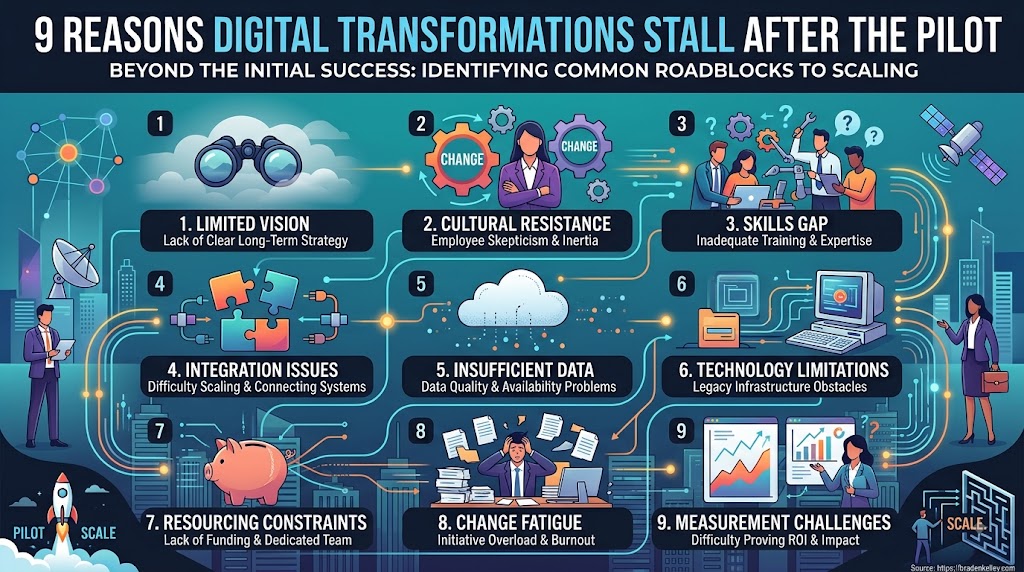
9 Reasons Digital Transformations Stall After the Pilot

9 Reasons Digital Transformations Stall After the Pilot

by Braden Kelley and Chateau G Pato


Why Do Digital Transformations Stall After the Pilot? (Short Answer)

Most digital transformations stall after the pilot because leaders confuse technical proof with organizational readiness. A successful demo shows something can work. Scaling requires named owners, redesigned work, aligned incentives, data and integration, change capacity, the courage to kill shadow processes — and the political will to live differently. The pilot was never the hard part.

The nine common reasons transformations stall are: (1) proof mistaken for readiness, (2) no named owner of the new way of working, (3) work redesign skipped, (4) incentives still reward old metrics, (5) data and integration debt, (6) change treated as communications, (7) shadow processes never killed, (8) pilot heroes ≠ scale reality, and (9) fear of the political cost of winning.

The Pilot Was Never the Hard Part

I have watched too many rooms celebrate a green pilot as if the transformation were already over. The interface worked. The select users smiled. The slide said “validated.” Then Monday arrived for everyone else — average managers, messy data, conflicting KPIs, and a legacy workaround that refused to die.

Human-centered change treats that gap as designable, not mysterious. Below are nine stall patterns I see repeatedly, what each looks like, and what real transformers do instead.

Reason Common sign What to do instead
1. Proof ≠ readiness “It worked” used as scale approval Require an adoption/scale scorecard
2. No durable owner Project ends; BAU orphaned Name a workflow owner with rights
3. No work redesign New tool, old handoffs Redesign jobs and decisions first
4. Old incentives KPIs punish new behavior Align metrics to transformed outcomes
5. Integration debt Pilot used clean workarounds Fund data/integration as scale work
6. Change = decks Training without practice time Build change muscle and coaching
7. Shadow process lives Old path still easiest Kill legacy paths on purpose
8. Heroics don’t scale A-team pilot, average-team crash Design for the median user
9. Political avoidance Endless “learning” Govern winners/losers in the open

1. Proof Mistaken for Readiness

What it is: Treating a successful pilot as proof the organization is ready to scale.

The stall: “It worked” becomes a funding sentence. Feasibility gets confused with operability. Leaders skip the boring questions about volume, exceptions, support load, and who changes how they spend Tuesday.

What to do instead: Separate technical validation from operating-model readiness. Before scale money, require an adoption and scale scorecard: owners, workflows, incentives, data path, support model, and stop rules for the old way.

2. No Named Owner of the New Way of Working

What it is: The transformation has a project manager — and no durable operator once the project ends.

The stall: Sponsorship was energetic in kickoff season. Then the program office demobilizes, and business-as-usual inherits a half-changed process with no one empowered to keep improving it.

What to do instead: Assign a named workflow owner with decision rights before scale funding. If nobody owns the new way after applause, you do not have a transformation. You have a temporary exhibit.

3. Work Redesign Skipped — Tool Bolted onto Old Process

What it is: Installing new technology on top of unchanged handoffs, policies, and approvals.

The stall: Same friction, prettier screens. People invent local workarounds because the system still asks them to do impossible coordination. Digitization accelerates the old mess.

What to do instead: Redesign jobs, handoffs, and decisions first. Technology should serve the human system you intend to run — not freeze the system you meant to leave.

4. Incentives Still Reward the Old Metrics

What it is: Asking people to adopt new behaviors while KPIs, bonuses, and recognition still pay for the old ones.

The stall: Managers optimize what still gets measured — speed-to-close, local utilization, ticket deflection theater — even when those metrics punish quality, collaboration, or customer effort in the new model.

What to do instead: Align metrics and recognition to transformed outcomes: adoption quality, end-to-end cycle time, customer/employee effort, first-time resolution, revenue or risk outcomes tied to the journey — not activity that photographs well.

5. Data and Integration Debt Comes Due

What it is: Pilots that succeed on clean samples, manual stitches, or heroic data wrangling collapse under production reality.

The stall: Scale exposes fragmented systems, inconsistent definitions, and brittle interfaces. The “digital” experience becomes a queue of exceptions.

What to do instead: Fund data quality and integration as first-class scale work — not a vague phase two. If the pilot needed spreadsheet glue, assume production needs architecture, not optimism.

6. Change Capacity Treated as Communications

What it is: Substituting town halls, slide decks, and one-time training for the real work of building new skills and habits.

The stall: People were informed. They were not enabled. Managers never got coaching time. Role anxiety filled the gap that practice should have filled.

What to do instead: Build change muscle: champions, spaced practice, protected learning time, manager enablement, and clear stories about how roles evolve. Communication is necessary. It is not capacity.

7. Shadow Process Never Gets Killed

What it is: Leaving the old spreadsheet, email path, or “temporary” workaround alive “just in case.”

The stall: Adoption stays optional. The easy path is still the legacy path. Leaders wonder why usage is soft while the organization quietly runs two operating systems.

What to do instead: Write stop criteria for shadow processes. Make the new way the only easy way. If you cannot turn something off, you have not finished the design of scale.

8. Pilot Team ≠ Scale Team — Heroics Don’t Industrialize

What it is: A hand-picked A-team succeeds in the pilot; average teams inherit complexity without the same support.

The stall: What worked for enthusiasts fails for the median user and median manager. Support tickets spike. Leaders blame “resistance” instead of design for the middle of the bell curve.

What to do instead: Design for the median. Staff enablement and operations for steady state. If only heroes can run it, it is not a transformation asset — it is a dependency on burnout.

9. Fear of the Political Cost of Winning

What it is: Avoiding scale because success would force real tradeoffs — turf, vendors, pet projects, or status stories that cannot survive daylight.

The stall: The organization stays in luxurious “learning mode.” Another pilot. Another vendor bake-off. Another steering committee. Progress becomes a lifestyle of almost.

What to do instead: Surface winners and losers early. Govern tradeoffs in the open. Use kill criteria as leadership hygiene. Transformation is not only a technology journey. It is a power redesign with manners.

How Do You Scale a Digital Pilot Without Stalling?

Before you fund the next wave, run a soft-landing go/no-go. Say no — or not yet — unless you can answer yes to these:

  1. Who owns the new workflow after the program ends?
  2. What human behavior must change for scale to count as success?
  3. What old path will we turn off, and when?
  4. Is integration and data readiness funded as core work, not hope?
  5. Do incentives and manager routines reinforce the new way?

A pilot proves possibility. Transformation proves the organization can live differently. If you want digital change that lands with customers and employees, stop celebrating demos as destinations — and start designing the human system that has to carry the future on a normal Tuesday.

Frequently Asked Questions

Why do digital transformations stall after the pilot?

They stall when leaders treat technical pilot success as organizational readiness. Scaling fails without durable owners, redesigned work, aligned incentives, data/integration, change capacity, retired shadow processes, design for average users, and political willingness to make tradeoffs.

What is the difference between a successful pilot and a scalable transformation?

A successful pilot proves something can work under controlled conditions. A scalable transformation proves the organization can run the new way of working in production — with owners, incentives, data plumbing, adoption support, and the old path intentionally shut down.

How do you scale a digital pilot successfully?

Name a workflow owner, redesign jobs and handoffs, align metrics, fund integration and data quality, build real change capacity, kill shadow processes, design for the median user, and govern political tradeoffs openly before expanding volume.

What are common reasons digital transformation fails after a pilot?

Nine common reasons include mistaking proof for readiness, lacking a durable owner, skipping work redesign, keeping old incentives, hitting data/integration debt, treating change as communications, leaving shadow processes alive, relying on pilot heroics, and avoiding the politics of winning.

What should leaders check before funding digital transformation scale-up?

Leaders should confirm ownership after the program, the human behavior that defines success, which legacy paths will be turned off, whether integration/data work is funded, and whether incentives and manager routines reinforce the new operating model.

Image credits: Google Gemini

Content Authenticity Statement: The topic area, key elements to focus on, etc. were decisions made by Braden Kelley, with a little help from Google Gemini and Cursor to clean up the article, add images and create infographics.

Subscribe to Human-Centered Change & Innovation WeeklySign up here to get Human-Centered Change & Innovation Weekly delivered to your inbox every week.